
ipgnmgnbejpakncpddcjdapnaipollhi
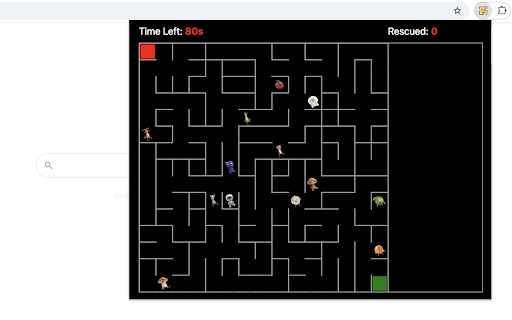


Rescue every character trapped in the maze before making your way to the exit! In this game, your mission is to guide the red block from the top-left corner to the green exit at the bottom-right. But there’s a twist—13 animated characters are scattered throughout the maze, waiting to be saved. You must touch each one to rescue them before you can leave. Rescued characters will gather on the right side of the maze, and the top-right counter will track your progress. Finish saving them all within 80 seconds, and they’ll join together for a lively victory dance! • Use the Arrow keys or WASD to move the red block. • Touch each trapped character to rescue them. • Watch your rescue count in the top-right corner. • You can’t exit until every character is saved. • Keep an eye on the 80-second timer in the top-left—time is ticking! Tips for Success: • Plan your path to avoid unnecessary backtracking. • Save characters in groups to reduce travel time. • Memorize shortcuts in the maze as you go for quicker navigation. Each game round creates a brand-new maze with unique character dance styles, keeping every playthrough exciting and fresh. Additionally, we've showed our other featured games after game over for extra enjoyment. If you'd like to try them, simply click the corresponding links. Version 0.1.6 - 0.2.8 - Update featured game names - Remove the link of full screen - Update image CDN domain and game name - Rename the game to character rescue - Dynamic update of featured game list - Add WASD movement support - Prettify code and styles Version 0.1.3 - 0.1.5 - Update image CDN link - Add the link of playing full screen - Add the links of featured products Version 0.1.2 - Change game window from new tab to popup - Show related games on the game over page Version 0.1.1 - Make maze responsive to browser size - Implement fallback loading for images Version 0.1.0 - Initial release of the game

Drag Maze: Sliding Doors
Drag red dot through sliding doors while avoiding collision with them! Your goal is to guide the red dot through a rectangular tunnel and reach the green exit without colliding with the vertically moving door pairs. Each pair starts simultaneously, with one door moving up and the other down in the same vertical positions. They reverse direction after colliding each other. The tunnel has 11 evenly spaced door pairs. Their different speeds create varying meeting points, adding extra challenge and fun. To start, click the extension icon in the top-right corner of your browser, and the game will open immediately in a popup window. Navigate cautiously around the shifting doors. For a higher success rate, just wait when the next two doors are very close, and proceed until they open again. Patience is crucial to mastering this maze; sometimes it's wise to wait in front of each door pair to avoid failure. Additionally, we provide a full-screen option and showcase our featured game extensions after game over for extra enjoyment. To explore these options, simply click the links below the restart button.

Character Cursor
Fun custom cursors with pose-changing characters! This extension brings a delightful twist to your Chrome browsing experience with AI-generated character cursor packs! Unlike typical custom cursor extensions that use just two images, each of our cursor packs features a single character in multiple expressive poses that change dynamically based on your actions. We’ve made the character images larger than the standard cursor size so you can enjoy all the fun details more clearly! The character’s head area aligns with the original cursor point — so when clicking or hovering over links, just aim with the head to hit your target accurately. 1) Dynamic Poses Based on Interaction Your cursor is brought to life by a cartoon character that changes poses depending on what you're doing — for example, hovering over a link might trigger a cheering pose with a raised hand! 2) Random Cursor Packs + Lock Option By default, a fun cursor pack is pre-selected for you. If you choose to unselect it on the settings page, a random cursor pack will be applied each time you load a page—picked from a collection of 100 unique cartoon characters. See one you like? Just click its image on the settings page to lock it in as your cursor. 3) Easy On/Off Toggle Quickly enable or disable custom cursor feature anytime using the toggle switch in the top-right corner of the settings page. Transform your everyday browsing into a playful adventure with our Character Cursor. Say goodbye to dull cursors and hello to fun! More cartoons and pose styles will be added in future updates - there's always something fresh to explore.

Barcode Maze
Using our chrome extension, you can play a novel & fun maze game in a popup window anytime. The game area is filled with two-dimension barcode which is consisted of 160 blocks randomly-distributed in the 20x20 board. Try to solve the maze by moving the red box to bypass the barcode and reach the green exit at the bottom right corner. Use the Arrow keys or WASD to move. You have 15s to finish the move and the top bar will show how much time is left. When the game ends, press the Restart button or the Space/Enter key to begin a new game. To start the game, just click on the maze extension icon in the top right corner of your browser and the game window will occur in a popup immediately! Have a great time playing this game and enjoy yourself! To see the shortest path for the best solution, just click the relevant links under the 'Restart' button. Also, we've included some of our featured game extensions after the game ends for extra enjoyment. CHANGELOG ========== Version 0.1.7 - 0.3.1 - Add the links of featured games - Update game window background - Update the link of the shortest path - Dynamic update of featured game list - Add WASD movement support - Prettify code and styles Version 0.1.4 - 0.1.5 - Add the section of new games - Update new game list Version 0.1.0 - 0.1.3 - Initial release of maze game - Improve interface and features

Drag Maze
Quickly drag the red dot to the orange exit while avoiding borders. Just click on the maze extension icon in the top right corner of your browser and the game will start immediately in a popup! All you need to do is to move the red dot along the white path until it reaches the orange exit. • For moving the red dot, just click on it and drag it with your mouse. Just be careful not to touch the blue borders as you move. • A timer is displayed in the top bar of the maze, indicating the amount of time you've spent on the current level. Once you've completed all the levels, you'll be able to view the total time used. • To advance to the next level, completion of the current level is required. To return to level one, just click the reset button whenever you wish. • If you happen to fail the current level, the game will automatically restart shortly thereafter. The extension has thirteen built-in maps and if you want to try more maps, just visit our website to access them. Beat the maze challenge and have fun! CHANGELOG ========== Version 0.1.1 - 0.1.9 - Add google analytics - Update the link to more maps - Prettify code and styles
