
ipfbhnkkjbafekefiifigffaelgffaed


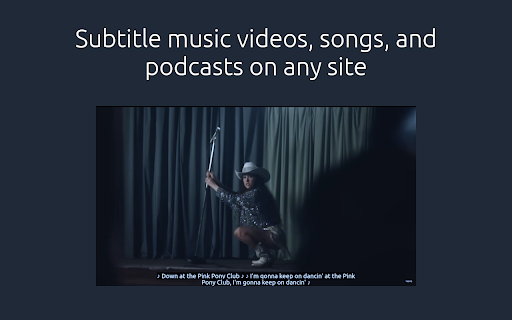


Add AI generated subtitles to any video or audio playing in your browser. This closed captioning extension lets you generate subtitles on demand, wherever you browse. Same language transcriptions and translations to English are supported, as well as some non-speech sounds. Protect your ears with lower volumes, get the gist of that foreign language dialogue, improve your retention while studying, and follow the conversation! 1. Free: No monthly payments or credits. If your device supports it, you can run it forever. Free. 2. Private: No data leaves your device. Subtitle Anything doesn't run translations using cloud services. 3. Flexible: No site specific support. One extension. Any tab that plays audio. 99 languages plus autodetect. This extension doesn't show ads and doesn't send your data anywhere. Subtitles are generated by continually capturing a buffer of recent audio from any tab and passing it to a locally run machine learning model. As with all AI powered apps, the generated subtitles will not be perfect and will contain mistakes. Subtitle Anything is not a replacement for translations and transcriptions created by a native speaker. Smaller models and translations to languages far from English will have high error rates. This extension is best suited as an aid for real time content with no available subtitles. Subtitle Anything is a privacy first extension: it doesn't send your audio data to the cloud. All data stays on your device. This means your device must be powerful enough to generate subtitles in a timely matter or things might not work well. As a rough guideline, your device should meet the hardware performance requirements of a Microsoft Copilot+ PC (graphics card capable of at least 40 TOPS). Support on Linux is experimental. As of version 0.6.0, only Whisper Tiny is bundled with the extension to keep installs small. You can enable or disable downloading remote models from Hugging Face in the extension options. See the official website for more documentation: https://www.subtitle-anything.com/ Feel free to check out the GitHub releases and issues tracker here: https://github.com/ae9is/subtitle-anything/

Sound Booster - increase volume up
Sound booster increase volume video or music on any tab! Bass booster and volume control in your browser. Sound Booster is an extension that will allow you to increase the sound of your system. It can raise volume level up to 600%. Provides volume-enhancing features for popular video platforms such as YouTube, Vimeo, Dailymotion, and others. This means that users can watch their favorite videos at a higher volume, and even improve the overall sound quality of the content. Volume Booster allows you to improve the sound quality in the Chrome browser to get more pleasure from listening to music and watching videos. Bass boost to the full. One of the most efficient and practical extensions for Chrome, which allows you to amplify the sound of any video or audio content played in the browser. Volume booster is an easy and convenient music tool for brilliant sounding of your favorite songs.Just try to take advantage of this Equalizer and enjoy its benefits. How to use Sound booster extension: 1. Install Volume Booster. 2. Pin it in the toolbar. 3. Click on the extension icon and enable the boosting with toggle button. 4. Then, click on the extension icon and choose the sound boost range. Volume Booster is an easy and convenient music tool for brilliant sounding of your favorite songs.Optimize the sound according to the genre which you listening with equalizer for chrome browser. Audio Equalizer is a lite extension that let you easily adjust audio settings (the balance between frequency components in an audio file) from a toolbar popup. Equalizer for Youtube. Just try to take advantage of this Equalizer and enjoy its benefits. Bass Booster Bass booster that help you to set a desired speaker volume degree for each individual tab in your browser. It have a simple interface of sound volume control switch as it just possible with keeping all of its power in a light design. Stylish popup Audio Enhancer with a volume switch with a list of tabs that a now playing audio content. Volume Control Take control over all that audio you need a power volume adjust tool with the ability to set individual volume settings for each tab. To solve that task we developed our audio volume control extension. What’s new (v1.0.11) - Added change of modes Floating window (stays on screen and you can move it) and Pop-up window (opens when you click the icon) - Fixing the issue in Full screen mode We hope you find our extension useful! We are waiting for your feedback and ratings!

Text to Video - AI Video Creator | Pictory
Convert any text or URL into a professional AI-generated video with captions, visuals, and voiceovers — powered by Pictory 🎬 Turn Any URL or Text into a Video Instantly The Text to Video Chrome Extension by Pictory lets you transform any online article, webpage, or script into a complete video, all without leaving your browser. 📋 Paste a URL or text, and our AI automatically extracts the main ideas, writes a script, selects visuals, and adds captions and voiceovers. Whether you’re a marketer, educator, or content creator, you can turn blogs, research papers, or news articles into ready-to-publish videos in minutes. ⚙️ How It Works Step 1 – Capture a URL or Enter Text While browsing any webpage, click the Pictory Chrome Extension. The extension automatically captures the URL. Step 2 – Choose Video Type Select your preferred video style: 💡 Explainer 📣 Marketing 💼 Internal Communication 🎓 Tutorial This helps the AI tailor the tone and flow of your script. Step 3 – Generate Your Script Click “Generate Script.” Pictory AI will summarize the webpage or process your text input to create a concise, editable script optimized for video storytelling. Step 4 – Edit and Customize You’ll be redirected to your Pictory workspace, where you can: • Review and edit the generated script • Adjust visuals, captions, and audio • Apply your brand kit (logo, fonts, colors) • Choose voiceovers and music Step 5 – Generate and Download Video Preview your project and download a high-quality video, ready to share across social platforms, websites, or presentations. ✨ Key Features 🔗 URL to Video: Convert any online article or web page into a summarized AI video. 📝 Text to Video: Paste any text, and Pictory turns it into visuals, captions, and voiceover. 🧩 AI Script Summarizer: Automatically extract key ideas from long-form content. 🎨 Fully Customizable: Edit scenes, captions, visuals, and add your brand kit. 🎙️ Voiceover and Subtitles: Choose professional AI voices and auto-generate subtitles. ⚡ One-Click Workflow: Seamlessly integrated with your browser and Pictory account. 👥 Who It’s For 📈 Content marketers repurposing blogs and news articles into videos. 🎓 Educators turning lessons or research into visual explainers. 🏢 Corporate teams creating internal communication videos. 🎥 Creators and entrepreneurs sharing insights on YouTube, LinkedIn, and TikTok. 💎 Why Choose Pictory Pictory’s award-winning AI video platform powers this extension, enabling effortless text-to-video and URL-to-video conversion. 🌍 Trusted by over one million professionals worldwide, it combines script generation, video editing, and brand management in one seamless workflow. 🔒 Privacy & Permissions This extension requires minimal access: • Reads the active webpage only when you click the extension • No background tracking or data storage • Processes text securely via your authenticated Pictory account

Sound adapter - Boost your volume
Sound booster increase volume video or music on any tab! Bass booster and volume control in your browser. Turn up the volume on any video or music tab! 🎧🔊 Sound Booster is the ultimate browser extension that amplifies audio up to 600%, giving you powerful volume control and deep bass booster effects. Perfect for music lovers, movie watchers, and anyone who wants louder, richer sound on platforms like: Dailymotion ...and more! Why You'll Love It: ✅ 600% Volume Boost – Break through default audio limits. ✅ Bass Booster – Enhance low frequencies for deeper, punchier sound. ✅ Works on Any Tab – Boost music, videos, meetings, and games instantly. ✅ Easy Controls – Adjust volume & bass with a simple slider. ✅ Lightweight & Free – No lag, no ads, just pure audio power. How to Use: 1️⃣ Install the Sound Booster extension. 2️⃣ Pin it to your toolbar for quick access. 3️⃣ Click the icon, toggle the boost, and slide to your perfect volume! Perfect For: 🎵 Music – Make every song hit harder. 🎬 Videos – Hear dialogues and effects clearly. 🎮 Gaming – Boost in-game audio for a competitive edge. 💻 Meetings – Never miss a word in Zoom or Google Meet.

AI Language Translator
Use AI Language Translator to automatically immersive translate any word or phrase and their meaning on web pages or in subtitles. 🌟 Introducing AI Language Translator (AILT): Your Personal Translator for web sites, Netflix, YouTube & More! Language learning shouldn’t interrupt your entertainment—now, it doesn’t have to! We transform your favorite websites and streaming platforms like Netflix, YouTube, Prime Video, Coursera, and Crunchyroll into immersive, effortless and fun classrooms. Using this cutting-edge extension makes mastering new languages intuitive, natural, and fun. Whether you want to translate Spanish to English or English to Spanish, Japanese, Hindi, Turkish, or Hindi or to Russian seamlessly, our AI-powered translation ensures every word, phrase, and subtitle becomes a learning opportunity—no pausing, no manual lookup, just smooth immersive translate. 🔹 Experience Real-Time AI Video Language Translator Imagine watching your favorite Spanish show and instantly getting an accurate Spanish to English translator pop-up when hovering subtitles. AI language translator app ensures you effortlessly translate meaning, pronunciation, lemma, frequency, and collocations for immediate understanding. Learning becomes seamless, enjoyable, and immersive. 🎯 How AILT Works: 1️⃣ Install the app. 2️⃣ Open any web page or supported video platform. 3️⃣ Hover subtitles or select text for automatic translation—no more tedious copy-paste! 4️⃣ Automatically save translated vocabulary into your personal Wordbook. 5️⃣ Engage with AI Language Buddy for further explanations, grammar clarifications, and cultural context. 🎬 AI YouTube Language Translator: Watch, Learn, and Enjoy With our technology, every YouTube video becomes your personal classroom. Whether it’s documentaries, music videos, or viral content, you’ll effortlessly grasp context, idioms, and cultural nuances while maintaining full immersion in the video experience. 📖 Effortlessly Build Your Vocabulary with AI Dictionary Whether you translate web or subtitles, each translated word or phrase is instantly saved to your personalized Wordbook. Integrate seamlessly with AnkiDroid, AnkiMobile, Telegram, or export directly to Excel. Review vocabulary effortlessly during your daily commute, coffee breaks, or spare moments, making learning fit naturally into your lifestyle. 🌍 AI Translate All Languages: Comprehensive Support Enjoy generative AI language translation in 30+ languages including English, Spanish, Portuguese, Ukrainian, and Russian. From casual learners to heritage speakers reconnecting with their family roots, our app ensures accuracy, cultural sensitivity, and contextual depth, unmatched by typical online translator or translator software. ⚙️ Premium Features for Serious Learners: ▸ Unlimited automatic translation lookups. ▸ Advanced collocation detection for deeper context. ▸ Full access to AI Language Buddy GPT chat for grammar, slang, and cultural insights. ▸ Comprehensive statistics and full control of your vocabulary library. 🧑🎓 Who Will Love Our App? AI language translation isn’t just revolutionary—it’s versatile. Perfectly designed for: • Busy professionals. • Students reinforcing classroom learning through immersive entertainment. • Anime, drama, and documentary enthusiasts who wish to learn while enjoying content. • Polyglots leveraging AI-powered language translation and explanation for authentic input. • Heritage language speakers aiming to reconnect effortlessly with their mother tongues. 🚀 Why Choose Our AI Language Translator? AILT is more than traditional google translation or other translation apps like DeepL: ➤ Immersive translate embedded directly into your favorite streaming platforms. ➤ Real-time hover translation provides instant comprehension. ➤ AI dictionary with vocabulary syncing for seamless learning. ➤ Friendly pricing starting at just $1.5/month ensures everyone can access powerful AI tools for translation. 📌 AILT App Key Benefits: Transform passive viewing into active learning without interruptions. Enhance vocabulary naturally, in-context with powerful generative AI language translation. Effortlessly integrate daily language practice into your entertainment schedule. 🌐 Full Subtitle Control & RTL Ready Adjust subtitle size and position for maximum comfort. Perfect rendering for Arabic, Hebrew, Urdu, and all RTL scripts ensures universal accessibility and comfort, enhancing every learner’s experience. 💡 Start Now with the AI Translator That Understands You! Skip outdated text translators—AI-powered language translation makes it easy to translate any word directly while watching Netflix or browsing the web. Forget manual google translation searches; our extension does it instantly, accurately, and contextually. 💬 Need Help or Want to Know More? We’re always ready to assist you in maximizing your language skills. Contact our friendly team at welcome@ailanguagetranslator.cc and start your seamless AI language translation journey today. Embrace the future of language learning with the ultimate our AI language translator—where your daily entertainment naturally becomes your most effective learning tool. 🌟 Join thousands already using our Language Translator AI: Learn, watch, and enjoy your favorite content—effortlessly translate meaning, master new languages, and embrace a smarter, immersive way to learn.
