
ipeogcankgfdmhlfdomjllhfckklcklf
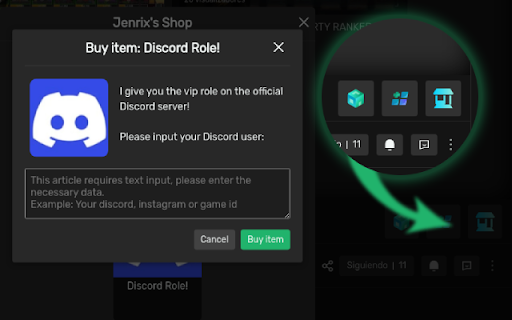

The best free software for Trovo, Twitch, Kick and YouTube streamers. BotRix is a browser extension built for streamers and viewers who use BotRix across Trovo, Twitch, Kick and YouTube. The extension adds practical tools directly into supported streaming platforms, including custom and BetterTTV-style emotes, channel shop/reward access, chat integrations, and quality-of-life features for streamers. For streamers, BotRix can connect to supported chats and read viewer messages aloud through Text-to-Speech (TTS), using the streamer’s BotRix configuration such as command, cooldown, permissions, points, levels, blacklist, voice, volume and spam filters. On Trovo and YouTube, viewers can access BotRix channel shops from the chat interface and redeem rewards using the streamer’s points system. The extension also improves chat interaction by displaying supported external emotes directly in live chat. On Kick, the extension helps streamers connect BotRix features with their Kick account, including subscription sync and clip-related tools when available. BotRix is designed to extend the BotRix streaming platform experience inside the sites streamers already use, reducing the need to switch between panels while managing chat, rewards and viewer interaction. This extension is not affiliated with, endorsed by, or sponsored by Trovo, Twitch, Kick, YouTube, Google, BetterTTV, or any of their respective owners. Platform names are used only to describe compatibility.

Twitch VOD Downloader
Download and View Twitch VOD Segments This extension allows users to download sections of a Twitch VOD within the browser. New feature updates demo: https://youtu.be/jaUo3ROumE8 https://voddownloader.com **Now allows for viewing/downloading stories, highlights and clips. Deleted VOD recovery is always going to be a shot in the dark. There will be missing segments and sometimes the VOD will not be available at all. No VODs are available after 60 days. Very few are available after 7 days. Version 3.25 update: (2 Dec 2025) 1) Fixed bug in auth flow 2) Fixed issue with kick endpoint variability 3) Fixed issue with UHD Twitch video viewing and download 4) Added notification for VOD availability with partners Version 3.21 update: (11 Feb 2025) 1) Bug fix- Addressed remaining icon issues with the recent darkmode changes 2) Bug fix- Addressed scrollbar issue on the icon introduced in last update 3) Bug fix- Addressed issue where saved resolution not existing within the current VOD resolution caused failure for VOD to load. 4) Bug fix- Addressed issue where users were allowed to run a search with nothing in the input field Version 3.19 update: (9 Feb 2025) - https://youtu.be/0ac5fgIQ1hU 1) UI change- Added ability to select from 6 different border/button color options within the settings menu. 2) UI change- Added ability to change resolution selection on the download page rather than just taking the selection from the VOD view. 3) UI change- Added settings for default file name format. (no. mp4 is not available) 4) Bug fix- Failure to retrieve hidden VODs no longer blocks retrieving the displayed VODs. This does not yet address the underlying issue where some people are getting blocked from accessing hidden VODs. 5) Bug fix- Addressed issue with mod view where channel name did not populate. 6) Bug fix- Addressed issues with dark mode setting. 7) Bug fix- Addressed issue with file name where end time was the start of the last fragment instead of the end -- thus causing the time displayed to be off by around 10 seconds. 8) Bug fix- Addressed issue where fractional fragments were causing the slider UI to fail to re-align on window resize. 9) UX change- Clicking any view will bring it to the front/top of the stack. Prior behavior required a user to drag a view to bring to the front. Version 3.18 update: (3 Feb 2025) 1) Bug fix- Addressed issue with VOD controls interference with view dragging. Version 3.17 update: (1 Feb 2025) - https://youtu.be/jaUo3ROumE8 1) Bug fix- Addressed issue with VODs sometimes failing to be found where streamer name includes underscore. 2) Bug fix- Addressed issue with file names on multiple file downloads. 3) Downloading multiple files no longer requires the tab to remain in view. 4) Added ability to download stories. 5) Added chat view back where available. Not all VODs or even livestreams will have chat available. 6) Added titles to recent streams menu where available. 7) Added color to the resize edge of containers in an effort be more visible. 8) Added menu for users to review updates. 9) Added slider selector back to the VOD download. Version 3.15 update: (29 Jan 2025) 1) bugfix- resolved issue with VOD page views due to a change implemented in v3.14. 2) minor UI changes. Version 3.14 update: (28 Jan 2025) 1) Added view/download functionality for highlights. 2) bux fix- another attempt to resolve the main app button showing in theatre mode. clicking the theatre mode button OR using the command Alt+T should now work. 3) bug fix- hiding main app button on pop-out views. 4) added back discord and donation buttons to the main menu. 5) added darkmode option to settings menu. Version 3.13 update: (27 Jan 2025) 1) bug fix- resolved issue with VOD list failing to find hidden VODs 2) bug fix- resolved issue with view-current-stream and current-vod buttons introduced in 3.12 3) bug fix- hide main app button when in theatre mode. 4) added clip download functionality. (clips are mp4 files from the server) 5) moved settings button to bottom of main menu. Version 3.12 update: (23 Jan 2025) 1) Added View Current stream and current VOD for people who refuse to watch the demo video and thus think functionality has been removed. Version 3.11 update: (20 Jan 2025) (complete rebuild) 1) Chat removed for now 2) UI overhaul. Simplification. See demo video

Mo'Kick - Better Kick For Everyone
Better Kick for everyone. Chat Enhancements, Video Enhancements, Advanced Giveaway, Drawing Game, and so many more features to list! Mo'Kick is your supporter that builds your Kick experience from top to bottom. For chat, video, streamer/moderator panel, and more. — DRAW'N'GUESS — The streamer draws a random word, and the viewers guess it. — Those who guess correctly earn points, and the one with the most points wins. — Number of turns and time settings — Points system settings — Comprehensive word packs — Blacklist support — Create and share your own word packs — Support for 3 languages + community languages — ADVANCED CHAT GIVEAWAY SYSTEM — Participation with customizable chat commands (“!mokick,” “gimme giveaway,” etc.) — Role-based participation (VIP, moderator, etc.) — Role-based chance increase (E.g. OGs have 3x more chance etc.) — Blacklist support — MODERATION ASSIST — List all suspicious message content and take faster action with an indicator when someone sends it to the chat — Cross-Ban/Unban — The unused ban reason feature embedded within Kick can be used. — MASS BAN — Ban/mute/unban/cross-ban all users you provide with your desired settings. — CUSTOMIZABLE QUICK TIMEOUT — Customize the timeout button in quick moderator actions, set the duration you want, or add multiple duration options. — Chat Size Changer — Supported links in the chat can be opened and interacted with as a floating window in the same tab without the need for a new tab. (Kick.com streams, Twitter posts, YouTube videos, Instagram posts and profiles, Reddit posts, and Streamable videos.) — User-specific note-taking system — Reply to messages that have been deleted, belong to you, and are no longer visible even in the chat. — Minimizable or hideable KICKs notifications / Hidden pinned KICK messages — Find user box — CHAT LOG — Search through all the messages collected since you joined the chat using a wide range of filter options, and interact with those messages. — STATISTICS — Statistics related to chat and broadcasts are collected from the moment you join the broadcast. — Data such as messages, replies, message content, top contributors, participation, etc., about chatters and viewers are collected and listed. — Your session is recorded, and your data is preserved for a certain period of time even if you close the page and return later. — COMMUNITY PANEL — Everyone who types in the chat is listed from the moment you join. — Hierarchically divided into roles — See whether a person is active in the chat or not, and when they last typed. — Find the person you want with the username search feature — Click on the user names to open their cards. — MESSAGE ACTIONS — Message copy button — User tagging button — Copy username button — Message hiding option — Time stamp display — CTRL+click shortcut for special actions — Higher Message Actions — MODERATION LOGGER — View deleted and cleared messages — Moderator action notifications (timeout, ban, unban) — All mod actions are logged in a single menu — Follow the duration of active timeouts on the channel — AI MOD label for viewers in deleted messages — BETTER MESSAGES — Sound notification when mentioned, selectable notification sounds. — Messages including your username will be highlighted just as if you were mentioned — Role-based highlighting (VIP, Moderator, Kick Staff...) — Highlight your friends by adding them to your priority list — Clickable Mentions — ADVANCED USER CARD — Copy Username — Quick Notes Access — Followers Count — See the date of joining the Kick — Reveal Messages — See Messages — See Replies — Expand and zoom in on profile photo — ADVANCED USER CARD (PINNED) — Pin your card with the button on the default user card and expand its functionality. — Moderation data for everyone — Bio & Social media — If the person is on a live stream, it shows — Technical Details — More than one can be opened at the same time — Auto Theater Mode — Precise forward and rewind buttons — Directly download/copy the screenshot of the stream/vod — Ability to put the full screen option at the end of the player, just like in classic video players — Video statistics — Auto Quality — Streamer dashboard theater mode — LIVE FEATURES — Catch the real time of the stream when you press "Live" in the player. — ADAPTIVE PLAYBACK SPEED — Bring playback speed to live streams. — With adaptive playback speed, if you fall behind the live stream, it will automatically speed up. — VOD FEATURES — Pick up where you left off with VODs — VOD DOWNLOADER — Download live stream replays with a single click in the name, quality, format, and duration of your choice. — STREAM RECORDER — Record the live stream you're watching with a single click, pause it if needed, or let it record in the background. — In addition to the number of viewers, information on the number of chat participants and participation percentage — Access the top navigation bar while watching the stream in theater mode — Preview the streams by hovering over them in the sidebar. — CHANNEL HIDING — Hide channels you don't want to see with a single click, both from the sidebar and from the browse section. — HIDE CATEGORIES — Hide categories that Kick doesn't moderate well from your Explore tab for a better experience.

7TV
Improve your viewing experience on Twitch & Kick with new features, emotes, vanity and performance. The 7TV Extension lets you see chat emotes in nearly a million channels across Twitch & Kick! Not only that, but also dozens of new features, performance improvements and vanity options to truly create your own experience. 7TV supports other popular emote extensions out of the box, too. This is the only one you'll need.

VK Play Tools
Неофициальное расширение для улучшения VK Видео Live (бывший VK Play Live) Чат • Смайлики от BetterTTV, 7TV и FrankerFaceZ • Автосбор баллов и дропсов • Изменение отступов Уведомления • Любой звук при упоминании вас в чате • Оповещение о начале стрима Плеер • Превью для стримов из бокового меню при наведении мыши • Включение звука для превью и других плееров Совместимость Chrome, Edge, Opera, Яндекс и другие на движке Chromium Firefox https://addons.mozilla.org/addon/vk-play-tools
