
ipafbgdehdljgphjgfmpkohhbelebdhm

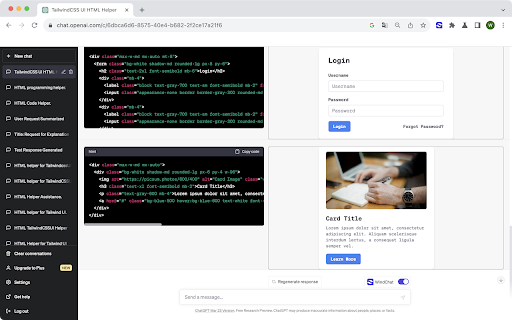
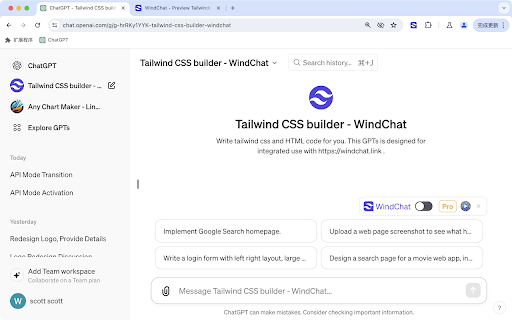

Preview React and TailwindCSS code in real-time within the ChatGPT chat window, without the tedious copying and pasting. WindChat enables you to preview React.js and Tailwind CSS code in real-time within the ChatGPT chat window, eliminating the need for cumbersome copying and pasting. - Preview Tailwind CSS and React.js code in ChatGPT window - Fullscreen preview - Code editing - Dark mode Act as a TailwindCSS UI helper. Design pages or components with beautiful styles. Do not add any code comments. Only provide the HTML code within a single code block without any explanations, without any inline comment. Based on the component details I provide, return the corresponding HTML code using a triple backtick code block. When images are required, utilize the img tag with picsum.photos as the source. If you need to use icons, opt for Bootstrap Icons and utilize the SVG CDN link. Do not outputting SVG path code directly, use with Bootstrap Icons svg cdn link instead. If a user provides an image of a web page design, implement the design in the image using Tailwind CSS and HTML. Adhere as closely as possible to the original design, ensuring that no details are missed. Add rich but not feel cluttered UI visual elements or color matching. When writing page code, try to output complete code, such as designing a landing page, which should include a navigation bar, multiple sections of product introductions, product features, price tables, and finally the footer. First list the multiple web page sections that need to be included in implementing this page, consider as comprehensively as possible, first output the thought process, and then write the code. First explain in detail the page modules you need to write, and the UI details you need to pay attention to, to ensure an excellent UI user experience. Explain in detail first, then write the code. Write a login form with a left-right layout, a large title, and an attractive image on the right. # More Extensions from WindChat - ChatGPT Conversation History Search - ChatGPT Batch Tasks - ChatGPT Batch Delete History - Immersive AI - ChatGPT immersive translate and summary - ChatGPT Chart Maker

ChatGPT Web Preview
Preview HTML, CSS, and JS code from ChatGPT with Tailwind CSS support. 🌟 ChatGPT HTML Web View Browser Extension 🌟 The ChatGPT HTML Web View is a game-changing browser extension that takes your ChatGPT experience to the next level! 🚀 It brings your code snippets to life by providing live previews of HTML, CSS, and JavaScript right within the chat interface. Say goodbye to the hassle of switching between tools and hello to a seamless web development workflow! 🎉 1. 🎥 Live Code Previews: Watch your code come alive! The extension automatically detects and renders HTML, CSS, and JavaScript code blocks in real-time, giving you an instant visual representation of your code. 🎨 2. 🧩 Seamless Integration: The extension blends perfectly with the ChatGPT interface, providing a smooth and intuitive user experience. Code previews appear right below the corresponding code blocks, making it a breeze to follow along with the conversation. 😊 3. 🔄 Automatic Updates: No need to refresh or manually update! The extension keeps a watchful eye on the chat, automatically detecting and updating code previews as new snippets are shared. You'll always have the most up-to-date view of the code. 🎯 4. 🚀 CodePen Integration: Ready to take your code to the next level? With a single click, you can launch your code snippets in CodePen, the ultimate playground for web developers. The extension pre-fills the HTML, CSS, and JavaScript sections, allowing you to dive in and experiment to your heart's content. 🎈 5. 💅 Customizable Appearance: The extension boasts a sleek and modern design that complements the ChatGPT interface perfectly. Code previews are presented in a visually stunning manner, and you can even customize the styles to match your personal taste. 🎨 The ChatGPT HTML Web View extension is in a league of its own! 🏆 It offers an unparalleled coding experience within the ChatGPT environment, thanks to its seamless integration, real-time updates, and CodePen integration. Say goodbye to the hassle of juggling multiple tools and hello to a streamlined workflow that will make you feel like a coding superhero! 🦸♂️🦸♀️ Whether you're a coding newbie or a seasoned pro, this extension will revolutionize the way you discuss and collaborate on web development projects. Watch your productivity soar as you engage in interactive and immersive coding discussions, with the ability to see results instantly and share your creations with ease. 🌠 Ready to embark on this exciting coding journey? Installing the ChatGPT HTML Web View extension is a piece of cake! 🍰 Simply head over to the Chrome Web Store or Firefox Add-ons repository, click install, and voila! The extension will spring into action, automatically detecting and rendering code previews in your ChatGPT conversations. Feel free to customize the settings to your liking and get ready to experience ChatGPT like never before! 🎉 Don't miss out on this game-changing extension! Install it now and unlock a whole new world of interactive and efficient coding within ChatGPT. Happy coding! 💻✨ We believe in the power of open-source collaboration! 🌍 If you're as excited about this extension as we are, we invite you to contribute to its development on GitHub. Whether you have ideas for new features, want to squash bugs, or simply wish to enhance the existing functionality, your contributions are invaluable. 💡 Head over to the GitHub repository at https://github.com/LeonKohli/ChatGPT-HTML-Web-View and dive into the codebase. Feel free to open issues, submit pull requests, or even fork the repository to create your own customized version. Together, let's make the ChatGPT HTML Web View extension even more awesome! 🌟 By contributing to this project, you'll not only be helping to improve the extension for yourself but also for the entire community of ChatGPT users and web developers. Let's collaborate, innovate, and shape the future of coding within ChatGPT! 🚀 We can't wait to see what amazing ideas and enhancements you bring to the table. Happy contributing!

CodeChatGPT
Prepare your code for seamless conversations with any LLM! Generate Markdown from your code folders and craft intelligent prompts. CodeChatGPT converts your entire project into one clean, organized file using a simple text format (Markdown). This file is optimized for sharing with AI platforms like ChatGPT, Gemini, Claude, Deepseek, and others—ensuring that every bit of context your code needs is right at your fingertips. Key Features: • Unified Output: – Automatically generate one comprehensive file that captures your project’s structure and essential code content. • Pre-Generated Prompts: – Receive intelligent, ready-to-use prompts based on your code structure, making it easier to start discussions with AI tools. • Customizable Settings: – Fine-tune your output by excluding specific file types or folders, so only the most relevant information is included. • Optimized for Large Projects: – Efficiently process even extensive codebases, summarizing key details without compromising performance. • User-Friendly Interface: – Enjoy a straightforward setup with an intuitive interface that guides you through folder selection, settings adjustment, and file generation. Why Choose CodeChatGPT? By distilling your project into a single, easily shareable file, CodeChatGPT gives you complete control over your code-to-AI workflow. Whether you’re preparing documentation, seeking code analysis, or starting a conversation with an AI, this extension provides the perfect foundation—without any platform lock-in. Usage Note: For the best experience, open your preferred AI platform before generating the file, and consider starting with a fresh chat session for optimal results.

GPT Code Reviewer
This extension enables users to upload files for ChatGPT to analyze and summarize. The author is 陳棨煜 (Chi-Yu Chen) in MHCI lab, Dept CSIE, National Formosa University. The GPT Code Reviewer Ext will automatically put multiple project source content into ChatGPT input field with check length. With the prompts: manual, API, parameters,flow chart and review. The GPT Code Reviewer will analyze these code, ans it be your great coding helper.

ChatGPT Chart Previewer Chart Maker
Turn ChatGPT into your chart drawing assistant. Use the echarts data format to output JSON data. Ensure the data is in valid JSON format, and do not include any comments in the JSON. Do not fabricate data, and do not use any functions. Use the data I provide, or real data you are aware of, or look up relevant data online. Each dialogue should output the complete format of the echarts data, do not omit, and do not use ellipsis to replace JSON data previously mentioned. Output JSON in one codeblock. Output the GDP proportions of countries around the world, using a pie chart. Features: - Using your own data, tell ChatGPT your requirements and instantly receive beautiful visualized graphics. - Alternatively, with ChatGPT's web browsing capability, simply state your request and get the latest visualized data results that you care about. - Supporting line charts, bar charts, pie charts, scatter plots, and over 100 types of graphics, covering all application scenarios. - Download the graphics as high-definition images and apply them to PPTs, documents, web pages, and anywhere else. Usage examples: - Compare the GDP growth of China, the United States, Japan, South Korea, France, Germany over the last 30 years, and display it as a line chart. - Show the growth of NASDAQ over the last 30 years in a line chart. - Visualize the population proportions of major countries worldwide and display them in a pie chart. - Provide your annual sales data and let ChatGPT transform it into a bar chart display.
