
ioofnlghmmdbmkadofabikgcgjacnnaf
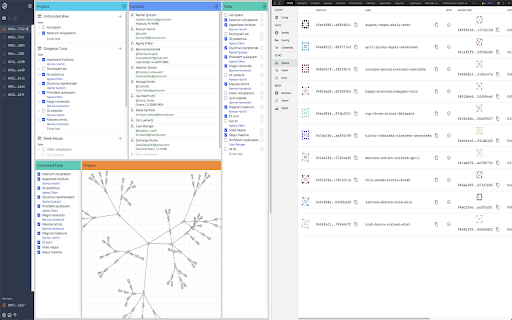
Debugging tools for DXOS Client in the Chrome developer console. Using this tool you can connect to DXOS Client to visualize and debug the state of the application. GitHub page: https://github.com/dxos/dxos/tree/main/packages/devtools/devtools-extension

Next Experience Developer Tools
Debugging/Profiling tools for your ServiceNow Next Experiences. The extension is composed of two panels: Next Exp Inspector and Next Exp Profiler. The Next Exp Inspector has the capability to observe page behavior and access component details via seven distinct tabs. • Home: view indicators to help identify areas of improvement • Components: analyze the DOM tree and inspect a component’s properties, state and actions. • Events: view a list of events occurring in a page and generate a new custom event when needed for testing. • Traces: view interactions of a page and an execution hierarchy to see relationship between items and their duration • Logs: view a list of logs that have been emitted across the page. • Versions: a list of all asset versions on the instance • Service Workers: debugging service worker info on the instance Next Exp Profiler allows you to create, manage, and compare profiles for optimizing page performance proactively. • Profile: view detailed information about the page execution to understand its performance and opportunities for optimizations. • Compare: See what has changed between two profiles by viewing differences across different event types. This helps identify areas of focus when troubleshooting performance degradation. Right-click and use "ServiceNow Tools" to navigate to UI Builder and other builders from the current page.

CSS Pro Editor & Debugger
Visual CSS styling and debugging tool for developers. CSS Pro Editor is the ultimate visual styling tool for developers and designers. Forget inspecting elements and manually typing CSS values. With CSS Pro, you just click an element and edit it visually. 🚀 Why CSS Pro is Different? Most "inspector" tools in the store are read-only or require you to write raw code. CSS Pro is a full Visual Editor. It's like having Figma or Webflow tools directly inside your browser, working on any live website. ✨ Key Features 👆 Click & Edit Select any element on the page and change its color, font, size, spacing, and more with a simple visual interface. 📦 Computed Box Model (NEW) Visualize margins, borders, and padding instantly. See the exact computed pixel values for every layer of your element. 💎 Glassmorphism (Instant frosted glass effect) ☁️ Neumorphism (Soft, extruded shadows) 📏 Debug Redline (Instantly outline all elements) 🃏 Card Shadows (Beautiful, elevated dropshadows) 📐 Layout Engine Debug Flexbox and Grid layouts efficiently with visual alignment controls (Start, Center, End, Space-Between). 📋 One-Click Copy Happy with your changes? One click copies the clean generated CSS code to your clipboard, ready to paste into your project. 100% Offline: We don't send data to any server. No Tracking: Your usage is completely private. Lightweight: Zero impact on page load speed. Perfect for: Designers: Test fonts and colors on live sites. Developers: Debug layout issues in seconds. Students: Learn how CSS works by interacting with it. Try CSS Pro Editor today and design the web at the speed of thought! ⚡

ProseMirror Developer Tools
Run prosemirror-dev-toolkit as Chrome extension Inspect and debug any ProseMirror rich-text editor from your browser without having to bundle prosemirror-dev-toolkit https://github.com/TeemuKoivisto/prosemirror-dev-toolkit Created in the spirit of React and Redux DevTools. Report any issues or bugs to the GitHub repository.

Preact Developer Tools
Adds debugging tools for Preact to Chrome Debugging tools for Preact. This extension allows you to inspect the component hierarchy and change properties on the fly.
