
ioeknboggdleihgbbbpmagmjiddagofp

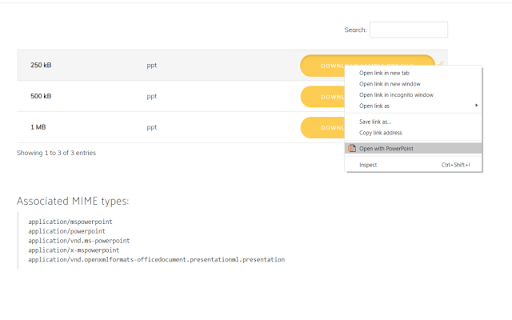

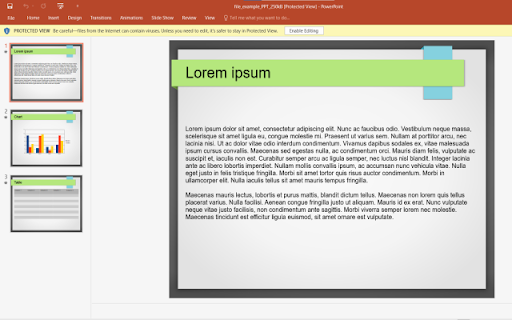
Easily convert your Microsoft PowerPoint slides Bring your Presentations which were made with Microsoft Powerpoint with you wherever you go. Want to convert Microsoft Powerpoint presentations so you can view the slides without having to use a desktop software? You can do so now after you install our software extension. To begin using our software extension for powerpoint online, here are the steps you need to do. Ensure you have the Microsoft Powerpoint slides on your computer. Install our software extension "Converter for Powerpoint" Once you install our software, please refresh all your existing Chrome Tabs/close Chrome browser and restart Chrome browser to let the software work for powerpoint. Choose the presentation link/pptx files you wish to convert with powerpoint viewer via the right click context menu button. Its that simple, just use the right click context menu to choose our software when you want to convert a presentation which was made with Microsoft Powerpoint. You can convert your presentations to PNG/JPEG as our software extension will let you choose the presentation file to convert when you right click and use our software option on the context menu. Disclaimer: Please note this extension is NOT made by Microsoft and is made by an independent development team. All copyrights belong to their respective owners. Google doesn’t endorse or sponsor this Chrome extension. This extension is not owned by, it is not licensed by and is not a subsidiary of Microsoft Inc.

Word to PDF
Convert Word to PDF for free. Free PDF File Converter - Two Supported Formats. Convert DOC/DOCX to PDF for free. You can convert Word to PDF once you install our software. Convert your word documents to PDF format today. •This software supports PDF conversion from DOC/DOCX •Convert PDF from DOC and DOCX files •Unlimited number of conversions for free How to use this extension: - Click on the software icon - Choose DOC file you would like to convert, - Press Convert and wait for the PDF file to be downloaded to your computer. Disclaimer: Please note this extension is NOT made by Google and is made by an independent development team. All copyrights belong to their respective owners. Google doesn’t endorse or sponsor this Chrome extension. Word to PDF is not owned by,it is not licensed by and is not a subsidiary of Google Inc.

Google Drive Mini
Create and manage Google Drive files. This extension helps you manage Google Drive files, create docs, spreadsheets, or forms. All actions are performed locally in your browser, ensuring no data is sent to third-party servers. When you click the extension icon, it opens your Google Drive in a pop-up window. From there, you can rename, download, delete, and transfer files. The interface is similar to Google Drive, intuitive, and user-friendly, without unnecessary features. For managing Google Drive , you can: • Create new files • Rename files • Download or delete files • Search for specific files • Browse different Google Drive sections like a Shared With You or Starred. Google Drive is a cloud service of Google Inc., registered in the U.S. and other countries. This is an independent project developed by the community and has no relationship to Google Drive or Google Inc. in any way.

Open with Google Docs
Open your Documents using Google Docs. Want to open documents using your favorite document editor? You can do so now after you install our software extension. To begin using our software extension to open documents using Google Docs, here are the steps you need to do. Install our software extension "Open with Google Docs" You can open your documents/spreadsheets/presentations quickly. Disclaimer: Please note this extension is NOT made by Google and is made by an independent development team. All copyrights belong to their respective owners. Google doesn’t endorse or sponsor this Chrome extension. This extension is not owned by, it is not licensed by and is not a subsidiary of Google Inc.

PPTX to PDF | powerpoint to pdf
Convert PPTX to PDF quickly with our chrome extension. Easily transform PPT presentations to PDF in one click. Try it now. 🚀 Easily convert PPT to PDF with our chrome extension Looking for a fast, efficient, and user-friendly solution to convert your presentations? Our Chrome extension is your go-to pptx to pdf tool that makes transforming your PowerPoint files into PDFs as simple as a single click. Whether you're a student, teacher, or professional, this extension is tailored to meet all your needs when you want to convert your files 🚀 Why choose PPTX to PDF? 1) Fast and reliable: the extension processes your presentations in just seconds 2) User-Friendly: no technical expertise required upload your file and let the magic happen 3) Quality output: maintain fonts and layout when converting ppt presentation to pdf 4) Secure: we prioritize your data privacy and ensure all your files are processed securely 🚀 Key features ✅ Instant conversion: quickly convert without any delays ✅ Multiple file types supported: easily work with documents ✅ In the browser: save time by converting to PPTX to PDF directly within your browser ✅ Multilingual support: extension works in multiple languages 🚀 How does the app work for converting powerpoint to pdf? - Add the extension to Chrome - Choose a file you want to move from powerpoint to pdf - Drag and drop file to the area - The app will output ppt as a pdf - Download your freshly converted document 🚀 Who can benefit from this app? ➤ Students: submit assignments where you need your ppt file convert to pdf ➤ Professionals: impress clients by sharing polished PDFs instead of raw PowerPoint files ➤ Teachers: share lectures by easily save ppt as pdf so students can open it on any device ➤ Event organizers: use this app to print event schedules 🚀 Why use a chrome extension for conversions? ⭐️ Ensures smooth conversion of ppt to pdf without the need for extra software ⭐️ Saves time by providing quick access from your browser ⭐️ Works flawlessly to transfer documents with just a click 🚀 Advanced features of PPTX to PDF ⚙️ Preserve layout: ensure your slides are intact during processing power point to pdf ⚙️ It is simple: you can just drag and drop your files and get results ⚙️ Cross-Device functionality: access and use the extension from any Chrome browser 🚀 When to use this extension 🖊️ Preparing for professional presentations 🖊️ Sharing documents with restricted editing access by changing presentation to pdf 🖊️ Distributing materials without worrying about compatibility 🖊️ Finalizing school projects and team collaborations by transfer ppt to pdf 🚀 Advantages of PPTX to PDF over other tools 📑 No additional apps required for conversion 📑 Hassle-free and lightweight design 📑 Free updates to enhance your export pdf from powerpoint experience 🚀 Steps to get started working with this extension 📕 Install the extension from the Chrome Web Store 📕 Upload your PowerPoint file to convert 📕 Relax as your file transforms from pppt to pdf 🚀 Frequently asked questions ❓ Can I use this extension to convert large ppt presentation? 💡 Yes, the extension supports converting large documents without compromising quality ❓ Does PPTX to PDF maintain the original formatting of the slides? 💡 Absolutely. The extension ppx to portable document format ensures that all text, images, animations are fine ❓ Can I convert .ppt to portable document format online? 💡 Yes, our extension supports online converting ppt to pdf for added convenience ❓ Is it safe to use? 💡 Absolutely. Your data is safe as never, making it a reliable tool to convert ppt en pdf ❓ Does it support older PowerPoint files like .ppt? 💡 Yes, it supports both powerpoint formats, making it easy changing their type regardless of the file version ❓ Does it work on all devices? 💡 Yes, the extension is compatible with any device running the chrome browser ❓ What happens if I encounter an error during conversion? 💡 If an error occurs while you convert, you can contactour support team ❓ How long does ppt file convert to pdf process take? 💡 Most conversions completes in just a few seconds ❓ Can I convert encrypted or password-protected PPT files? 💡 You’ll need to unlock the presentation first, but once unlocked, the ppt to pdf converter can process it with ease ❓ Does the extension work for Mac users? 💡 As long as you have the Chrome browser installed, Mac users can enjoy the same app ❓ When I download documents are there any watermarks? 💡 No, we never put a watermark in pptx to pdf 🚀 Don't Miss Out Whether you need to convert your files, this Chrome extension is the ultimate presentation to document converter for all your needs. Start using it today and experience effortless conversions.
