
iobbcinhjaicgjnjljbbjpbfkfejhceo

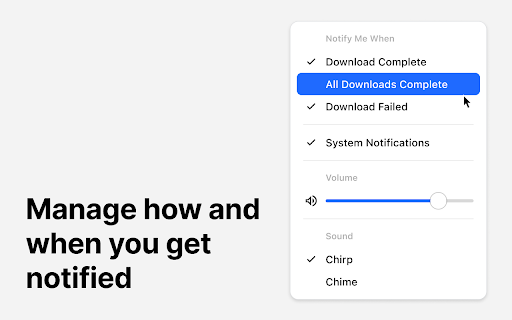
"Download Notifier & Sounds" is a helpful little tool that will alert you to the status of your downloads. Tailor your notification preferences to hear a sound when a download completes, all downloads finish, or if a download fails. Select from various sound packs and adjust the notification volume to your liking. Choose to receive system notifications. Requires a one-time payment. - Customizable Alerts: Choose which events trigger an audible alert. - Variety of Sound Packs: Personalize your experience by selecting from a range of sound packs to suit your taste. - Volume Control: Adjust the notification volume to match your environment or personal preference. - System Notifications: In addition to sound alerts, receive system notifications.

Download Sound
This simple extension plays a sound or utters a text using speech synthesis when a download is completed. New in version 1.4: Separate texts for successful and failed downloads

Teams Notification Sound
This extension plays a sound each time a desktop notification is displayed. It is particularly intended for linux users that need to transition to the PWA once the desktop app will be dismissed.

Extension Update Monitor
Notify users when extensions are updated and log extension installs, uninstalls, and updates. This extension was created as an alternative to 'Extensions Update Notifier' (last updated June 2016) and 'Extension log' (last updated July 2019). It is quite possible one or both of these will not be updated to Manifest V3 and will disappear from the Web Store forever. An alternative that is currently available in the Web Store is 'Extensions Update Tracker'. Options are available to choose which extensions will trigger an update notification. A button badge counter may be used instead of a notification. Audio files may optionally be played on extension updates. Clicking on the extensions toolbar button will open a popup that will show the most recent extension updates. A log page may also be opened to view install, uninstall, and update data for extensions. Other options are available that may be viewed in the extensions Options page. Right click the toolbar button to access the Options page or to view the log page.

Download Helper
A Chrome extension for managing downloads # Download Helper - Simplify Your Download Management ### 🚀 Real-time Download Management - Live download progress and status tracking - Elegant progress bar animations - Pause, resume, and cancel downloads - Real-time file size display ### 📊 Smart Status Indicators - Dynamic icon showing download progress - Badge counter for completed downloads - Clear file status indicators - Intelligent error notifications ### 💡 User-Friendly Design - Clean, modern interface - File icon previews - Toast notifications - Batch history cleanup - Custom scrollbar for better navigation - 🎯 **Focus on Core Features**: No bloat, just efficient download management - 🎨 **Thoughtful Design**: Every detail crafted for a better user experience - ⚡ **Light & Fast**: Minimal resource usage with quick response time - 🛡 **Secure & Reliable**: Only essential permissions requested Whether you're handling daily downloads or managing multiple files, Download Helper makes your download experience smoother and more efficient. ## Getting Started 1. Install from Chrome Web Store 2. Click the download icon in your toolbar 3. Enjoy a better download experience! ## Technical Highlights - Modern Chrome Extension (Manifest V3) - Real-time progress tracking - Efficient file size formatting - Responsive UI updates - Error handling and recovery *Make download management hassle-free with Download Helper - Your smart download companion.* *Note: This extension is designed to enhance Chrome's built-in download management while maintaining simplicity and efficiency.*
