
injnkmmecojnjiiojgfgonihjpejklik
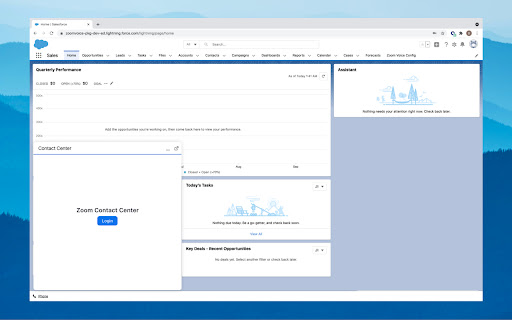
This extension resolves issues with Zoom Contact Center in multi-tab scenarios due to the browser’s third-party storage policy. The Zoom Contact Center for CRM browser extension allows for communication between the Zoom Contact Center CTI embedded in a CRM and its WebRTC communication window that is opened. This allows for a better multi-tab experience within the browser for CRM windows.

Rippling Browser Extension
A new tab page for quick access to your integrations. The Rippling Browser Extension makes it easy to access your organization's tools and services - all right when you open a new tab. Automatically sign in with one click—no more fumbling around digging through your bookmarks, looking for login credentials, or resetting forgotten passwords!

Salesforce
Work with Salesforce records directly in your browser. Sales Cloud Everywhere lets you work on your to-dos, see engagement alerts, create records, and update multiple records. You can use it in your Gmail inbox, or in a standalone window alongside any web page. - Sell where you work: Move deals forward as you move around the web. - Access data anywhere: Bring context to every conversation. - Accelerate deals with real-time buyer data: Engage with people who want to engage with you. What you can do with Sales Cloud Everywhere: - Work with Salesforce directly in Gmail. - View, sort, and complete tasks like sending emails, reaching out on LinkedIn, and updating records, without returning to Salesforce.com. - Connect Salesforce to your Calendar and send calendar links, set availability, and more. - Get real time notifications of recent engagements as you browse the web. - Create and update records from within your Chrome web browser without leaving the current page. - Access and quickly update CRM records like leads, opportunities, and contacts. If you can’t access Salesforce via the extension, ask your Salesforce admin for help. Review the app’s terms of service: https://c1.sfdcstatic.com/content/dam/web/en_us/www/documents/legal/Agreements/software-order-form-supplements/gmail-integration-order-form-supplement.pdf

Dark Mode for Salesforce
Take care of your eyes day and night using dark theme for Salesforce tools and services. Switch the white background of Service Cloud Lightning to dark to work nicely in low-light environments. Prevent dry and itchy eyes, and preserve your vision. DARK MODE FOR SERVICE CLOUD LIGHTNING No need to adjust org settings or ask your Salesforce Admin to do so. You can easily switch from and black to a light theme. You can also tweak contrast and brightness levels in advanced settings. NIGHT SHIFT When staring at a computer screen, we get affected by the harsh blue light it emits. The cold undertone of the screen is proven to harm our sleep and vision. The Night Shift feature decreases your exposure to blue light, making it soft and warm. You can turn the Night Shifts on and off when you need to.

Salesforce Dark Theme
Do you have a decent screen time while working on Salesforce? If yes, you can use Salesforce Dark Theme specially curated to give you a vivid dark mode experience across multiple Salesforce products with just one click ensuring you a strain free eyes and increased productivity. Salesforce Dark Theme Supports The Following:
