
inaicbjhlpdcncdcadhfgcpadlolhiho


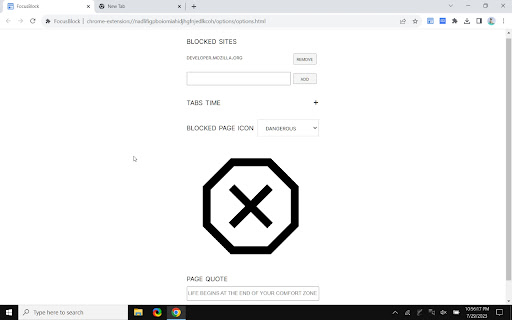
Lightweight and open source extension to block distracting websites and enhance productivity! FocusBlock is a lightweight and open-source extension designed to help you block distracting websites and enhance productivity. 1. Pomodoro Timer: Optimize productivity by blocking and unblocking sites at scheduled intervals. 2. Tabs Analytics: Gain valuable insights to better understand your internet usage. 3. Temporary Unblock: Strike a balance between focus and leisure, preventing users from spending time excessively. 4. Shadow DOM: Provide a seamless and hassle-free browsing experience.

FocusGuard - Block Site & Focus Mode
Free site blocker for enhanced productivity. Custom blocklist and password protection. Stay focused, and block distractions. If you want some time to browse online but hope to avoid a full-blown internet spiral, a site blocker might be perfect for you. Set a time limit for distracting sites. When you reach the limit, a block goes into place. That means you still get to check your feed now and then, just not for too long or too often. Site blocker is designed to help you stay focused on studying, learning, and working. Blocks all time-westing websites to keep you productive and away from all the distractions the internet offers. To use a site blocker, set a password, decide which websites you want access to, and let the site blocker block the rest. If you want to visit a site you have blocked, enter your password, and decide how long you want to be on the blocked site. If you’re a parent, you can set the password for your child. Or, if you’d like to use it yourself, have a friend or partner put it for you to help you concentrate. And voila! You now have a set of internet guardrails that help to help you stay productive and on task whether you’re studying, remote learning, or need an extra boost of self-control to finish a project. 👉 Block sites, including its subdomains Remove all distracting and harmful websites from your life by blocking them for you while you need to stay focused and productive. 👉 Allowlist Add exceptions to the blocked websites list. Sites from this list avoid all blocking settings. 👉 Focus mode The focus mode timer lets you control your schedule via the Pomodoro technique. Break down your tasks into intervals followed by a short break. With ‘Focus Mode,’ you can set times to disable websites and browse freely. 👉 Time management Show how many work cycles you completed during a session. So you’ll be able to get all your tasks done and still have time to browse your favourite sites and apps in between. 👉 Password protection If you start focus mode, you can stop it with a passcode of your choosing, making it harder to procrastinate. You can also password-protect the options page to keep you from efficiently removing sites from your list. 👉 Unstoppable focus mode Select the option to hide the pause and stop buttons in the extension settings. And you won't be able to stop blocking sites until the block time expires. 👉 Funny blocked page You will now see funny images if you are trying to enter a blocked site. To do this, you need to enable this option in the site blocking settings. You will still not be able to enter the blocked site, but perhaps a funny picture will make you smile :)) Block Site is one of the best productivity tools available to help people procrastinate less, become more productive and reach their life goals. You’ll never have to worry again about how to stay focused at work. ⭐️Note⭐️ To block sites in incognito mode, you need to activate Allow run in incognito mode checkbox on the chrome://extensions page.

BlockSite Pomodoro: Block Sites & Focus
Stay focused & Boost productivity with a custom blocklist & pomodoro-based site blocking. The BlockSite Pomodoro extension is the perfect extension/site blocker for staying productive and avoiding distractions while using the internet. With this site blocker, you can easily choose sites to block, and based on the Pomodoro work technique, they'll be blocked and unblocked automatically. This extension can help anyone stay focused, from high schoolers to office workers to freelance entrepreneurs. Eliminate procrastination and block sites with BlockSite Pomodoro! 🚫 Block Websites by URL You can choose to block any website and any number of websites in the settings. Add the websites you want to block and we'll take care of the rest! (You can remove blocked websites at any time). 🏳️ Whitelist Websites You have the option to block every other website except the ones added to your whitelist for even more powerful blocking! 🟢 Except Websites If you have subpages on websites you want to block that you still need to access (like a specific YouTube video), you can add them to the exceptions list and they'll never be blocked! 🍅 Pomodoro Block Timing Using the acclaimed Pomodoro technique, this extension will automatically block websites until a break interval is reached, during which you can freely use your blocked websites! ✋ Strict Blocking Block websites even while outside the timer if you want to stay focused on your work for more time! BlockSite Pomodoro is the site blocker for maintaining focus without completely giving up distracting websites. Download this extension to stay focused, boost productivity, and achieve your goals!

Block Sites 2.0
An all-in-one add-on that lets you custom blocklist, scheduled site blocking, and password protection. 1. Install the extension. 2. Sync your schedule with the extension. 3. Turn on Focus, block unrelated sites 🚫, or even schedule the blocking to focus more in your busy hours. 1. Focus timer removes all distracting and blocked content from your sight. 🧘♀️ 2. Focus Mode lets you set times when to disable websites and when to browse freely. 3. Block adult content on your device. 🚫 4. Set a passcode for the extension to restrict yourself from procrastination. 5. Sync the extension with your devices to have total control over your schedule. This extension makes you more productive with customized working-schedule features.

Pomegranate
Pomegranate started as a passion project to help me stay focused and I’m glad it’s helping others too.… Pomegranate started as a passion project to help me stay focused and I’m glad it’s helping others too. If you find it useful and want to support continued development, you help buy me a beer with a small donation: Ever find yourself typing “facebook.com” without thinking? Yeah, same. That’s where Pomegranate comes in. It’s your focus-enhancing sidekick that helps you reclaim your attention and actually get things done. At its core, Pomegranate is a website blocker with a twist. It uses the proven structure of the Pomodoro® Technique, where you focus for set periods of time and take short or long breaks in between. When willpower isn’t enough, Pomegranate adds tools like custom redirect links (send yourself to a "nails on a chalkboard" video if that helps) or Exclusive Mode, which simply blocks distracting sites without timers or fuss. Features: Website Blocker With a little honest encouragement when you slip up. Pomodoro® Timer Includes short and long break intervals and progress tracking. Redirect Mode Send blocked sites to a URL of your choice. Use it creatively or punitively. Exclusive Mode Turns off timer functionality and just blocks websites in the background. Wildcard URL Blocking Block entire domains with partial keywords. For example, typing “facebook” will block anything containing that word, not just “facebook.com”. Focus Stats See how many pomodoros and breaks you’ve completed.
