
impjbpplidghcibnkolpadnifbapofdn
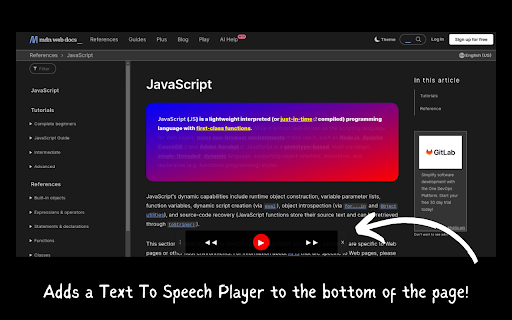


Read any web page out loud with this intelligent, fully customizable, text to speech application. Supports 500+ human-like voices. * Adds a Text to Speech Player to the bottom of the page. * Play, pause, or skip text as it is being read. * Automatically highlight each sentence as the voice reader reads it. * Supports over 500+ human-like voices. (All of which are always, 100% free.) With this extension, you can.. * Teach a voice reader how to pronounce words exactly how you want them pronounced. * Click on any text to read it automatically. * Change reading speed, voice pitch, and other important settings. * Choose which web elements should be read so that the voice reader only reads what you want. *+Many other additional features and benefits which are continually being updated and improved!

Voice In - Speech-To-Text Dictation
Use dictation to type in 10k+ sites in 50+ languages. VoiceIn transcribes your speech to text in real time. Voice In enables voice typing --- it makes it easy to type in the browser using voice-to-text. Whether it is writing emails in Gmail, answering assignments in Classroom, responding to customer tickets, replying to chats or learning pronunciations, Voice In Speech-To-Text capability lets you do them all using your voice. For more information, visit https://dictanote.co/voicein/ WORKS WHERE YOU DO Voice In for Chrome allows you to use the power of speech recognition to type emails in Gmail or write blog posts on Wordpress or send messages in Slack. Voice In works in Gmail, Outlook, web-based CRMs and EHRs, dating sites, Teladoc, and in any site that contains a text box. TRUSTED BY THOUSANDS OF USERS Voice In is trusted by 500K+ users across more than 50 countries who record over 5 million minutes every month. Students, journalists, salespeople, medical professionals, elders, and anyone who wants to work more effectively use Voice In daily. FREE TO USE Our Basic plan comes with everything you need to dictate for free. DICTATE IN 40+ LANGUAGES Voice In recognizes 40+ languages including Portuguese, Italiano, Deutsch, Français. You can also use Voice In to practice your pronunciation in all these languages. VOICE IN IN THE NEWS "If you’ve ever been using a website and wished it had a voice input, now you can add one yourself." – LifeHacker SUPPORT Would love to hear your feedback! If a particular site does not work or you have feedback, email us at support@dictanote.co

FreeTTS — Free Text to Speech
Read any web page aloud with 400+ AI voices. AI Summary, Theatre Mode, listen queue, HD voices, background play. FreeTTS — 400+ AI Voices for Any Web Page. Free. Listen to any webpage in a natural AI voice. Right-click → Read aloud, summarise, or download as MP3. 400+ neural voices across 75+ languages. No signup needed for the basics. 🔊 HOW IT WORKS • Select any text → Right-click → "Listen to selection (FreeTTS)" → Read, Theatre Mode, Summarise, or Download MP3 • Right-click anywhere on a page to read the whole article • Or press Alt+S (selection) and Alt+R (full page) for instant playback • Audio plays in a natural voice with sentence-by-sentence highlight 🎭 THEATRE MODE — KARAOKE READ-ALONG • Full-screen, distraction-free reader • Karaoke view: each word lights up in sync with the voice • Teleprompter view: large text scrolls smoothly as it's read • Perfect for studying, accessibility, or following along while you cook, drive, or commute ✨ AI SUMMARY — SKIP THE ARTICLE, GET THE GIST • 30-second summary of any webpage in 3–5 bullet points • Plays back in any of the 400+ voices • Great for long-form articles, research, and news triage 🎙️ FLOATING MINI-PLAYER • Play / pause / skip / 0.5×–2× speed • Auto-scrolls so the current sentence stays on screen • Pre-buffers the next sentence for zero-gap playback • Listen Queue — save pages, listen later, auto-resume where you left off • Background playback continues when you switch tabs • Keyboard: Space pauses, Esc closes, ← → skip sentences ⬇️ DOWNLOAD MP3 Right-click selected text → "Download as MP3" to save audio for presentations, video voiceovers, studying, podcasts, or accessibility use. 🌍 400+ NEURAL VOICES · 75+ LANGUAGES English, Spanish, French, German, Arabic, Hindi, Japanese, Chinese, Korean, Portuguese, Italian, Russian, Turkish, Polish, Dutch — and 60+ more. Male and female voices in every language. Auto-detects the language of whatever you select. ⚡ KEY FEATURES • Right-click context menu — Read, Theatre Mode, Summarise, Download • Full-page article reader with floating mini-player • Theatre Mode — Karaoke + Teleprompter • AI Summary (30-second gist of any page) • Keyboard shortcuts — Alt+S and Alt+R • 400+ AI voices, 75+ languages, automatic language detection • Download as MP3 for offline use • Adjustable speed 0.5× to 2× • Smart voice memory — remembers your favourite voice per language • 24-hour audio cache for instant replay of recent reads • Listen Queue with resume-where-you-left-off • Background playback across tabs • Dark & light mode — follows your system theme • Polished karaoke + Theatre Mode reliability across CSP-strict sites (Wikipedia, GitHub, Substack) 🔒 PRIVACY • No account required for core read-aloud features • No advertising, no analytics, no tracking pixels, no telemetry • Page text is sent only when you explicitly trigger a Read or Summarise — to FreeTTS.org for speech synthesis, and (for AI Summary only) forwarded through FreeTTS.org to a third-party AI model to generate the summary • Optional sign-in (PRO): your auth token is sent to FreeTTS.org only to verify your plan • Stored locally on your device: voice preference, recent text, speed setting, install ID, and a 24-hour audio cache • Full privacy policy: https://freetts.org/privacy 🆓 GENEROUS FREE TIER Read any webpage, use Theatre Mode, download MP3s, and access 400+ standard voices — free, forever. A monthly fair-use cap applies on the free plan; PRO unlocks higher limits and HD voices. 💎 PRO UPGRADE (OPTIONAL) Sign in at freetts.org with a PRO account and the extension automatically unlocks: • HD neural voices (more expressive, studio quality) • 95 expressive emotional styles — cheerful, sad, whispering, newscasting, and more • Higher per-generation character limit • No audio watermark • Unlimited AI Summary • 30-day generation history & re-download Visit https://freetts.org/pricing for details. 🌟 PERFECT FOR • Students reading long articles or research papers • Writers proofreading their own work by ear • Commuters turning blog posts into podcasts • People with dyslexia, ADHD, or visual impairments • Multitaskers who'd rather listen than read • Creators previewing voiceover scripts in 75+ languages Built by FreeTTS.org — the free text-to-speech platform used by thousands of creators, students, and accessibility users worldwide.

Read Aloud: A Text to Speech Voice Reader
Read aloud the current web-page article with one click, using text to speech (TTS). Supports 40+ languages. Read Aloud uses text-to-speech (TTS) technology to convert webpage text to audio. It works on a variety of websites, including news sites, blogs, fan fiction, publications, textbooks, school and course materials. Read Aloud helps users who prefer to listen to content instead of reading, including children learning to read and those with dyslexia or other learning disabilities. Read Aloud allows you to select from a variety of text-to-speech voices, including native voices provided by the browser and AI voices from cloud providers such as Google Wavenet, Amazon Polly, IBM Watson, Microsoft Azure, and OpenAI. Cloud-based voices may require additional in-app purchase or bringing your own API key to enable. Read Aloud can read PDF, Google Docs, Google Play books, Amazon Kindle, and EPUB (via the excellent EPUBReader extension from epubread.com). To use Read Aloud, navigate to the web page you want to read, then click the Read Aloud icon on the browser menu. You can also use the shortcut keys ALT-P, ALT-O, ALT-Comma, and ALT-Period to activate the extension. If some text is selected, Read Aloud will read only the selected text. Additionally, you can right click the text selection and start Read Aloud from the context menu. To change the voice, reading speed, pitch, or enable text highlighting, go to the Options page via the Gear button on the extension popup (you'll need to stop playback to see the Gear button). You can also access the Options page from the context menu by right clicking the extension icon. On the extension popup, there are buttons to increase/decrease the the size of the popup window, the font size, as well as toggle dark mode. Read Aloud is an open-source project. If you wish to contribute bug fixes or translations, please visit the GitHub page at https://github.com/ken107/read-aloud

Qariyo: AI Text to Speech & Voice Reader
Listen to articles and webpages with human-like AI voices. Get premium text-to-speech with highlighting and NO subscriptions! Tired of expensive yearly fees from tools like Speechify or Natural Reader? Qariyo is the ultimate pay-as-you-go alternative. Simply click, sit back, and listen while you multitask, learn, or improve your pronunciation - without being locked into a subscription. 💳 100% Pay-As-You-Go: No hidden fees, no locked-in annual subscriptions. You only pay for the reading time you actually use. 🖱️ Interactive Paragraph Clicks: Jump around effortlessly. Just click any paragraph on the page to instantly start reading from that exact spot. 🎛️ Customizable Playback: Easily adjust reading speed, tone, and voice to match your unique listening style. 🪟 Smart Floating Widget: Move the reader anywhere on your screen, pause, or hide it without disrupting your workflow. 📖 Two Ways to Listen Full Page Mode: Open any webpage, hit play, and let our TTS engine read the text aloud. Pause, rewind, fast-forward, or skip around by clicking anywhere on the page. Text Selection Mode: Only want to hear a specific part? Highlight any text on the screen with your mouse and listen as Qariyo reads exactly what you selected. 🎯 Perfect For Multitaskers: Consume articles, news, or Reddit posts hands-free while working, exercising, or cooking. Accessibility & Focus: A vital reading assistant for users with ADHD, dyslexia, visual impairments, or general reading difficulties. Students & Professionals: Absorb study materials, research papers, and long documents faster. Language Learners: Improve your pronunciation and listening comprehension with native-sounding AI. Why Choose Qariyo? Unlike other read-aloud tools, Qariyo combines natural AI voices with precise reading controls, a distraction-free widget, and a completely fair pricing model. It’s fast, simple, and designed to make reading effortless. Experience a smarter way to consume written content. Install Qariyo today and listen to the web!
