
imjphkfldnipjnecfbohpdjibfhlegfn
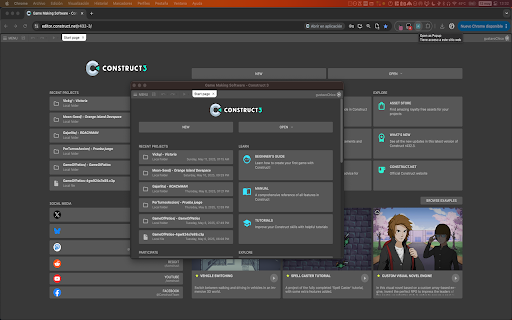


Open the current tab or any link as a popup window. Open as Popup V3 is a modern, updated, and enhanced remake of the original Open as Popup extension, which was no longer compatible with Manifest V3 and lacked several improvements. This extension allows you to open any page or link in a clean popup window without tabs, address bar, or browser UI, now fully compatible with Manifest V3 and optimized for modern Chrome. 📁 Remembers the last opened popup URL for quick reopening 🧪 CSS/JS injection ready via scripting API for future use 💻 Helper tool to copy a ready system command to open any page as an OS-style app window (--app=), with OS-aware command This extension is lightweight, requires minimal permissions, and aims to be as clean and unobtrusive as possible, giving you fast popup-like workflows while staying compliant with Chrome’s latest standards.

Smallify
This extension enables you to open current tab in a small popup window. This extension opens current tab in a small popup window without toolbar, address bar, status bar, and tabs, improving your experience of glancing through the web-content.

Open link in small window.
'Open link in small window.' is a simple yet powerful Chrome extension designed to streamline your browsing experience by letting you open links in a small pop-up window instead of a full tab. With just a right-click, you can open any link in a compact window, positioned conveniently on the screen, helping you keep your workflow organized without cluttering your browser tabs. Why Install This Extension? Improve Your Productivity: Stop juggling multiple tabs. When you want to quickly view a link, this extension opens it in a small, focused window, so you don’t lose track of your main task. Seamless Multitasking: View links side-by-side with your current content. Whether you're doing research, referencing materials, or watching videos, this extension makes it easy to manage secondary content. Customizable Window Positioning: The small window can open on the right side of your screen, perfect for multitaskers who prefer keeping their workspace organized. No more losing windows behind your main application. Reduce Browser Clutter: Say goodbye to tab overload! The small pop-up window ensures that your browsing stays organized and efficient by keeping links separate from your main window. Lightweight and Easy to Use: No complicated settings. Just install, right-click, and enjoy a smoother browsing experience.

Peek Preview - Arc like link preview
Peek Preview - Arc like peek preview for your web browser Create by tomowang with ❤️ Open source on GitHub: 1. Preview links in current tab or popup window 2. Use shift⇧ + click link to open links for peek preview (support customizable hotkey) 3. Drag link to open links for peek preview 4. Press Esc or just blur the preview window to close it 1. Some websites may not work properly due to `onfetch` handler of service workers 2. Some websites disable the drag event or shift⇧ + click event, so you can't use them to open links for peek preview 3. Links may not work properly when they redirect to another sites which have Content Security Policy (CSP) enabled

Poppify - Open-as-popup
✅ Poppify helps you instantly convert any browser tab into a clean popup window — perfect for side-by-side work, distraction-free browsing, or focused tools. With one click, open your current tab in a minimal popup window without tabs or address bar. 🐧 Need a quick place to jot down your tasks while working? The Task-to-do feature lets you capture them instantly. Contact me if you have any question or feedback: lamanh.business@gmail.com. Ahhgg Don't ask me about the version number - I just made them up 🤣 Change log: - 1.3.1.0 - December 01, 2025: fix bugs align center between checkbox and task text - 1.3.0.0 - November 24, 2025: add new feature Task-to-do for we nerds 🤓🐧 - 1.2.5.2 - November 13, 2025: center the new popup, fix the context menu; fix some bugs - 1.2.5.1 - September 09, 2025: smooth out the transition effect of Minimize button; fix some bugs - 1.2.4 - September 04, 2025: add option to minimize "Back to Tab" and "Settings" buttons (thanks to feedback from 9 NINE) - 1.2.3 - August 23, 2025: add option "Open page as popup" in Right click (additional to clicking extension icon) - 1.2.2 - August 08, 2025: add Settings button, allow user to set popup size. Change name from Popupify → Poppify - 1.2.1 - July 14, 2025: fix bug not closing popup when hitting button Back to Tab - 1.2.0 - July 10, 2025: add keyboard shortcut (Ctrl + Shift + Y) - 1.0 - July 07, 2025: initial release
