
imiakeaigofbcfdjajmgjfnohjlekndg
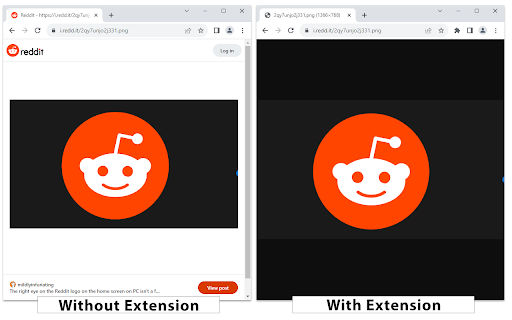
Displays Reddit image links directly in the browser by modifying the HTTP Accept header. Restores the original behaviour when loading images on Reddit. With this extension, images will load directly into Chrome by modifying the HTTP Accept header, which allows them to bypass the Reddit image preview screen.

Old Reddit Redirect
Ensure Reddit always loads the old design Dislike Reddit's redesign? Old Reddit Redirect will ensure that you always load the old (old.reddit.com) design instead. Forces all reddit.com links to old.reddit.com, including navigating to the site, opening links or using old bookmarks. Unlike the account setting for turning off the design, this works regardless of whether you are logged in or not or in incognito mode. - Remove the undismissable cookie banner - Prevent reddit from rendering raw image URLs as HTML - Rewrite links to galleries to the raw old reddit comments page Old Reddit Redirect is free and open source software. The code is available at https://github.com/tom-james-watson/old-reddit-redirect. Pull requests are more than welcome.

New Reddit Enhancements & Chemo (nREC)
Improvements for new Reddit: subreddit filters, ad-block, user-tags, video downloading, and more. Hide trending and sidebars. Add options to hide the trending strip, right sidebar, and/or subreddit sidebar. Blur NSFW. Quick option to blur NSFW thumbnails. Not a replacement for the similar option in the Reddit settings but provides a shortcut to quick turn on/off should the need arise without having to navigate through the settings. Fix image previews. Clicking on image previews take you directly to the image itself, instead of the lightbox element. Direct image links. Bypass Reddit forcing direct image links onto a preview page/template. Add video download links. When viewing a video, download links are provided, using both a direct link and a link through rapidsave.com. On installation, most features are enabled by default. However, features like Reddit Chemo and user tags need to be populated to see their full effects. Features can be enabled, disabled, and modified through the extension's UI (accessed by clicking the extension logo on the browser Toolbar). Most features, such as dark mode, hide trending and sidebars, blur nsfw, fix image previews, direct image links, and add video download links can simply be toggled in the UI using the various controls. Add video download links attempts to add a link to the video (with buttons in the upper-left corner). In the feed, it will attempt to find and apply a direct video link. However, this is only possible with short videos. Otherwise, if the buttons do not appear, try opening the post/comments. Then two links will be provided: one for the direct video (usually without sound as Reddit separates the video/audio feed) and another using RapidSave (which can rectify the video download with audio). To add subreddits to Reddit Chemo's ban list, simply click the "ban" button next to posts in the r/all or r/popular feed from subreddits you do not wish to see. By default, a small strip will be shown in place of the blocked post with an option to remove the subreddit from the ban. To hide this strip, toggle "Show/hide blocked posts" in the extension's UI. To remove subreddits from the ban go to "Edit banned list" in the extension's UI to view the full ban list and remove subreddits from it. The effects of removing subreddits from the ban list may not take effect until a page change or refresh. User Tags. Next to every username (including your own) you will see an empty 'tag' icon (or an active tag, if one was set). To set or edit this value, simply click once and type to edit the text. When in edit mode inside of a tag, click the tag again to cycle different tag colors. Click outside the tag or press 'enter' to save changes or press 'esc' to cancel changes. If the new tag value is set as empty or whitespace, the tag will be removed. All existing user tags may also be viewed and edited from the extension's UI. Click "Edit user tags" to get a list of all existing user tags and edit individual tags as necessary. If you liked this extension, consider donating @ https://ko-fi.com/F1F25YGLA

UI Changer for Reddit
Enforce your preferred user interface. Changes various parts of Reddit's user interface. Note: The notice you see about having access to your data on all Reddit sites is automatically generated because the extension runs on every Reddit tab. It does NOT require your personal information to work properly.

Reddit Image Opener
Disables Reddit's image view page, allowing image files to be viewed directly When navigating to an image file on Reddit, like when right-clicking an image and selecting “Open image in new tab”, Reddit displays the image within its image view page. Disabling this page allows the image to be viewed independently, without the surrounding Reddit interface. * In earlier versions of this extension, there was an 'Open Image' button that provided convenient access to the source images of posts. However, due to constraints imposed by Reddit's redesign in 2024, this feature is no longer available.
