
imgnkgjdglmcjpgijklkdigageoocpoa

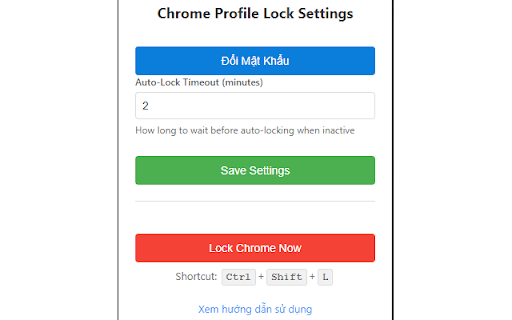

Password protection for Chrome profiles with auto-lock on inactivity Chrome Profile Lock - Password Protect Your Profile Protect your Chrome profile with a password. Features auto-lock on inactivity and allows trusted sites. Secure, simple, and effective! Do you often share your computer with others? Worried that someone might access your email, social media, or browsing history when you step away? Chrome Profile Lock is the perfect solution to effortlessly and effectively protect your privacy. This extension adds a powerful layer of security to your Chrome browser, requiring a password to unlock and use it. Now you can work and browse with peace of mind, free from prying eyes. 🌟 KEY FEATURES 🌟 🔒 Robust Password Protection Set a secure password to lock your entire Chrome profile. All your data, from browsing history and cookies to logged-in sessions, is kept safe and protected. ⏱️ Smart Auto-Lock No need to remember to lock your browser every time you leave. The extension automatically activates the lock screen after a customizable period of inactivity (e.g., 5 minutes, 10 minutes). ⚡ Instant Lock with One Click Need to lock your browser immediately? Simply click the "Lock Chrome Now" button in the popup or use the convenient shortcut Ctrl + Shift + L. 🌐 Allowed Domains (Whitelist) - A Unique Feature! This is what sets us apart! You can add trusted websites (e.g., youtube.com, news.google.com) to an allowed list. When the browser is locked, you can still access these sites without a password, while all other sites remain fully protected. Perfect for listening to music or following the news without compromising security. 🔑 Secure Recovery Code Forgot your password? No problem! When you first set your password, we provide a unique recovery code. Save it in a safe place to regain access at any time. 🛡️ Full-Screen Lock Interface When locked, the extension displays a full-screen overlay that prevents all interaction with the webpage content and protects against developer tools. WHY CHOOSE CHROME PROFILE LOCK? Comprehensive Security: More than just a simple popup, this extension locks the entire browser and prevents new tabs from being opened while locked. Flexible and Convenient: The "Allowed Domains" feature offers the perfect balance between security and usability, allowing you to customize the experience to your needs. Seamless Experience: When you unlock, all tabs are unlocked simultaneously, letting you get back to your work without interruption. Easy to Use: The intuitive settings interface allows you to quickly set your password, configure the auto-lock timer, and manage your allowed domains. PRIVACY COMMITMENT We are committed to protecting your privacy. Your password is encrypted using the SHA-256 algorithm and stored locally on your computer. We never collect or transmit any of your personal data. Install Chrome Profile Lock today to enjoy a safer and more private browsing experience.

Chrome Lock | Browser Password Lock Extension - ChromeLock.net
Lock your browser with one click. Protect your privacy and data with password protection, auto-lock, and keyboard shortcuts. Protect Your Browser Privacy with One Click Do you share a computer with family members or colleagues? Worried about others accessing your browsing history, saved passwords, or personal tabs? Chrome Lock is the simple, secure solution you've been looking for. Chrome Lock adds password protection to your Chrome browser. With just one click, you can lock your browser and keep your private information safe. When you return, simply enter your password to continue where you left off. THE PROBLEM: YOUR BROWSER IS AN OPEN BOOK Every day, millions of people leave their browsers unprotected: • Family members can see your browsing history • Colleagues might access your open tabs when you step away • Children can browse unrestricted content through your browser • Anyone can view your saved passwords and personal information THE SOLUTION: CHROME LOCK 🔒 One-Click Password Protection Set a password once, then lock your browser anytime with a single click. The extension displays a clean lock screen that blocks all access until the correct password is entered. ⏰ Auto-Lock on Startup Enable auto-lock to protect your browser automatically every time Chrome starts. Your privacy is protected from the moment you open your browser - no action required. 💤 Idle Auto-Lock Set a timer (5, 10, 15, or 30 minutes) to automatically lock your browser when you step away. Perfect for office environments or shared computers. ⌨️ Keyboard Shortcut Lock your browser instantly with Alt+Shift+L (Windows) or Cmd+Shift+L (Mac). Quick and convenient when you need to step away fast. ❓ Security Questions (Unique Feature) Forgot your password? No problem. Set up a security question and recover your password instantly. This is a feature most browser locks don't offer - you'll never be permanently locked out. 🔄 Auto-Reset Timer (Unique Feature) For extra peace of mind, enable auto-reset. If you forget your password, the lock will automatically reset after your specified number of days. This ensures you're never permanently locked out of your own browser. PERFECT FOR 📱 Shared Computers Protect your browsing data when sharing a computer with family members or roommates. Each person's browser activity stays private. 🏢 Office Privacy Keep your personal browsing private when you step away from your desk at work. Lock your browser before meetings, lunch breaks, or coffee runs. 👨👩👧👦 Family Protection Prevent children from accessing your browser, browsing history, or saved information. Create a safe boundary between adult and child browsing. ⚡ Quick Privacy Need to step away suddenly? Lock your browser instantly with a keyboard shortcut. Your tabs, history, and data remain protected until you return. ✅ Simple to Use - Set up in seconds, no technical knowledge required ✅ Lightweight - Zero impact on browser performance ✅ Secure - Password encrypted using industry-standard methods ✅ Private - All data stored locally on your device, never transmitted ✅ Recovery Options - Security questions and auto-reset prevent permanent lockout ✅ Free - All features available at no cost 1. Install - Add Chrome Lock from the Chrome Web Store 2. Set Password - Create your unlock password and optional security question 3. Lock - Click the extension icon or use the keyboard shortcut 4. Unlock - Enter your password to continue browsing Chrome Lock is designed with your privacy as the top priority: • All data is stored locally on your device • Your password is encrypted before storage • Uninstalling the extension removes all stored data ━━━━━━━━ Disclaimer: Chrome Lock is an independent product and is not affiliated with, endorsed by, or associated with Google or Google Chrome.

Browser Lock - Chrome Lock Browser | Browser-Lock.com
Lock your Chrome with a password to protect privacy. Auto-lock after inactivity and parental control for safe browsing. Keep Your Browsing Private, Secure, and Truly Yours – Effortlessly with Browser Lock Every time you walk away from your computer—at home or at work—you leave your most personal information just one click away from prying eyes. Your browsing sessions contain your emails, confidential work, private photos, and sensitive conversations. In shared spaces, busy households, or unpredictable office interruptions, relying solely on device locks or OS profiles doesn’t always shield your privacy. Browser Lock gives you seamless, always-on control—letting you safeguard your unique online world. **Why Privacy Matters: Day-to-Day Realities** How often do you step away from your laptop for just a minute, only to realize your open tabs are exposed? Whether it’s family sharing a computer, coworkers walking by, friends borrowing your device, or simply grabbing a drink—your web content can be seen by anyone. OS-level locking is clunky and sometimes impossible; Browser Lock fills the gap, letting you secure the browser instantly and automatically. **What Makes Browser Lock Different? Your Smart Security Partner** - Password-protect your Chrome browser—no complex setup required. - Auto-lock after inactivity: set your own timer for peace of mind. - Parental control mode: keep kids safe from unwanted content when you’re not around. - Locks without closing your work: resume right from where you left off after unlocking. - No cloud required, no sensitive data leaves your device—privacy by design. - Supports families, home offices, students, and professionals alike. **Everyday Scenarios: Real Benefits for Real People** - At home, you walk away to cook, and your emails/tabs remain private from other family members. - In the office, stepping out for a coffee, Browser Lock automatically secures client documents and private correspondence. - Public spaces—coworking or libraries—ensure strangers can’t snoop if you’re briefly distracted. - For parents, childproof your browser with one click—gain peace of mind when sharing devices. **Why Choose Browser Lock? The Clear Value** - Prevents information leaks, accidental clicks, and curious eyes - Saves time—no need to log out or reset sessions each time - Works quietly in the background, giving you seamless privacy - Distinct advantage over generic OS locking or user switching (quicker, more targeted, no session loss) - Extremely lightweight, no drain on system resources **Ready to Take Control? Install Browser Lock Now** Safeguard your browsing world—whether you care about confidentiality, parental oversight, or just peace of mind. Join thousands who trust Browser Lock for hassle-free, always-on web privacy. Install now and experience security without compromise!

Chrome Profile Lock (Secure)
Secure Chrome profile with PIN protection, session timeout, and advanced security features. Created by Global Webify. Chrome Profile Lock – Secure PIN & Session Lock Protect your Chrome browser profile with powerful security features. Perfect for personal, family, business, or shared devices. PIN Protection: Lock/unlock your Chrome profile with a secure 4–8 digit PIN (encrypted with SHA-256). Startup Lock: Always starts in locked mode for maximum privacy. PIN Recovery: Reset with a security question. Extension Protection: Prevents unauthorized removal or disabling. Custom theme creator for personalized design. Perfect for family computers, office use, or shared systems. Easy, fast, and reliable interface. 100% local: no data ever leaves your device. Optimized PIN recovery flow for reliability.

Tab Defenders
Worried that background tabs are eating up precious RAM? Tab Defenders is a memory manager for Chrome that automatically shuts down inactive tabs and frees up precious memory so that your system remains speedy and responsive! MODE 1: CLOSE TABS AFTER SPECIFIED DURATION You can specify a duration (in minutes) after which any background tab (i.e. a tab that hasn't been visted) will be shut down and its URL saved to storage. This mode is great if you wish to periodically clean Chrome tabs while ensuring that they are always available for recovery if needed. MODE 2: CLOSE TABS USING LEARNT PATTERNS The second mode of operation automatically learns your usage behaviors and shuts down tabs when it thinks that the chance of you returning to them is negligible. Tab Defender uses a state of the art statistical modelling module to track your domain-wise habits and automatically clean tabs in the background. RECOVERING CLOSED TABS If a tab was accidently closed by the extension and you wish to recover it, use the 'View Complete History' option under the 'History' tab to see closed tabs and recover them with the click of a button. WHITELISTING DOMAINS If there are some domains whose tabs you do not want to be automatically closed, you can add them to the whitelist directly from the extension. THEMES The extension offers a modern UI theme (default) as well as a more retro look. You can switch between the two by clicking the 'Tab Defenders' button in the extension popup. Please close and re-open the popup to see your changes in action. About the Developers This extension was developed by Aman Ladia, Jean Laguerre, Anthony Mensah, William Lam and Hung Bui of Stanford University.
