
imfbjbfcldgkdbfgeoppalofbjfihpdp

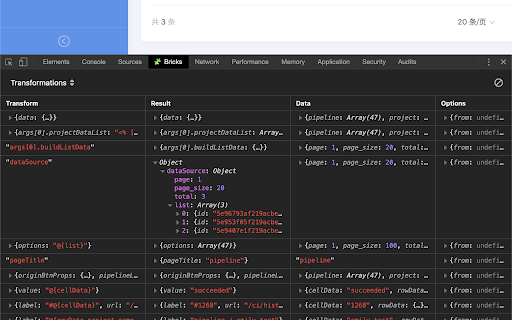
Adds Brick Next debugging tools to the Chrome Developer Tools. Brick Next Developer Tools is a Chrome DevTools extension for Brick Next. This extension allows developers to inspect the framework rendering tree which consists of custom elements, including their customized properties and events. And it also allows developers to monitor specific data processing of the framework. Developers will get a new tab in Chrome DevTools: "Bricks". By default it shows you the custom elements tree, by selecting one of them, you can inspect its customized properties and events. By switching to "Evaluations" or "Transformations", you can monitor the specific data processing, including the input, the result and the context.

Web Developer
Adds a toolbar button with various web developer tools. The Web Developer extension adds a toolbar button to the browser with various web developer tools. This is the official port of the Web Developer extension for Firefox. The best place for support is not in the reviews section below, but on the Web Developer site in the help:

Preact Developer Tools
Adds debugging tools for Preact to Chrome Debugging tools for Preact. This extension allows you to inspect the component hierarchy and change properties on the fly.

Mokku
Adds the API mocker MOKKU to Chrome Developer Tools for seamless integration & testing. 🚀 Take Control of Your API Workflows with Mokku Stop waiting for backend deployments or struggling with unstable staging environments. Mokku is the ultimate developer tool that integrates directly into your Chrome DevTools to let you mock, modify, and manage API responses seamlessly. Whether you're building a frontend against a non-existent API or testing edge-case error states, Mokku gives you the power of a full mock server right inside your browser. Complete Control: Specify JSON bodies, HTTP status codes, time delays (latency), and custom headers. GraphQL Native: Full support for mocking GraphQL queries and mutations. Dynamic Responses: Go beyond static files. Write JavaScript functions to return complex, conditional data based on the request. Dynamic URL Matching: Use patterns like /goals/:goalId (powered by path-to-regexp v8.2.0). URL parameters are passed directly to your response functions. Pro Editor: Built-in Monaco Editor (the engine behind VSCode) for a premium coding experience. Modify request headers globally or on a per-URL basis. Perfect for testing auth tokens or custom headers without touching your source code. Projects: Group mocks and headers by project to keep your workspace clutter-free. Import/Export: Share mocks with your team or backup your setup by exporting project-based configurations. ⚙️ How it Works Mokku adds a dedicated tab to your Chrome DevTools. You can: Click-to-Mock: Pick any existing network call from your logs and turn it into a mock with one click. Start from Scratch: Create custom mocks manually for APIs that don’t exist yet. Safe Injection: Mokku is non-intrusive. It only injects scripts into localhost by default. For all other domains, it remains inactive until you manually enable it from the panel. Secure Storage: Your mocks are stored safely within your Chrome profile storage. Stop waiting for the backend. Start building with Mokku.

ProseMirror Developer Tools
Run prosemirror-dev-toolkit as Chrome extension Inspect and debug any ProseMirror rich-text editor from your browser without having to bundle prosemirror-dev-toolkit https://github.com/TeemuKoivisto/prosemirror-dev-toolkit Created in the spirit of React and Redux DevTools. Report any issues or bugs to the GitHub repository.
