
imeimbedbkpcejaffifiooieojomihjn
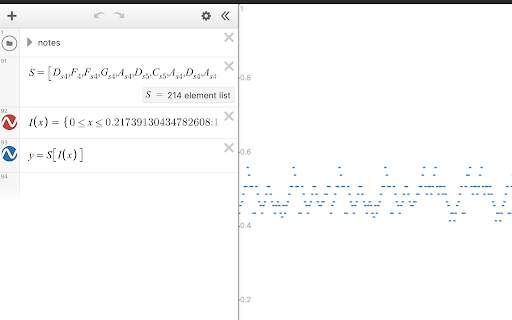
Enable a wider frequency and duration range for the audio trace function in Desmos. This extension extends the range of the audio trace functionality in Desmos from ~E4-E5 to A0-C8, and the maximum trace time from 20 seconds to 320 seconds. To play correctly, ensure your viewport is setup correctly: 0 ≤ x ≤ AUDIO_SPEED_IN_SECONDS 0 ≤ y ≤ 1 Click on the extension icon to view the note and song graph generator. Provide JSON input that describes a song (schema provided), and paste the generated equations into the calculator to listen to it.

Auto Desmos
An extension which brings ChatGPT's powers into Desmos It can add equations to Desmos through natural language. View remapping coming in the future!

Dark Desmos
Dark mode for Desmos. A simple dark mode for all of Desmos with full support of all calculators and webpages.

Desmos with Modern Math Font
Replaces Desmos's math font with a modern style. Replaces Desmos's default math font with a modern style. Click the extension icon to customize the settings. Report any issues here: https://github.com/physy/Desmos-extension Desmosグラフ計算機の数式フォントをモダンで見やすいものにします。 拡張機能のアイコンをクリックすると、設定を変更できます。 バグ等はこちらへ: https://github.com/physy/Desmos-extension

DesModder for Desmos
Supercharge your Desmos graph creation and sharing experience with many convenient features Supercharge your Desmos graph creation and sharing experience with many convenient features: - Core - Adjust settings that can let you hide the keypad, lock the viewport, and more - Render implicit-filled expressions on the GPU - Export videos and GIFs of your graphs based on actions or sliders - View expressions in a text editor (Beta) - Autocomplete variable names, jump to definitions, and create/use your own documentation. - Utility - Paste ASCIIMath (such as the results of Wolfram Alpha queries) into Desmos - Pin expressions to the top - Find and replace expressions - Display graph performance metrics - Adds right-click (instead of long press) on expressions to style them - Duplicate any expression with hotkey Ctrl+Q - Quickly dump a folder's entire contents, and merge expressions into a folder - Tweak equation input settings to make typing equations easier. - Measure the size of expressions for Code Golfing purposes. - Visual - Change the primary color from blue to any color - Toggle display of expression IDs - Display list elements, colors, and undefined values in expression list - View tips including lesser-known features of Desmos - Hide and ignore unwanted slider suggestions - Make the UI more compact to see more on the screen at once. - Split expressions onto multiple lines. - Highlight brackets to make complicated expressions easier to read. - Integration - Integration with WakaTime - More to come! All graphs created using this extension are compatible with vanilla Desmos. This means your graphs are always safe to share with others, regardless of whether or not they have DesModder. - One small exception: expressions rendered using GLesmos may be much slower for people without the feature. Chrome will warn you asking for permission for the declarativeNetRequest API ("Block content on any page you visit"). In this case, the warning is inaccurate because the net request rules apply [only to Desmos](https://github.com/DesModder/DesModder/blob/main/public/chrome/net_request_rules.json) and simply modify response headers to provide permissions that enable in-browser video export. This extension follows Chrome's best practices and is open source (https://github.com/DesModder/DesModder), so you and others can contribute and see what goes on in the background. Keep in mind that many features of this extension rely on unofficial, undocumented, or unstable parts of Desmos. When something stops working, report it on http://github.com/DesModder/DesModder/issues with a description of the issue. Currently only works on the public-facing calculator at https://desmos.com/calculator. Not affiliated with Desmos.
