
ilmoodhbpigjdbegjgocjildgajgmema
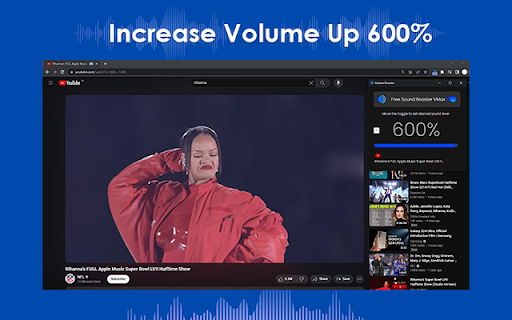

In a world where audio quality matters, having a powerful sound booster can make a significant difference in your overall multimedia experience. Imagine being able to amplify your device's volume by a staggering 600% without spending a dime. Introducing VMax, the ultimate free sound booster that takes your audio to new heights. With its ability to boost volume by an unprecedented 600%, VMax stands as a testament to the innovation happening in the realm of sound enhancement. Embrace the power of VMax and elevate your audio experience today, all without spending a penny. It's time to amplify your world with VMax! ## Sound Booster VMax | FREE — Boost Your Volume Up to 600% **Is your volume too low?** Whether you are watching a movie on Netflix, listening to music on YouTube, or playing browser games, **Sound Booster VMax** gives you the extra power you need. Break the 100% volume limit and experience sound like never before! Sound Booster VMax is a simple yet powerful Chrome extension that amplifies the audio of any tab. It’s light, fast, and designed to give you maximum volume without losing sound quality. * **Extreme Volume Boost:** Increase your sound up to **600%** above the standard limit. * **Zero Distortion:** Advanced audio processing ensures clear sound even at high volumes. * **Tab-Specific Control:** Adjust the volume for each tab individually. Keep your music loud and your notifications quiet. * **One-Click Toggle:** Easy-to-use slider interface for instant volume adjustment. * **Completely FREE:** Professional-grade sound boosting at no cost. * **Bass Booster:** Enhance low frequencies for a deeper, richer audio experience. * **Dynamic Range:** Optimized for laptop speakers and headphones. * **Lightweight Performance:** Minimal RAM and CPU usage; it won’t slow down your browser. * **Universal Compatibility:** Works on YouTube, Spotify, Twitch, Netflix, and all other web platforms. 1. Click **"Add to Chrome"** to install the extension. 2. Open any website with audio (YouTube, SoundCloud, etc.). 3. Click the **VMax icon** in your extension bar. 4. Slide the bar to reach your desired volume level. **Transform your browsing experience and feel the power of VMax today!**

Volume Booster Pro
Volume Booster Pro is an application to increase the sound volume in the Google Chrome browser. It gives you the ability to amplify the audio on any site or web app you use in Chrome. With Volume Booster Pro, you can adjust the sound volume level on your computer, amplifying the sound to the maximum level. This is especially useful when you are listening to music, watching movies or online videos and the sound is too quiet or unintelligible. The main features of the application include: - Adjusting the volume level of the sound in the Chrome browser - Increase the sound to the maximum level - Friendly user interface for quick and easy sound volume control - Support for various types of audio files, including music, videos, audiobooks and more. Volume Booster Pro is a free chrome store app available to download and install from the Chrome Web Store. It also ensures that your privacy is protected and does not collect personal user data.

Sound Booster that Works!
Sound booster extension for Chrome is a useful tool that can help boost the volume output of various media platforms. With its user-friendly interface and convenient features, it can be an ideal addition for anyone who frequently uses music and video streaming services, social networks, or other online media platforms. One of the key features of volume booster is its ability to boost the volume output of various music services such as Spotify, Soundcloud, LastFM, Deezer, and many others. This means that users can enjoy their favorite tracks at a higher volume than what is typically possible through the standard volume controls on their device. With this feature, users can experience their music more fully, and even discover new sounds that they may not have noticed before. Volume booster also provides similar volume-enhancing features for popular video platforms such as YouTube, Vimeo, Dailymotion, and others. This means that users can watch their favorite videos at a higher volume, and even improve the overall sound quality of the content. Whether users are watching a movie, a TV show, or just a fun video on YouTube, this extension can help make the experience more enjoyable. In addition to its music and video features, the Sound Booster that Works! also provides bass boost options for social networks like Facebook, Instagram, Twitter, and Tiktok. This means that users can enjoy their social media feeds with higher-quality sound and a more immersive experience overall. Whether users are scrolling through their Facebook newsfeed or watching a video on Instagram, this extension can help make the experience more engaging. Overall, the Sound Booster that Works! is a powerful tool that can help users get more out of their favorite online media platforms. With its convenient features and user-friendly interface, it can be an ideal addition for anyone who loves music, videos, and social media. Whether users want to enhance the volume of their favorite tracks or improve the sound quality of their favorite videos, this extension can help make it happen.

Volume Booster
Boost your audio volume up to 2000% with this simple and effective volume enhancer. Take control of your sound with the ultimate Volume Booster extension for Chrome. Whether you’re watching videos, streaming music, or enjoying a movie, Volume Booster lets you enhance your audio experience like never before. Easily boost your volume up to 2000% with just a few clicks – perfect for quiet videos, low audio levels, or simply for those moments when you need that extra sound boost. • Boost Volume Up to 2000%: Amplify your audio beyond the usual limits for a richer sound experience. • Advanced Noise Reduction: Enjoy clear sound with built-in filters to reduce unwanted noise and distortion. • Real-Time Adjustment: Increase or decrease the volume in real time, with precise control. • Intuitive and User-Friendly: Simple slider interface, easy to use for all. • Works on All Audio & Video Platforms: Boost volume on YouTube, Netflix, Spotify, and any other media platform. No more struggling to hear audio – elevate your sound and make every listening experience perfect with Volume Booster! Try it today and experience powerful sound control!

Ultra Volume Booster
Introducing the game-changer in audio enhancement: Ultra Volume Booster! Elevate your sound experience to unprecedented heights with our cutting-edge browser extension. Use Cases: - Watch your favorite movies and TV shows with immersive audio that fills the room. - Enhance your music streaming sessions by amplifying the volume and enjoying every beat. - Attend virtual meetings and webinars with crystal-clear audio that captivates every participant. - Immerse yourself in educational content and podcasts, catching every detail with pristine sound. Key Features: - Amplify volume in a specific browser tab, allowing you to customize the audio experience effortlessly. - Set up amplification levels precisely to your liking, with options ranging up to a staggering 500% boost. - Rest assured, our advanced technology prevents any sound distortion, ensuring optimal audio quality. Experience the transformation as Ultra Volume Booster empowers you to unleash crystal-clear sound on any website. Elevate your audio journey and immerse yourself in a world of enhanced audio with our intuitive browser extension. Don't settle for mediocre audio. Upgrade your sound game today with Ultra Volume Booster. Discover a new dimension of audio excellence, where every website becomes a symphony of immersive sound.
