
ildmgbcepgkllnimeohdeliabaifgmac


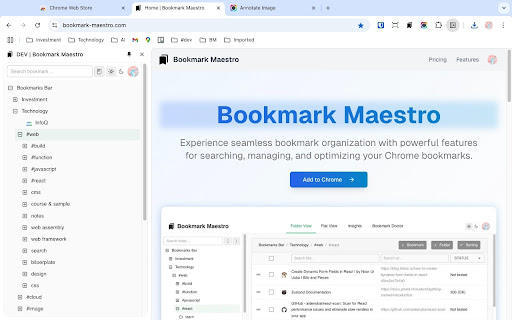
📌 Bookmark Maestro – The Ultimate Chrome Bookmark Manager Take control of your browsing life with Bookmark Maestro, the all-in-one Chrome extension built to streamline and supercharge your bookmark management. Whether you're a casual user or a productivity power user, Bookmark Maestro helps you organize, search, and clean up your bookmarks with ease. 🔑 Key Features: • Hierarchical Folder View: Browse your bookmarks in a clean, tree-style structure with instant access to quick actions and smart navigation. • Native Side Panel Integration: Open your full bookmark library right from Chrome’s side panel—without switching tabs. • Advanced Search & Filters: Instantly locate bookmarks by title, URL, or folder using powerful search and filtering tools. • Batch Bookmark Operations: Move, delete, and organize multiple bookmarks at once—no more one-by-one edits. • Dark & Light Themes: Enjoy a polished, responsive interface that matches your style and environment. 💼 Pro Features (Upgrade Anytime): • Selective Export & Import: Export or import only the bookmarks or folders you need—flexible and fast. • Broken Link Checker: Automatically detect and clean up dead or redirected bookmarks. • Bulk Editing Tools: Use regex and pattern matching to transform multiple bookmarks with precision. • Analytics Dashboard: Visualize your collection with insights like top folders, most-used links, and more. • Bookmark Doctor: Remove duplicates, empty folders, and other clutter in just a few clicks. ✅ Ideal For: • Professionals managing hundreds (or thousands) of bookmarks • Students organizing academic research and resources • Developers and power users optimizing workflows • Anyone tired of messy, unorganized bookmark bars Install Bookmark Maestro today and discover a faster, smarter, and cleaner way to manage your Chrome bookmarks!

Tiny Bookmark Tab
Replace your new tab with a super fast tree-list of browser bookmarks. Use a search field to filter bookmarks. Persist open folders between uses. Also accessible from the extension menu bar.

Tabme Mini — Tab & Bookmark Manager | Save, Organize & Sync Tabs
The easiest way to manage tabs, bookmarks, and sticky notes – all in one Chrome extension Save open tabs instantly with drag-and-drop, organize them into color-coded folders, and find anything with fast search. No registration needed! Try as a guest for free with an unlimited number of saved bookmarks. 👉️ WANT TABME AS YOUR NEW TAB PAGE? Alternatively, get the full Tabme experience by setting it as your new tab page: https://chromewebstore.google.com/detail/tabme-%E2%80%94-organize-tabs-and/jnhiookaaldadiimlgncedhkpmhlmmip 👆 Save Tabs With Drag-and-Drop Drag tabs and tab groups from the sidebar into any folder to save. 📦 Stash & Restore Tab Sessions Save all open tabs into a folder with one click. Reopen an entire session just as easily. 🗂 Spaces — Organize by Project or Topic (Pro) Create separate workspaces for different projects. Share spaces with your team. 📱 Sync Across Devices (Pro) Access your saved tabs from any device. No extension needed — use https://gettabme.com/app/ 📐 Vertical Tabs & Side Panel Manage your tabs in the Chrome Side Panel for a vertical Tabs (like in Arc browser) experience. 🌈 Color Coding & Visual Layout Categorize folders with colors and arrange them spatially for quick visual access. 🧹 Close Duplicate Tabs Detect and close duplicate tabs with a single click. 🌙 Dark Mode Switch to dark mode for a comfortable, easy-on-the-eyes interface whenever you prefer it. ⌨️ Keyboard Shortcuts Navigate and manage everything without touching the mouse. ✍️ Sticky Notes Jot down ideas and to-dos right alongside your bookmarks. 📥 Import & Export Import from Chrome bookmarks, HTML, TXT, CSV, or JSON files. Export anytime for backup or migration. WHO IS TABME FOR? • Managers organizing project docs and references • Researchers managing tabs across multiple topics • Students collecting study materials • Anyone drowning in open tabs • Teams sharing curated link collections (Pro) Tabme 100% privacy guarantee means: 1. We respect your privacy. 2. Any usage analytics are fully anonymous. 3. We never share your data with anyone. • Pin the Tabme Mini icon in the Chrome toolbar for quick access • Click the icon to open Tabme in a new tab • Drag tabs from the sidebar into folders to save and organize them

Bookmark Manager
This is the Chrome extension for BookmarkManager.com, a standalone bookmark manager that uses tags to organize and rediscover links. The extension makes it super easy to add new bookmarks and find existing ones.

Better Bookmarks | Streamline Your Favorites
Effortlessly organize bookmarks with advanced sorting, powerful search, bulk actions, and seamless import/export. Better Bookmarks is the perfect solution for users looking to efficiently organize, manage, and retrieve their bookmarks. With its sleek design and advanced features, Better Bookmarks replaces your browser's default bookmark manager, providing enhanced controls, faster search capabilities, and seamless functionality. Say goodbye to cluttered bookmarks and hello to streamlined organization. (1) Advanced Sorting Options (2) Powerful Custom Bookmark Search (3) Bulk Operations for Editing, Moving, and Deleting (4) Enhanced Bookmark Folder Organization (5) Optimized Bookmark Index View (6) Comprehensive Import and Export Options (7) Dark and Light Themes (8) Secure Bookmark Deletion with Undo Function (1). Advanced Sorting Options Organize your bookmarks your way: • By Date: Keep your most recent bookmarks on top. • By Name: Arrange them alphabetically for easy navigation. • Chrome Default Order: Maintain the default sorting for a familiar browsing experience. (2). Powerful Custom Bookmark Search Locate bookmarks instantly with our advanced search functionality. • Real-Time Results: Get results as you type for faster retrieval. • Efficient Search Filters: Narrow down your search to pinpoint the exact bookmark. (3). Bulk Operations for Efficient Management Manage multiple bookmarks effortlessly with powerful bulk actions: • Select Multiple Bookmarks: Easily select and perform actions on several bookmarks at once. • Open in New Tabs/Windows: Open multiple bookmarks simultaneously in new tabs, new windows, or private mode. • Edit Bookmarks: Update bookmark titles and URLs to keep them accurate. • Move Bookmarks: Reorganize bookmarks into appropriate folders quickly. • Delete Bookmarks: Remove unwanted bookmarks individually or in bulk. • Export Bookmarks: Save your bookmarks in HTML or CSV formats for backup or sharing. • Copy URLs to Clipboard: Select multiple bookmarks and copy their URLs to the clipboard for easy sharing with anyone. (4). Enhanced Bookmark Folder Organization • Folder View: See all folders along with the number of bookmarks in each. • Parent Folder Display: Every bookmark shows its parent folder name for better context. (5). Optimized Bookmark Index View • Comprehensive Overview: View all bookmarks in a neatly arranged list with folder names, URLs, favicons, and titles. • Better Navigation: Quickly identify and access bookmarks related to specific projects or categories. (6). Comprehensive Import and Export Options • HTML and CSV Formats: Import/export bookmarks for backups or sharing. • Seamless Sync: Sync bookmarks via your Chrome profile—no additional login required. • Data Safety: Always have a backup to ensure your bookmarks are secure in case of accidental deletion. (7). Dark and Light Themes Choose between dark and light themes to suit your preferences and reduce eye strain during extended use. (8). Secure Bookmark Deletion with Undo Function Accidentally delete a bookmark? No problem! Easily restore deleted bookmarks with the undo function. ⭐ Active Support Center At Better Bookmarks, we care deeply about our users. We continually improve the extension based on your feedback. Feature Suggestions: Share your ideas and requests for new features. Support Assistance: Need help? Our team is ready to assist you. ↪ Submit a Request: https://betterbookmarks.io/contact/?reason=feature ⭐ Privacy Policy Your privacy is our priority: • No Data Tracking: We don’t track your browsing data, website usage, or any personal information. • Local Storage Only: All data is securely stored in your browser. We don’t access or share your data. • Anonymous Analytics: We use Google Analytics solely for anonymous error reporting to improve extension quality. Have questions or concerns about your privacy? Contact us anytime: ↪ Contact Us: https://betterbookmarks.io/contact/?reason=general
