
ikjmjddgkofpfmajnfoadcnnakdpgkoi
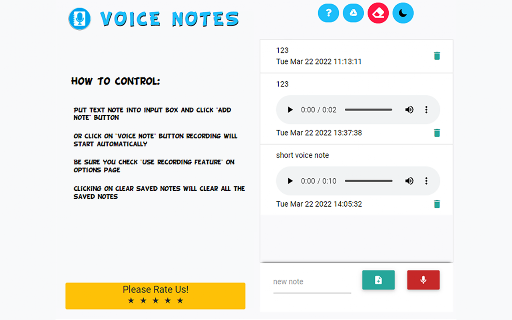
Create voice notes and add audio feedback for any projects/homework. Instead of writing long notes & emails when you're marking homework/grading a project, simply use this extension to create voice notes instead. The voice notes which you create are stored locally on your hard drive and you can upload these voice notes in your e-mails. Its extremely easy to begin recording your own voice notes, simply press the bottom right red button and you can start. Start giving audio feedback instead of writing out long detailed emails today. Try this voice notes software now and save time on giving feedback.

Record Voice Comments in Google Docs - Beep
Record and listen to voice comments and audio feedback on Google Docs, Sheets, Slides, and Forms. Beep for Google Docs is a voice commenting and feedback tool for Google Docs. You can comment on Google Docs, Google Slides, Google Sheets, and Google Forms with your voice. You never have to leave Google Docs to record or listen to voice notes as everything is integrated into Docs. Giving feedback can be challenging. You have to capture all your thoughts but also convey them in a tone that's constructive and positive. This is a lot harder to do if you're just trying to type comments. With voice, you can more quickly convey what you want to get across and make sure the tone is positive and clear. How it works? 1. Install the extension above. 2. Visit Google Docs, Google Sheets, Google Slides, or Google Forms. 3. Add a comment and click "voice comment" to record. That’s all it takes. A link will be inserted into the comment and that link will be auto-magically converted into an embedded player for anyone who has the extension installed. So you can listen to all the comments without leaving Google docs! Who’s it for? Collaborative Teams Great teams know the value of feedback. With Beep you can leave comments with a positive, constructive tone and make your team feel more connected. Editors Reading manuscripts or article drafts can be exhausting. With voice memos, you can convey more, faster. Professors Grading papers and providing feedback can take a serious amount of time. Beep saves you time by allowing you to voice your feedback and allows you to have a more personal connection with your students. ***Disclaimer*** This app is not affiliated with or officially endorsed by Google or Google Docs, Slides, Sheets, or Forms in any way

V2T: Voice To Text
Use speech recognition to convert your voice to text on any tab without typing Will convert your voice to text, using Google speech recognition API. Say goodbye to typos and grammar errors. ✅ Appears as popup, no need to keep separate tab open ✅ Simple and intuitive user interface ✅ No ads and limits What's next: + Capitalisation and punctuation auto-fix + Notes history

Voice Memo
Record voice online, create voice memo, and save ideas effortlessly with instant sharing and accurate voice to text conversion! ✨ What Is the Voice Memo Extension? The Voice Memo extension is an advanced app that helps you transcribe audio notes, manage tasks, and stay organized. Use the speak-to-text app to capture ideas, meetings, or reminders with the voice memo recorder, and let the AI automatically turn your recordings into actionable text. 🌟 Key Features of the Extension 🔹 Voice to Memo: Transform your ideas into neatly written notes with ease. 🔹 Speech to Text: Let the AI-powered transcription tool handle all your voice-to-text needs. 🔹 Record Voice Online Anytime: Capture thoughts, reminders, and tasks directly in your browser. 🔹Voice Commands: Edit your text notes with simple voice prompts. 🤩Enhance Your Productivity with Our AI Note Taker Leverage the efficiency of our AI-powered audio transcriber to transform your workflow. Voice memo allows you to convert your spoken ideas into structured memos effortlessly. Say goodbye to manual typing and embrace the convenience of voice-driven task management. Dictate your thoughts directly into the app, and it will promptly transcribe them into accurate, editable text. This streamlined approach not only improves precision but also drastically cuts down the time you dedicate to organizing tasks. Perfect for professionals on the go, it helps you focus on what's essential, boosting your productivity. 💡 Why Use the Extension? ▸ Save Time: Eliminate manual note-taking with the talk-to-text app feature. ▸ Stay Organized: Keep all your voice memos and audio notes in one place. ▸ Accurate Transcriptions: Let the AI deliver reliable speech transcripts from your online recordings. ▸ Versatile Usage: Record yourself or capture meetings, lectures, and ideas. ▸ Efficient Task Management: Record your tasks using our voice to text feature and keep your project details organized and accessible. 📌 How Does the Extension Work? 1️⃣ Record Yourself: Open the Voice Memo extension and use the sound recorder app to capture your voice. 2️⃣ Transcribe Audio Recording to Text: Let the AI process your recordings into clear, actionable text. 3️⃣ Organize Notes: Save and edit your transcriptions using the integrated voice notebook. 4️⃣ Create Tasks: Convert transcribed audio notes into tasks and sync them with project management tools like Trello. 📍 Maximize Efficiency with the Voice Memo Extension: Capture every idea from brief notes to comprehensive discussions effortlessly with our cutting-edge audio transcriber. This powerful tool not only records but also employs sophisticated AI note-taking technology to provide precise transcriptions. 💬 Effortlessly transcribe your voice memos into clear, editable text, making it easy to refine and organize your thoughts. The AI-driven transcription ensures that every detail is captured accurately, enhancing your workflow. Additionally, the seamless integration with productivity tools like Trello and Jira streamlines task management, enabling you to maintain organization and focus on more strategic tasks. 🤔 FAQs About the Voice Memo Extension Q: Can I use the extension for lengthy recordings? A: Yes! The Voice Memo extension supports long audio files, ensuring accurate transcription every time. Q: How precise is the AI transcription? A: The AI delivers highly accurate results, even for complex speech-to-text tasks. Q: Can I organize my notes within the extension? A: Absolutely. The integrated voice notebook makes it easy to edit and manage your transcriptions. Q: Is this extension suitable for beginners? A: Yes! The intuitive design makes it easy to use for anyone, whether you’re transcribing audio notes or managing tasks. 🌍 Use Cases for the Voice Memo Extension 🚀 Productivity Boost: Use the audio transcriber to record and transcribe meetings effortlessly. 🚀 Creative Projects: Writers and creators can use the voice-to-text app to organize ideas. 🚀 Daily Organization: Capture personal reminders and goals using the online voice recorder. ❓ Why You Need the Voice Memo Extension The Voice Memo extension is more than just a voice memo app—it’s a complete solution for managing tasks, transcribing audio to text, and staying productive. Whether you’re a professional managing meetings, a student capturing lectures, or a creative organizing ideas, this tool simplifies it all. 🛠️ Get Started with the Voice Memo Extension Ready to revolutionize your workflow? Download the Voice Memo extension today and experience the power of AI-driven transcription. Transform voice memos, organize tasks, and stay on top of your day—all in one place. Don’t let great ideas slip away—capture, transcribe, and manage them with the Voice Memo extension.

Voice Recorder
Record Audio from Microphone or Desktop right from your browser Want to record a quick simple voice message inside the browser? You can do so today by installing this software today. To get started, here is what you need to do. 1) Click on the extension icon. 2) Allow the microphone option for our extension. 3) Begin recording the audio message you have by speaking clearly into the microphone. 4) The audio file is saved directly onto your computer. Use this free voice recorder app today. You can also choose to record a voice message directly on our website without downloading any software as well.
