
ikipcddmebnahnagoekcipjeefoampmn


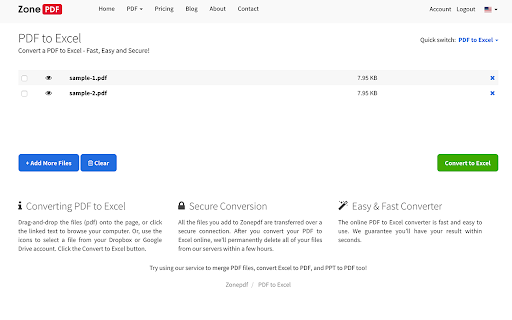
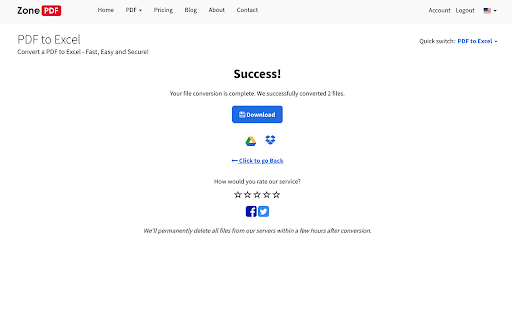
Fast and easy way to convert PDF files Select or drag your files, then click the Convert button to download your converted files. All converted files maintain the best quality which can be accepted on any web platform (when uploading to a website or attaching as email). Your files are fully secure as they are been transferred over a secure connection. We’ll permanently delete all files from our servers within a few hours after conversion.

PDF to Excel Converter
Swiftly convert PDF to Excel with perfection! Use our PDF to Excel Converter to turn any PDF document or table into xls/xlsx format. Turn any PDF into a ready-to-edit Excel spreadsheet in seconds. ⚡ This extension extracts tables, cells, and numbers with high accuracy and clean formatting: • ✅ Preserves rows, columns, and headers for clean Excel output. • 🔍 Supports native PDFs and scanned PDFs with OCR for AI-powered table recognition. • 📅 Keeps currency symbols, percentages, and dates consistent. • 🧠 Detects multiple tables per page and across pages automatically. • 🧩 Handles rotated pages and irregular layouts reliably. • 📊 Exports to XLSX for instant use in Excel or Google Sheets. Work confidently with multi-page reports, bank statements, invoices, receipts, research tables, and price lists. Perfect for finance, ops, sales, and research teams converting pdf to excel at scale. Finish repetitive copy-paste work in minutes and focus on insights instead. ⏱️ • Fast: convert from pdf to excel without manual ctrl+c ctrl+v • Accurate: convert pdf table to excel with clean columns and rows • Flexible: either convert pdf to xls to use in Excel, or use it in Google Sheets Easy as 1-2-3: 1. Click the extension icon in the toolbar 2. Drop your PDF file and start conversion to XLSX. 3. Download your spreadsheet and start analyzing data immediately. Key features: 💡 Detects tables automatically across pages and sections. 💡 Preserves rows, columns, and headers. 💡 Maintains currencies, dates, and percentages accurately. 💡 Supports scanned PDFs and images with AI-powered OCR. 💡 Handles rotated pages and irregular layouts reliably. 💡 Processes large files with progressive, stable performance. 💡 Splits or merges detected tables when needed. 💡 Keeps column types clean for formulas and pivots. 💡 Exports results that open perfectly in Google Sheets. 💡 Maps headers consistently for repeat documents. 💡 Receives automatic updates with accuracy improvements. Add to Chrome and turn locked PDFs into flexible spreadsheets today. 🚀 1️⃣ Save time by converting entire tables in one click. 2️⃣ Improve accuracy and reduce manual errors. 3️⃣ Keep structure intact for pivot tables and formulas. 4️⃣ Standardize data formats for clean analysis. Your data stays yours, and conversions are designed for safety and reliability. 🔐 ▸ In simple mode processing happens solely on your local device, no server upload. ▸ In AI-mode OCR runs on a secure server with latest AI models for speed and precision. Your data is never used for model training. ▸ No sign-up is required to get started. ▸ Clear permissions keep the extension lightweight. ❓ Does it work with scanned PDFs and images? 📗 Yes, it uses AI-powered OCR to recognize text and tables in scans, photos, and image-based PDFs. ❓ Will the Excel layout match the original PDF? 📗 Yes, it preserves table structure, headers, and numeric formats wherever possible. It includes the plain text as well. However, the tool is designed for data extraction, so in some cases it sacrifices the original formatting to produce a cleaner result that's easier to edit in Excel. ❓ Is there a file size limit? 📗 Typical conversions handle up to dozens of pages smoothly, and performance depends on table complexity and images. ❓ Do you store my files? 📗 No, files are processed for conversion in the local memory and then discarded, and temporary artifacts are cleared. ❓ How do I open results in Google Sheets? 📗 Download XLSX, then open it in Google Sheets or import it into your preferred spreadsheet app. ❓ What permissions does the extension need? 📗 It requires basic file access to read PDFs and create XLSX output, and it avoids unnecessary permissions. ❓ Does this pdf to excel converter keep table formatting? 📗 Yes. It’s optimized for converting pdf to excel with preserved headers, rows, and numeric types. ❓ Can I convert a pdf to excel offline? 📗 Yes, the conversion happens offline on your local device. ❓ Will it handle multi-page tables and bank statement pdf to excel? 📗 Absolutely. It’s designed to convert pdf table to excel across multiple pages consistently. ❓ What formats can I export to? 📗 Pdf may be converted to xlsx, but then you may open it in Excel, Google Sheets or other office software. ❓ Why is some content missing from my Excel file? 📗 Most likely, some content in your PDF was in image format, not selectable text. This pdf to excel converter only works on text-based PDFs, so images and graphic elements are skipped. For better results, ensure your source PDF is not scanned as a picture. ❓ My resulting Excel file layout looks different from the original PDF. Why? 📗 The main goal of the tool is to extract tabular data efficiently, not to reproduce the original pdf to excel with pixel-level accuracy. This extension is designed to convert pdf table to excel for streamlined analysis, so you can quickly use data in formulas, pivots, and other spreadsheet operations. Minor layout differences are normal when you convert from pdf to excel — focus on clean columns and rows for further processing in Excel or Google Sheets. ❓ I'm not satisfied with conversion quality. What can I do? 📗 Try enabling advanced options before starting the conversion. If your PDF tables are tightly packed or span pages, enable the option “Reduce merging of adjacent elements”, or select “Do not merge multi-page tables”. If your outcome still isn't optimal, reach out — this pdf to excel converter tool is continuously improved based on user feedback. 🧑💻 Prefer an excel pdf to excel converter right in your browser for repeated workflows? 📊 Use our pdf to excel format converter to standardize schemas across teams with confidence. 🧳 On the go? Try the online pdf to excel converter and continue work from anywhere. ☁️ From receipts to ledgers, pdf convert to excel in clicks without losing structure. 🗓️ Need to convert pdf document to excel for audits or month-end closes quickly? #️⃣ You can convert a pdf document to excel and keep headers, totals, and number types.

PDF to Word
Fast and easy way to convert PDF files Select or drag your files, then click the Convert button to download your converted files. All converted files maintain the best quality which can be accepted on any web platform (when uploading to a website or attaching as email). Your files are fully secure as they are been transferred over a secure connection. We’ll permanently delete all files from our servers within a few hours after conversion.

Excel to pdf
Use the excel to pdf extension to convert excel to pdf swiftly. Now, convert xls to pdf easier than ever, right in your browser! The Excel to PDF extension steps in, revolutionizing how you manage your documents directly from your Chrome browser. With our extension, you can effortlessly convert the formats, ensuring that your documents are always in a professional, shareable format. This extension is designed to make your life easier, allowing you to do it with just a few clicks. 🪄 Why this extension is a Must-Have Tool How to convert excel file to pdf - just simply try it! 1️⃣ Simple Conversion: To convert a spreadsheet into PDF, open the file in Chrome and use the extension to quickly perform the conversion. 2️⃣ Sidebar Menu Integration: Easily convert Excel files to PDF from the sidebar menu by selecting the file and choosing the convert option. 3️⃣ Drag and Drop Simplicity: One of the standout features of this convert excel to pdf converter is its intuitive drag-and-drop functionality that helps to convert xlsx to pdf effortlessly. 👤 Who Will Benefit the useful plugin? 🔸 Students: Convert the excel to pdf your data-driven projects into pdf for easy submission. Excel transfer to pdf is straightforward. 🔸 Professionals: Ensure your financial statements, and other important documents are in the preferred pdf format. 🔸 Educators: Share lesson plans, attendance records, and other educational materials with ease by converting xlsx to pdf. 🔸 Freelancers: Manage your invoices/project documentation by converting xl to pdf , ensuring your clients receive polished documents. 🥇 Speed and Precision in One Package It’s designed to work quickly, allowing you to convert xls pdf files without delay. ➡ Fast Processing: The format conversion happens in the blink of an eye. This means you can spend time on what really matters. ➡ Free XLS to pdf Conversion: While many tools charge for basic functionality, it offers free options, making it accessible for everyone. ➡ High-Quality Output: The extension doesn’t compromise on quality. Your documents retain their original formatting, ensuring that your data is presented exactly as you intended. 📈 Why Our Extension Stands Out What makes our product a top choice is not just its functionality but its commitment to user experience. 🔹 User-Friendly Interface: The extension’s interface is intuitive and easy to navigate, making the process of converting excel into pdf hassle-free. 🔹 Continuous Updates: The development team behind xcel to pdf is constantly improving the extension, adding new features and enhancing performance. 🔹 Versatile Functionality: Whether you need to convert a single file or manage multiple conversions, the program adapts to your needs. 📥 How to Convert to PDF using our Extension To convert from excel to .pdf with our tool is a breeze: 🛠 Install the Extension: Visit the Chrome Web Store and add excdl to pdf to your browser. 🛠 Convert and Save: With a single click, convert excel into pdf and save the document to your desired location. 🛠️ Select Your File: Choose the excel file you want to convert. Whether it’s a complex spreadsheet or a simple list, the extension handles it all. ✨ Customization to Fit Your Needs What sets this pdf converter apart from other tools. ➤ Custom Page Layouts: Whether you prefer landscape or portrait orientation, the plugin gives you the flexibility to choose the layout that best compliments your document’s content. ➤ Precision Margins: Fine-tune your document’s margins to ensure that every detail fits perfectly on the page, making it ideal for both digital sharing and print-ready formats. ➤ Smart Scaling: Automatically adjust the content to fit perfectly within the pdf page, ensuring nothing gets cut off or misaligned during the conversion process. ❓ Frequently Asked Questions 📌 Q1: How to convert an excel file to pdf? 💡 A1: You can simply drag and drop your file or click to upload it from the side menu bar of the extension. 📌 Q2: How to change xls to pdf ? 💡 A2: It’s easy! Just choose your file, customize your settings, and let the extension do the rest. 📌 Q3: Can I convert exel to pdf for free? 💡 A3: Yes, excell to pdf offers a free converter option, making it a cost-effective solution. 📌 Q4: Is the conversion process secure? 💡 A4: Absolutely. Your files are processed securely, and no data is stored or shared. 🌐 Conclusion It is more than just a conversion tool; it’s a vital part of your digital toolkit. With its powerful features, ease of use, and commitment to quality, this extension is the ultimate solution for anyone who regularly works with excel files. Ready to simplify your document management? Download it today and experience the difference!

Word to PDF Converter
Get your Word documents converted to PDF file format instantly from online utility. With this extension you can easily convert Word Documents which includes both doc & docx file formats to a PDF file. Converting WORD to PDF Documents is a handy extension designed for simplicity and convenience. It does not switch your search page & or add any advertising extras as some of the others might do. This is a simple extension that will convert Word documents to PDF files. The word to pdf conversion method uses the highest quality available so you will not lose quality in the conversion process. With Word to PDF Converter, there's... • No registration required • Very easy of use • Does not switch your search page and or add any advertising extras! Word to PDF Converter is a simple yet efficient tool to convert any WORD file to the PDF file format. You can uninstall the extension at any time. Version: 1.0 -------------------------- Now when you click doc links on any page, you are offered to convert them to pdf files.
