
ikfopgggdcafagjeflhomdpolhdcfenp
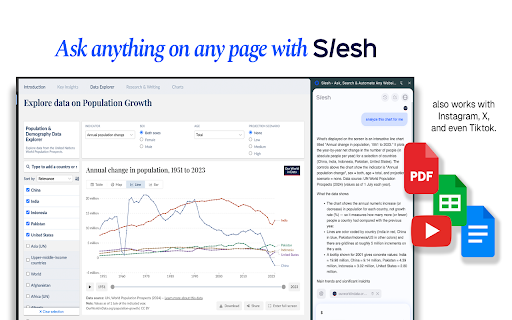


Talk to your tabs, search and navigate faster, and fully automate tasks. Trigger Slesh with Ctrl + / Slesh is an AI browser assistant that answers any questions on any page, compares tabs, and works with your apps: Google docs, sheets, slides and more. ⚡ What You Can Do with Slesh ❓ Ask any page, pdf, videos anything—Slesh reads and understands visuals, searches the internet for more sources, and answers in real time. 🔁 Copilot Mode - Tell slesh to take control of your browser and have it do tasks for you ⚙️ Ask Slesh to edit or scrape any content and export to apps like Gdocs, Gsheets and more ✍️ Get writing help, feedback, or problem-solving on Docs, Sheets, Slides, Canva, and more 📄 Summarize PDFs directly in your browser, no downloads needed 🎬 Get instant TL;DRs of YouTube videos, Shorts, and Reels 🧠 Compare tabs and recall content — ask Slesh to remember and compare what you were reading 💬 Why It’s Different Slesh isn’t just a sidebar chatbot or a summarizer. It’s a real AI copilot that understands what’s on your screen — and acts on it. Whether you’re working, researching, shopping, or learning, Slesh turns every site into something you can talk to and control. ✨ Why You’ll Love Slesh - 💬 Sidebar Chat Interface – Ask questions, summarize, help , or interact with any page - ⚙️ End-to-End Automation –Effortlessly execute multi-step tasks with simple commands like "Email every person on this google sheet" - 🧠 Tab Memory & Smart Switching – Slesh remembers what’s in each tab and lets you compare, summarize, or act across them. Get instant TL;DRs of articles, videos, and complex documents - 🔍 Smart Site Navigation – Use natural language to explore Gmail, Twitter, GitHub, Amazon, and everywhere on the internet. Skip the guesswork of finding where to go. - 📎 Always-On Assistant – The sidebar stays with you as you browse, with no need to copy-paste or switch tabs 🧪 Sample Prompts - “Summarize this article” - "Make a gsheet from this page" - "Email every person on this google sheet" - “Unread emails from this week” - “What’s the main point of this video?” - "What do you think of this draft? Does this match the other page I saw?" - “Click the Apply button” - “List open PRs”

The Currency Analytics - Live News & Alerts
Crypto & finance news from The Currency Analytics in English & French. Real-time notifications for breaking news. Stay on top of the latest cryptocurrency and finance news with the official Chrome extension from The Currency Analytics. 📰 LIVE NEWS FEED Browse the latest articles from TheCurrencyAnalytics.com directly in your browser toolbar. Rich article cards with thumbnails, categories, and author info. Instant full-text search lets you find what matters. 🌍 BILINGUAL — ENGLISH & FRENCH Switch between English and French with one click. Each language pulls from its own dedicated RSS feed, with a fully translated interface. • English: thecurrencyanalytics.com/feed • French: fr.thecurrencyanalytics.com/feed 🔔 REAL-TIME PUSH NOTIFICATIONS Never miss breaking news. Get instant push notifications when new articles are published in your chosen language. Click any notification to read the full article on our website. Configurable check interval: 1, 5, 15, or 30 minutes. 🎨 BEAUTIFUL DESIGN • Light, Dark, and Auto themes • Unread article indicators • Auto-generated category filters • Staggered animations and smooth transitions • Brand-consistent blue accent color 🔒 PRIVACY-FIRST No personal data collected. No browsing history accessed. All preferences stored locally on your device. See our full privacy policy for details. ⚙️ FEATURES • Live RSS feed reader (English + French) • Push notifications for new articles • Full-text search across all articles • Category filtering • Light / Dark / Auto theme • Configurable refresh interval • Unread article tracking • One-click access to full articles Built by The Currency Analytics — your trusted source for cryptocurrency and financial news. Website: https://thecurrencyanalytics.com

TondiKey – Web3 Wallet
An independent self-custody wallet supporting the Tondi ecosystem This extension is an independent third-party wallet and is NOT affiliated with, endorsed by, or produced by the Tondi blockchain, the Tondi Foundation, or any official organization.

Action Model
Train and automate browser interactions with optimized performance powered by Action Model The Action Model Extension allows you to contribute to the next evolution of artificial intelligence: Large Action Models. These AI systems don’t just generate text, they learn to act on your computer just like humans do. By simply using your browser as you normally would, you’re helping train AI models that can understand how real people complete real-world tasks online, earning you rewards and a piece of the AI future. You can also use the extension to record your own workflows, for example, how you upload documents, check analytics, manage emails, or fill out forms. These recordings become personal AI agents that can repeat those tasks for you automatically in the future. It’s like training an assistant that does your browser work, step by step, exactly the way you would. Your participation helps build The Large Action Model, which can automate workflows and adapt to any environment, all by learning from actual human interaction patterns. The extension runs quietly in the background, training on anonymized action data to build the Action Model. Together, we’re teaching AI how to use the internet. Don't miss out on the future of AI. Train it, earn it, own it. Your privacy matters. Read the full policy at https://actionmodel.com/chrome-privacy

Namso Validator
Powering the trustless modular compute engine. Power the decentralized network by contributing your machine's idle computing power. Validator v1.1.8 is a lightweight browser extension that transforms your device into a compute validator and task relayer. It runs quietly in the background, using only spare bandwidth and processing power—so it won’t affect your everyday use. By participating, you help power the network and will soon earn incentives based on your contribution. It’s a simple way to make use of idle resources while supporting something bigger. Get started today. Power the network. Earn while you idle. We’re currently in beta. More features and updates are on the way.
