
ijiknjbcnaiibhoadoamiofcmplokhln
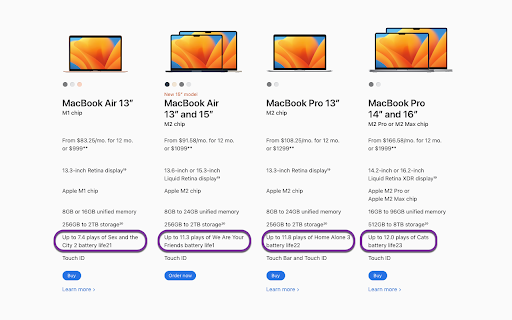

Inspired by The Worst Idea of All Time Podcast, this extensions converts the battery life of products for sale on Apple's website to their equivalent in movie runtimes. The movies selected are from The Worst Idea of All Time canon, in order to give fans context for how just how much time is spent on this silly little podcast. Inspiration came directly from this episode of the podcast: https://shows.acast.com/worstideaofalltime/episodes/08-battery-life

Energy Saver
Optimize resource usage to save battery and reduce energy consumption. Updated Google Web Store Description for v1.4 Energy Saver is your all-in-one tool for automated tab management, resource optimization, and battery conservation. Version 1.4 introduces Smart Sleep Mode and a refreshed UI for better control over your browser's performance. 🔥 What’s New in v1.4? Automatically sleeps inactive tabs when CPU or memory usage is high. User-defined performance thresholds for better control. Works in the background to optimize browsing efficiency. Get notified when high resource usage is detected. Option to enable/disable Smart Sleep directly from the popup. Smoother interface with animated toggle switches for better usability. Tooltips added for easier feature explanation. Refined layout & spacing for a cleaner look. ✅ Manual & Auto Tab Sleep – Reduce memory & CPU usage by putting inactive tabs to sleep. ✅ Battery-Aware Mode – Automatically manage tabs when battery is running low. ✅ Smart Sleep Mode – Intelligent tab sleep management based on system performance. ✅ Media Optimization – Auto-pause/mute media in background tabs to save power. ✅ Whitelist – Keep selected websites active while managing inactive ones. ✅ Performance Alerts – Stay informed when Smart Sleep is triggered. ✅ User-Friendly UI – Quick access to all features with a sleek design. 🔸 Dark Mode & Custom Themes for a personalized browsing experience. 🔸 Detailed Performance Dashboard to track CPU, memory, and battery usage over time. 🔸 More UI Customization Options including font adjustments and layouts. Take control of your browser with Energy Saver, the smarter way to save battery, reduce CPU load, and improve browsing speed!

Battery Percentage
Displays the battery percentage in digital form on the toolbar or its own floating window, and sends smart notifications. This extension gives you a clear and simple way to monitor the remaining battery percentage on your laptop, with powerful features to keep you informed, including visual notifications and audio alarms. Powerful Alarms: Click the percentage inside the floating window to access the settings panel. Here, you can configure detailed alarms to notify you at specific battery levels, whether your device is charging or discharging. Customizable Notifications: Choose from several built-in sounds for your alarms to ensure you never miss an important battery event. The extension comes with smart defaults to get you started: an alarm at 88% while charging and at 22% while discharging. Live Toolbar Icon: The extension icon dynamically draws your current battery percentage, updating every minute. The icon's colors automatically adapt to your browser's light or dark theme. Floating Window: Click the toolbar icon to open a compact, standalone window with the battery percentage in a large, easy-to-read font. Because it's a true window, it stays open so you can keep an eye on your battery while you work. Clicking the icon also instantly refreshes the battery level. Full Dark Mode: A dedicated dark mode is available for both the main display and the settings window for comfortable viewing in any lighting. Your preference is saved and applied instantly across both windows.

Battery Charging Change Notifier
Get notified when your battery stop or start charging. Useful when your charger is not working properly or accidentally disconnects. Battery Charging Change Notifier alerts you when your device stops or starts charging. Never miss when your laptop suddenly stops charging due to: • Loose charging cables • Faulty power adapters • Unreliable charging ports • Power outages Features: • Shows a persistent notification when charging stops (stays until dismissed or charging resumes) • Shows a temporary notification when charging resumes • Displays current battery percentage with each notification • Respects your privacy - no data collection, no external servers • Cross-Platform Support: Verified on macOS, Linux, Windows 10, and Windows 11 (the required OS system settings for notifications might differ) The extension runs silently in the background with minimal resource usage. Supported browsers: Chrome, Edge and Opera (any browser that supports the Battery API) Not supported browsers: Brave, Firefox, Safari (these browsers don't support the Battery API) IMPORTANT: Ensure you have set the required permissions to display notifications for your browser of choice in your system settings: • MacOS: System Settings > Notifications > Enable notifications for your Browser AND for your Browser Helper (Alerts) • Windows 11: Settings > System > Notifications > Enable Notifications (Get notifications from apps and other senders) AND enable it for your Browser • Windows 10: Settings > System > Notifications & actions > Enable Notifications (Get notifications from apps and other senders) enable it for your Browser • Linux: Settings > Notifications > App Notifications > Enable for your Browser

Advanced Dark Mode
Intelligent dark mode manager with customizable settings Transform your browsing experience with Advanced Dark Mode, the ultimate tool for a more comfortable, visually appealing, and less straining web experience. Whether you're working late into the night or just prefer a darker interface, this extension ensures every website you visit is enveloped in the perfect dark theme. Key Features: Automatic Dark Mode: Enjoy seamless dark mode on every website you visit—no more switching themes manually. Customizable Settings: Adjust the brightness, contrast, and saturation levels to perfectly match your preferences. You can even apply different dark themes to different websites! Advanced Theme Options: Fine-tune colors, fonts, and page elements for a completely personalized experience. Night Mode Scheduler: Set automatic "light" and "dark" modes based on the time of day, so you can browse effortlessly whether it’s day or night. Smart Detection: The extension adapts to your system’s dark mode settings and automatically switches when needed. Whitelisting: Customize which sites should not use dark mode—ideal for sites where dark mode doesn’t look great or isn’t supported well. Minimalist Design: Experience a sleek, simple interface that doesn't distract from your browsing. Why Choose Advanced Dark Mode? Save Your Eyes: Reduce eye strain, especially when browsing in low light or at night. Battery Saver: On OLED screens, dark mode helps save battery life by using less power. Optimized for All Websites: Unlike other dark mode extensions, ours intelligently adjusts content, layouts, and colors for the best dark mode experience—no matter what site you're on. Free & Easy to Use: Install and get started with just one click—no hassle, no complex settings. Switch to Advanced Dark Mode today, and give your eyes the comfort they deserve while browsing the web!
