
iiohcmbpekhjmfkbhakbgibgjepldlmb
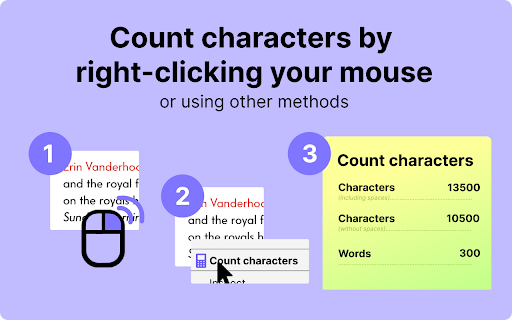
Character counter, Twitter character counter. Operates by right-clicking your mouse. Suitable for counting characters in Excel. This instrument is of great help when you need to identify the number of symbols and/or words with or without spaces in your text. The text itself can be any size because there is an option to scroll its checked part down if necessary. You can use our app to pursue different goals. It will be very helpful in the working sphere, or educational area, or even for creative activity. Feel free to use it as a means to count characters to reach your target 🔥. 🤔 What exactly is the character counter? * This online program is an online extension that provides immediate results of word character count for any given or selected text, and is available for free. It includes the opportunity to get the total sum of symbols and words, the amount of symbols without spaces, the number of white spaces, and total words (learn how to count characters in word below). * This is a straightforward tool for calculating the number of symbols in your text. It provides a rough estimate of the words and characters present on a webpage. This character counter operates online, which is very convenient. And in so doing, it is not important how many symbols your text contains. You do not have to download or save anything on your computer to make a word character count or to perform counting characters in excel. ❓ What are top eight reasons to download our extension? 1️⃣ To use this program, it is enough just to open a tab with it! Resort to it as a means of character count to prevent wasting your time and effort. 🔥 2️⃣ This extension has a very simple and user-friendly interface. With our app, it does not matter if you are an advanced user or not. You will master it as a way of character count in word or excel count characters in cell without any difficulties. 3️⃣ As with all of our extensions, magic happens in one click. To count excel characters or to character count in word, you do not need to put much effort. The program provides you only with the necessary functions, saving your time. This extension operates by right-clicking your mouse so you even will not have to resort to the help of your keyboard🔥 4️⃣ The extension calculates the sum of symbols and words by choosing the text from the context menu (right-click). Our tool can cope with this task in a blink of an eye! 5️⃣ With this user-friendly and efficient online-program, it is easy to quickly make a character count or check the exact number of words in a text without interrupting your workflow. Whether you're writing a short essay or a long report, this tool can help ensure you're meeting your word or symbol requirements. 6️⃣ You have the opportunity to use our app to monitor the amount of signs in a given text. It can serve different purposes such as count excel characters or keeping track of the amount of symbols, or even character count in word 🔥 7️⃣ The extension can also work flawlessly as a tool of twitter character counter! To learn how to count characters in word in this social network, use an option for calculating the sum of signs and wоrds. By clicking this option, the tool will instantly calculate and display the total number of symbols in your selected text. This can be particularly useful for writers, students, and professionals who need to keep track of their word character count for assignments, articles, reports, and more. It is just the time you started incorporating our extension in your work and studies 🕛 8️⃣ The last, but not the least, is that this extension allows you to implement the discussed tool for the Internet space. You do not need to download or save anything on your computer because it functions perfectly as an online character counter. 🔥 9️⃣ All these features allow users to instantly receive results or feedback based on the text they have selected. Сharacter counter saves time and increases efficiency as users do not have to manually search or cross-reference information. It is especially useful for researchers, students, writers, or anyone who works extensively with text. The immediate results feature is ensured by a character counter online. It enhances the user experience by providing instant access to information, making the task at hand more streamlined and manageable. Use these characters counter to achieve all of your goals. 🔥 ❓ How can you get the exact number of signs through counting characters in excel? You have an unlimited access to the function of excel count characters in cell. To calculate the number of symbols in Excel, you can use our extension without any problem. Here are the steps to follow: # open your Excel spreadsheet and find the words/text the symbols of which you need to keep track of. # Before calculating, don’t forget that our character counter works online so there is no need to launch or download anything. # Click on the cell that contains the text you want to count characters for. Right-click on the selected part and choose the option for monitoring the amount of signs provided by character counter. # Or start the extension and copy-paste the highlighted text into the special box. It will work as a characters counter automatically. # The number that appears in the cell where you entered the formula is the number of signs in the specified cell. You see now that our character counter online is a really user-friendly tool to use to count excel characters! Resort to our character counter to facilitate the learning and working process 🔥 Use it for counting characters in excel without any hesitation! ❓ How is it possible to apply our extension for getting the amount of signs in Twitter? 👍 The answer to this question is actually not difficult. It’s not a problem to use our extension as a twitter character counter. 👍 The only limitation is that you can calculate no more than 280 symbols. It includes spaces, punctuation, emojis, and URLs. But you are still able to do it on the Internet—our online character counter will do the job for you! 👍 Reach out to us if you need to ask anything about our extension, propose ideas or request additional features, don't hesitate to let us know via the Feedback button in the extension's pop-up menu. Alternatively, you can email us. Your input is greatly appreciated!

Word Counter
Count words and characters in selected text with a single click. Just right-click on any text to analyze it! Word Counter: The fastest way to count words and characters in any selected text on the web. No copying, no pasting, just select and count instantly. ✓ INSTANT COUNTS: Get word count, character count (with or without spaces), sentence count, and paragraph count in one click ✓ WORKS EVERYWHERE: Count text on any website, email, document, or social media platform ✓ MULTIPLE DISPLAY OPTIONS: Choose between in page popup (default), system notification, browser alert, or optional floating counter ✓ FLOATING COUNTER (OPTIONAL): Enable the floating counter in settings to see real time word count as you select text, no right click needed ✓ ACCURATE COUNTING: Advanced sentence detection handles abbreviations, ellipsis, and headings, matches popular word counter tools ✓ ZERO LIMITATIONS: Count text of any length with no restrictions ✓ PRIVACY FOCUSED: All counting happens locally, no data is ever transmitted Perfect for writers monitoring word limits, students working on essays, content creators optimizing SEO, professionals drafting emails, and anyone who needs quick text analysis. Two ways to use: • Right click on selected text and choose "Word Counter" for instant results • Enable floating counter in settings for automatic counting as you select text (requires page refresh) Simple, fast, and essential for anyone working with text online.

Character Count Tool
Calculate how many words and characters are on a page. Simply highlight the text, right click, and click the Character Count icon! Want to do a quick word character count/character count for an essay you're writing/article you're reading? You can do so now by using the context menu. Simply highlight the text you want to count characters/words for and right click => Choose our extension from the context menu and it'll help you count the number of words you highlighted. Another way you can use our extension is by clicking on our extension icon => paste in the text you want to do a word count/character count for. Try using this free character count tool/word count tool today and let us know if you have any questions. Ensure you hit the word limits/essay assignment lengths by using our tool before you submit in your essays/homework to your teachers.

Word counter - character count
Word Counter - Character Count helps track metrics. Use this word count checker and sentence counter for quick, accurate results. The Word Counter - character count Chrome extension is the ultimate solution for writers, editors, and anyone who needs to keep track of text metrics. Whether you're working on an essay, a blog post, or a tweet, this powerful resource makes it easy to track important data like word count, character count, sentence, paragraph, and spaces — all in real-time. 🔍 How It Works: 1️⃣ Visit any webpage 2️⃣ Highlight what you need 3️⃣ Click on the icon 4️⃣ See the result! ❗️Or just paste in ready text or type directly into the pop-up. One of the key features is the character count tool, which allows users to monitor the length of their text easily. You can also check how your text will appear on different platforms, ensuring that you don't exceed the limits for social media posts, essays, or other writing formats. 📌Features: 👉 User-Friendly: With just one click, this service is ready to go! 👉 Flexible Options: Highlight any text on a site, paste in pre-written content, or work directly in the pop-up to quickly count words. 👉 Instant Analysis: Get results instantly while keeping all your data 100% private. 📦 How to Install: ▶ Click the "Add to Chrome" button on the right side of your browser window. ▶ A pop-up will appear. Click "Add Extension" to confirm and complete the installation. ▶ Once installed, you'll find it in your Chrome toolbar. ▶ Pin the feature for quick and easy access. 🎉 That's it! The installation is complete, and you're ready to start using the service! ✨ This platform offers a simple and effective way to check word count. Whether you’re drafting a short email or a lengthy article, just paste your text or highlight it on a website, click the icon, and instantly see the tally in the pop-up. This is ideal for: 📹 bloggers, 📚 students, 💼 SEO specialists, SMM managers, copywriters, writers, and other professionals. Here are some ways the service can be used: 1️⃣ Track characters 2️⃣ Easily monitor the number of words counter 3️⃣ For social media posts 4️⃣ Count highlighted characters word accurately 🚀 This Chrome-based resource is a powerful assistant for anyone who regularly works with text. Whether you're a writer, student, editor, or SEO specialist, it helps you track essential metrics like word count, character count, sentences, paragraphs, and even spaces. This ensures that your content meets specific requirements, helping you deliver polished and professional work. 🧮One key feature is its ability to count the characters in this text alongside words, sentences, and paragraphs. This versatility makes it perfect for tasks like writing essays, reports, or preparing social media content. For instance, the twitter character counter is essential when creating posts with strict limits. You can also highlight specific sections for analysis, giving you greater control over your work. 📝 Writers will appreciate the ability to monitor word and sentence limits for essays, articles, or stories. Knowing how much text you've written helps you check word count guidelines for assignments or submissions. This simplifies the writing process and ensures you don’t exceed or fall short of the required length. 📈For SEO professionals, this assistant is invaluable. Counting words, characters, and paragraphs is crucial for optimizing content for search engines. Accurate metrics help manage keyword density and improve rankings. Whether you're creating blog posts or landing pages, this assistant ensures your content is structured and optimized. 📚Students benefit from the ability to track precise metrics for school assignments. Whether writing a research paper, thesis, or short essay, the essay word counter keeps you on track with your writing goals. With real-time data on the number of words counter, you can confidently meet assignment requirements without worrying about length. This feature ensures your assignment meets specified guidelines. One major advantage is its privacy-focused design. All data remains private, with no information shared or stored on external servers. Everything happens within your browser, maintaining security and protecting sensitive documents. 🤝 The interface is user-friendly, making it accessible for anyone. It has a simple, intuitive design, ensuring users of all skill levels can get quick and accurate results. This makes it ideal for those who need an efficient way to get text metrics without a steep learning curve. 🎯 Flexibility is another strong feature. You can easily check the length of an entire document or focus on specific sections by highlighting text. This flexibility is especially useful for long documents or when editing smaller portions of a larger project. The ability to count highlighted characters word gives you more control over your content, providing detailed data that allows for more effective editing. 🐦 For social media users, particularly those on Twitter, tracking character limits is essential. This service provides quick and accurate twitter character counter, ensuring your posts meet platform requirements without any last-minute adjustments. It saves time for anyone managing social media content. Professionals across industries will find this resource helpful for improving content planning and structure. Whether you're drafting a business report, creating marketing copy, or preparing presentations, having accurate count characters is crucial. It allows for better organization and adherence to required standards without manual counting. The letter counter feature is incredibly useful for anyone needing to monitor the precise length of their text. Keeping track of your letter count ensures that you maintain accuracy and consistency throughout your writing, making it easier to meet specific requirements. 🎨 Content creators, digital marketers, and copywriters will find this platform indispensable for streamlining their workflow. Offering precise metrics for different sections of text, it helps maintain consistency, improves readability, and ensures compliance with SEO guidelines. In collaborative projects, this service provides a reliable way to ensure content length consistency across contributions. Whether working on a group report or digital campaign, having access to accurate text metrics keeps projects on track and organized. ⭐️ In conclusion, The Word Counter - character count Chrome extension offers a comprehensive set of features for anyone working with text. It counts words, characters, sentences, paragraphs, and spaces, providing accurate results to enhance productivity and improve content quality. Its flexibility, privacy features, and ease of use make it an indispensable assistant for writers, students, professionals, and SEO experts alike.

Clicker Counter
The digital clicker counter app for counting people, votes, and other items. It replaces the hand tally counter and tally marks. 💡 The Clicker Counter offers a fast, reliable way to keep track of anything—from 👭 people at events to ☕ coffee cups throughout the day. 1️⃣ Super easy to use – Clean, clutter-free design that anyone can use 2️⃣ Unlimited Counters – Create as many multi click counter items as you need 3️⃣ Counts Up and Down – Set your ⬇️ count down clicker or regular ⬆️ count up counter 4️⃣ Custom Names – Easily rename each counter to stay organized 5️⃣ Works Offline – Use the clicker counter app anytime, even without Internet - Easily track the number of people entering or leaving with a reliable person counter clicker. - Keep precise counts of stock or items using the number counter clicker. - Monitor completed tasks or steps in a process with a simple manual counter clicker. - Quickly record the presence of students or pupils with the clicker to count attendance. - Monitor habits, tasks, or scores using the versatile digital clicker counter. - The tally counter replaces tedious tally marks for quicker and easier counting. • Easy to use for everyone with flexible single or multi click counters. • Runs in Chrome with a simple interface for offline or online use. • Replaces the traditional hand clicker counter with smarter, more advanced features. • Your data stays private and secure, and we continually improve the counting app based on user feedback. • The digital counter is a trusted choice for hassle-free counting! 💖 1. Click Add to Chrome to install the 'Clicker Counter' to your browser. 2. Click the Extensions icon (🧩 puzzle piece) in the top right of Chrome and pin the button clicker counter to your toolbar. 3. Click the counter button anytime you want to count days, clicks, people, items, or anything else in seconds. 📌 Do I need to sign up to use the app? 🔹 No sign-up, no account, no hassle! 🤩 🥳 🎉 📌 Can I track multiple things at the same time? 🔹 Yes, that’s one of the extension’s biggest strengths! 🔹 Use the multi-section layout to manage separate count fields for people, objects, or tasks. 📌 Can I reset my counters? 🔹 Absolutely! You can reset any individual click count, or choose to reset all your counters at once. 📌 Can I reorder my counters? 🔹 Yes! You can easily reorder your multiple clicker counter items by dragging and dropping them. 📌 Will my data be saved if I close the browser? 🔹 Yes. All your digital counter records are automatically saved. 📌 Can I use this extension across several devices? 🔹 Yes! Data syncs across all devices when using the same Chrome account. 📌 Can the number counter clicker count fractional numbers? 🔹 No. The number counter works with whole numbers only. 📌 Is there a dark mode available? 🔹 Yes! It is perfect for low-light environments or users who prefer a darker interface. 📌 How is my privacy protected? 🔹 The Clicker Counter does not collect or sell your data! 🔹 All your counts and information stay private and stored locally in your browser. We’re here to help! If you encounter any issues or have suggestions to improve the clicker counter, don’t hesitate to reach out. Simply send your questions, problems, or ideas to the email address listed on the extension page below. Together, we can make this a powerful click counter Chrome extension for all your tracking needs! 🙏🏻 We’re working hard to bring you exciting new features that will enhance your counting experience: ➤ Backup and restore your data easily ➤ Customize sounds to get the perfect click feedback ➤ Choose from a variety of themes to match your style and mood ➤ Receive notifications when you reach your counting goals ➤ Track the history of your counts to review changes over time More features coming soon, developed based on valuable user feedback to make counting easier and more efficient. 🔔 Stay tuned for these updates — there’s even more great stuff on the way! If you find this clicker counter helpful, a quick thank you goes a long way! We’d really appreciate it if you could take a moment to leave a review and set a 5-star rating on the Chrome Web Store. 🎗️ Your support helps us keep improving and deliver an even better counting experience to everyone. 🥰 Thank you for counting with us! 🥰
