
iijpnnohhobldpgjipljmpkachcenmcl
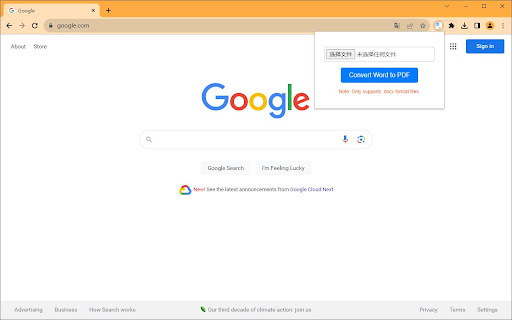
Convert your .docx documents to PDF quickly and easily within your browser. Introducing "Word to PDF Converter / Convert docx to PDF", the Chrome extension that simplifies the process of converting Word documents to PDF. No more need for third-party software! This extension enables you to convert .docx files to PDF in just a few clicks. Perfect for professionals and students who need a fast and efficient way to convert documents. Note: This extension only supports .docx format files.

DOCX to PDF Converter
In case you don’t know how to convert DOCX to PDF use DOCX to PDF Converter to convert MS Word documents to PDF online. Enhance your daily productivity with a powerful docx to pdf converter designed for fast, secure, and seamless file processing. This Chrome extension makes it easier than ever to convert docx to pdf without installing extra software or dealing with complicated tools. With a clean interface and optimized workflow, it solves the challenge of how to convert docx to pdf in just a few clicks. 🙂 This tool is ideal for students, office workers, freelancers, and anyone who frequently handles word document tasks. Whether you are preparing official reports, sending resumes, or sharing formatted forms, the extension ensures every word doc you upload looks exactly the same after you convert to pdf. Our ms word docx to pdf converter provides instant results. No delays, no watermarks, no limits. It acts as your personal word online assistant, especially when you need fast results while browsing, editing, or working remotely. With the docx to pdf converter online functionality, your files remain accessible anytime and anywhere. If you often wonder how can I convert docx to pdf without opening Microsoft Word, this extension is your ideal solution. It works directly in your browser and uses advanced rendering technology to maintain fonts, layouts, tables, headers, and all essential document elements. Key advantages include: 1️⃣ Lightning-fast processing 2️⃣ Cloud-based document transformation 3️⃣ Perfect formatting accuracy 4️⃣ One-click workflow 5️⃣ Compatibility with all modern browsers The extension also helps you understand how to convert docx to pdf step by step. Simply open your word doc, upload it, then press convert to pdf. That’s it. No email registration required, no sign-ins, and no technical knowledge needed. Thanks to professional optimization, the docx to pdf converter provides outstanding reliability. Even large word document files, complex charts, or long-form reports are preserved with precision. If you need to convert it pdf repeatedly throughout the day, this tool is built to handle bulk tasks smoothly. The tool works great for online collaboration. When using word online or cloud storage platforms, you can quickly generate a PDF version and share it instantly. No need to download additional apps or switch between programs. Everything happens right inside your browser. Common reasons to use a docx to pdf converter online include: ➤ Sending formal documents ➤ Preserving formatting across devices ➤ Ensuring compatibility with all systems ➤ Protecting file integrity ➤ Minimizing editing or distortion issues For anyone still asking how can i convert docx to pdf reliably, this extension provides a clear solution. It is built to understand modern workflow needs, where speed, accuracy, and convenience matter. Whether you're dealing with a single word document or managing daily conversions, the performance remains exceptional. Typical use cases: ▸ Transforming homework assignments ▸ Preparing business proposals ▸ Converting resumes before emailing ▸ Saving contracts in a secure format ▸ Creating final deliverables for clients When you convert docx to pdf, you ensure universal readability. This tool makes the process effortless and immediate. You can process multiple word doc files throughout your day and convert to pdf as needed, without interruptions. Businesses also benefit from the ms word docx to pdf converter because it helps maintain document consistency across departments. It eliminates formatting errors and ensures every document appears professional when viewed on any device. If you're searching online for how to convert docx to pdf using the simplest workflow, this extension offers a direct and intuitive solution. Upload your document, hit the button, and your new PDF is ready in seconds. It’s that straightforward. Give yourself the advantage of a fast, dependable docx to pdf converter that supports your daily productivity. Whether you use word online, offline tools, or cloud services, this converter helps you work smarter, not harder. 🚀 Experience seamless conversion today and make every word document look perfect in its final PDF format.

Quick Image Saving via CSS Selector
This Chrome extension is designed to facilitate the quick and efficient saving of images from web pages using CSS selectors. Quick Image Saving via CSS Selector Streamline your image-saving process directly in Chrome. Ideal for professionals, developers, and hobbyists who work with large numbers of images, this official Chrome Extension simplifies the way you collect and manage visual assets from any web page. 🖼️ Multiple Image Management Download many images at once — great for creative projects, development tasks, or research. 📦 Bulk Download in ZIP Format Save all selected images in a single ZIP archive for better organization. 🧩 Customizable Order & Naming Choose how images are ordered (top-to-bottom or raw order) and keep their original filenames. 🧠 Smart Regex Pattern Cleaner Remove size suffixes like -1024x683 from filenames automatically using regex — perfect for accessing full-size images. 📊 Real-Time Progress Bar & Reset Stay informed with clear download status and a reset option if something goes wrong. 📂 History Management Reuse your recent selectors and remove old entries with one click. 👌 User-Friendly Interface Simple, fast, and intuitive — designed to make your workflow smoother. ⚡ Quick Installation Add the extension in seconds and start saving smarter immediately. 🔐 Trusted & Secure This is the official version of our Chrome Extension. Be cautious of imitations or similarly named tools — unofficial versions may pose security risks. ⚠️ Image Usage Notice Some images you retrieve may be subject to copyright. Always check licensing and usage rights before using images from websites. This extension does not bypass image protections. ✅ Get Started Today Enjoy a faster, smarter way to manage your visual content. 📍 Visit our website devraiks.com 🛠️ Extension by DevRaiks © 2025 – All Rights Reserved

Anti FeR toolkit
Adds features and extensions for the bushtarion web game (formerly Canola toolkit formerly Antisback's bushtarion toolkit) This adds some functionality to the Canola toolkit, which it is forked from. Fixes the regex for Company name matching (no more oddities with names that include '@', '~', or '^'), adds information about who someone has attacked, includes stealth mobs in the activity chart, and maybe more! 1.2.22 Changes: Defaults for options set to "on" 1.2.21 Changes: Additional options for the military page and supply depot 1.2.18 Changes: Includes an options page, navigate by right-clicking the icon and selecting "Options" 1.2.13 Changes: Displays development information for technologies unlocked for a given dev/construction Shows troop count on a hack Shows a horribly formatted estimate on the flak needed to land on a target given the visible units Display information about what you are 30% and 70% of in the score breakdown overlay Show gov defense in spy report incoming (but doesn't account for when it recalls) 1.2.12 Changes: Fixes seed/income calculation Adds a button to hack from the search page in a new tab Spy report incoming/outgoing is now sorted by ETA Spy report incoming/outgoing displays original mob ETA Adds an input so that dynamic AR calculation can be done from the spy report 1.2.11 Changes: Attacks on an HQ don't show a huge number for ETA Stealth mobs sent now default to ETA 5 sent New "Plant Max" feature calculates how many seeds you are able to plant given how many gards you have home. Updates grass seed bonus in Spring 1.2.10 Changes: Fixes single person mobs not showing up on spy reports Fixes HQ incoming/outgoing not showing HQ outgoing mobs stay in the outgoing screen "until recalled", which I don't know when it is recalled so take the info as an alert more than a reality Alerts if the user does not have enough harvesters to cover the max needed (in total, not at home) 1.2.9 Changes: Reverting mob notes and loving on Alci 1.2.8 Changes: Makes mob notes on alliance incoming screen more interesting for some :) 1.2.7 Changes: Fixes score evaluation for players with public ID's Fixes military mob calculations for "all" Income calculator now reasonably accounts for exponential seed loss and nighttime seed penalty Search results include a "Total" row for acres and score 1.2.6 Changes: Fixed spy report when spying a member of your own alliance Finished searching by Public Name Added full Hack output to console debugger when hacking from Alliance incoming page Added troop cost calculation on Military page 1.2.5 Changes: Fixes score calc for insurance that is "claimable early" Alliance incoming "Defend" and "Retaliate" links are now buttons Added "Hack" button on alliance incoming to make a best guess at route and fill out incoming notes Added "Recall" button on alliance incoming to recall from alliance page 1.2.4 Changes: Add Land Fat percentage to search results Fix Alliance page incomings when AHQ! is targeted Add Unit Stats quick link in side panel Add ID list generation with search results (in console debugger output) Add "Has Attacked" information on news page 1.2.3 Changes: Alerting when the user has uncultivated acres Maintenance page additionally displays the seeds you can grow with troops home Alliance page has quick links to setup defensive or offensive mobs from the incoming screen

InfoSE
Quickly access relevant information for selected word Introducing "InfoSE," the ultimate extension for lightning-fast access to relevant information right at your fingertips. With InfoSE, effortlessly explore top relevant results for selected word, neatly organized within accordion-style panels, each offering a concise summary for quick insights. Key Features: Effortless Access: Simply highlight any word or phrase on your browser, and InfoSE springs into action, fetching relevant information instantaneously. Accordion Interface: InfoSE presents search results in a sleek accordion format, allowing you to expand and collapse each panel effortlessly. This intuitive design enables efficient browsing without cluttering your screen. Comprehensive Summaries: Dive into succinct summaries within each accordion panel, providing essential details without overwhelming you with excessive information. Whether it's definitions, explanations, or background context, InfoSE delivers the highlights at a glance. Wikipedia Integration: Seamlessly explore Wikipedia entries directly within InfoSE. With a single click, delve into comprehensive articles, gaining in-depth understanding on your chosen topic without leaving your browsing session.
