
iidnankcocecmgpcafggbgbmkbcldmno
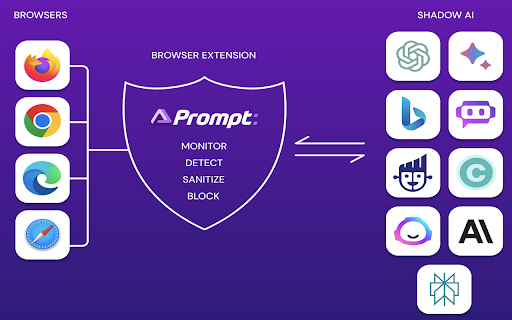
This extension will detect and optionally prevent sensitive data leakage to third party generative AI web apps.

SpinMonitor – Free Extension Security Checker
Risk Assessment for Browser Extensions Installed in Your Browser. SpinMonitor for Work detects and assesses the risk of all browser extensions, including those pushed directly to the browser, providing full visibility into the potential business, security, and compliance risks of each extension. With SpinMonitor, IT and SecOps teams have a proactive, automated solution for reducing browser extension risk. SpinMonitor audits the following key factors: - Permissions Review – Assessing the permissions that a browser extension requests, such as access to sensitive data or services, to determine if they are necessary or excessive. - Privacy and Data Security – Evaluating how an extension handles user data, whether it collects or shares it with third parties, and whether it aligns with privacy policies or regulations like GDPR or CCPA. - Malicious Behavior Detection – Identifying any potentially harmful or suspicious activities of the extension, such as injecting malicious scripts, stealing credentials, or engaging in phishing. - Compliance Check – Ensuring that browser extensions comply with organizational security policies, industry regulations, or legal standards related to data protection and cybersecurity. - Vulnerability Assessment – Analyzing the extension for any security flaws, unpatched vulnerabilities, or weak coding practices that could be exploited by attackers. - Ongoing Monitoring – Continuously tracking updates or changes in the extension's behavior, permissions, or ownership to detect new risks as they emerge over time.

Anonymous Links by Webfuse
Browse without leaving your fingerprints This extension adds a new option to your browser’s right-click menu: “Open link anonymously via Webfuse.” It also adds a quick-access button next to links on major search engines for fast, private browsing. When selected, the link is opened in a Virtual Web Session — a secure, sandboxed environment hosted on remote infrastructure. This allows you to visit websites without revealing your identity, IP address, or local browser data. Use Anonymous Links to: - Safely open unknown or untrusted links - Browse without leaving a local trace - Avoid being tracked or fingerprinted - Access content anonymously and securely

DefendMe AI - Prevent Phishing and Identity Attacks
Protect yourself, and others too... DefendMe AI – Prevent Phishing and Identity Attacks Stay safe online with DefendMe AI, the free browser extension that actively protects you from phishing while helping secure the wider internet community. Now enhanced with email registration, DefendMe AI also safeguards your identity by monitoring and alerting you of any breaches involving your registered email. Experience proactive protection against both phishing and identity theft—all in real-time. 1. Block Phishing Attacks DefendMe AI detects and blocks phishing links and malware, protecting your sensitive information from phishing attacks. Combining AI-based zero-day detection with signature-based detection, DefendMe AI prevents over 97% of phishing attempts, enhancing your browsing experience. 2. Identity Protection Register your email with just two clicks using Google SSO directly through the DefendMe AI extension. We continuously monitor the dark web for data breaches and alert you immediately if your credentials are compromised, helping you take swift action to secure your accounts. 3. Community Protection By using DefendMe AI, you’re not just protecting yourself—you’re helping defend millions of others. When a malicious website is detected, our system shares critical threat intelligence with global cybersecurity partners, making the internet a safer place for everyone. Why Download DefendMe AI? - Dual-layer Protection: Get real-time protection against phishing and identity attacks, powered by advanced AI technology and dark web monitoring. - Effortless Setup: Easy to use and free to install—DefendMe AI requires no technical expertise. Activate with just a few clicks and enjoy robust security. - Community Impact: Be a cyber hero by contributing to global online safety. Every blocked threat not only protects you but also enhances security for everyone online. Take control of your online security with DefendMe AI. Join the mission to make the internet safer for everyone. Install DefendMe AI today and start browsing with peace of mind! Learn more and get protected: https://defendme.ai/

Swift Security Extension
Swift Security's browser extension enables the safe use of artificial intelligence applications such as ChatGPT, Gemini and more. Swift Security: AI-Powered Protection for Your Browser Welcome to Swift Security, where we specialize in safeguarding your data and enhancing your organization's security in the age of artificial intelligence. Our cutting-edge browser extension is designed to secure your interactions with AI platforms like ChatGPT, Gemini, and more. Key Features: - Visibility into GenAI Usage: Gain deep insights into how generative AI is being used within your organization, with real-time monitoring and logging of sensitive data interactions. - Real-Time Data Protection: Monitor, log, and control sensitive data, ensuring that your information remains secure. - Seamless Integration: Fast, easy deployment with centralized visibility and control over AI usage across your organization. Whether you're protecting sensitive data from public AI models or securing internal AI deployments, Swift Security is your trusted partner in the digital world. Have questions or feedback? Contact us at info@swiftsecurity.ai. For more information, visit our website https://www.swiftsecurity.ai/ Thank you for choosing Swift Security, your ally in AI-powered protection.
