
iicdafbcdabnmclbmilkaoiplaalimak
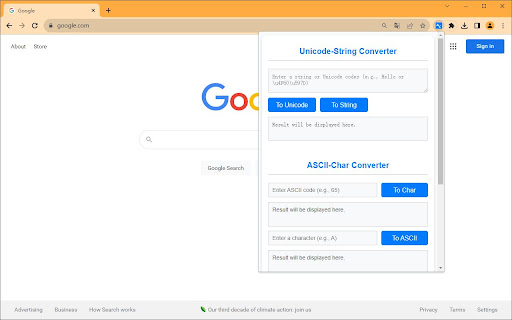


A versatile tool for converting between Unicode-strings, ASCII-characters and ASCII-strings. This extension is a robust, user-friendly tool designed for a variety of text encoding and decoding tasks. It supports three primary conversion types: • Unicode-String Converter: Convert any string into its Unicode representation and vice versa. This is particularly useful for developers working with internationalization and localization. • ASCII-Char Converter: Convert individual ASCII codes to their corresponding characters and the other way around. This is beneficial for understanding the ASCII values of specific symbols or characters. • ASCII-String Converter: Transform an entire string into its ASCII code equivalent and back. This feature is essential for data serialization and other encoding-related tasks. The extension's interface is designed for ease of use, featuring input fields, buttons, and output areas that are intuitively organized. Whether you're a seasoned developer, a student, or someone who just needs to convert text for whatever reason, this tool provides a quick, reliable way to perform these conversions.

Fontcetera - Unicode Text Formatter
Fontcetera is a browser extension that allows you to use custom fonts on any website. Transform your plain text into stylish Unicode fonts with 𝐅𝐨𝐧𝐭𝐜𝐞𝐭𝐞𝐫𝐚! This easy-to-use extension allows you to format your text with various Unicode fonts and styles, perfect for social media posts, messaging, or any platform that supports Unicode characters. 𝑲𝒆𝒚 𝑭𝒆𝒂𝒕𝒖𝒓𝒆𝒔: • Multiple font options: 𝙼𝚘𝚗𝚘𝚜𝚙𝚊𝚌𝚎, 𝔊𝔬𝔱𝔥𝔦𝔠, 𝒮𝒸𝓇𝒾𝓅𝓉... • Text styling: Bold, Italic, Underline, Strikethrough, and Overline (availability depends on the selected font) • Real-time preview of formatted text • One-click copy to clipboard • User-friendly interface Enhance your digital communication with 𝐅𝐨𝐧𝐭𝐜𝐞𝐭𝐞𝐫𝐚 and make your text stand out!

utf-8 and unicode characters
☞ utf8 characters is an extension that contains a list of cool characters ☆ ✪ ✰ to copy and paste into your messages ❀ on sites that use utf, like twitter or wordpress ☺ ✓ ➩ I ❤ ☕ with chrome in the ☔ ☺☻ Warning: only for modern Operating Systems. Approximately 80% of the characters appear in Windows 7 and 10% on Windows XP. 100% in most Linux distributions. code: http://github.com/codexico/UTF-8-Chrome-Extension Firefox Extension: https://addons.mozilla.org/firefox/addon/utf8-characters/ These are only a sample, it's really hard for the device to render so many fonts! They appear depending on the fonts installed on the system, if you want more you can try to download this fonts: BabelStone Han http://www.babelstone.co.uk/Fonts/Han.html Quivira http://www.quivira-font.com/ Deja Vu http://dejavu-fonts.org/wiki/Main_Page Unicode Fonts for Ancient Scripts http://users.teilar.gr/~g1951d/ Code2000 http://www.fontspace.com/james-kass/code2000 WAZU JAPAN's Gallery of Unicode Fonts http://www.wazu.jp/gallery/views/View_MPH2BDamase.html All about utf: The Unicode Consortium http://www.unicode.org/

UnicodePlus - Search for Unicode characters
Just search for any Unicode character either by typing it directly in the search field (Σ for example), or its codepoint (U+03A3), name (Greek Capital Letter Sigma), and HTML code (Σ | Σ | Σ). UnicodePlus will then: - Display the basic properties of Σ (name, block, version, codepoint). - Check the bidirectional data of Σ (Left to Right). - Check the character case of Σ and find its lowercase/uppercase counterpart (σ -> U+03C3).

Forced Embedded Font
Tired of inconsistent fonts across websites? iOS Style Font Switcher is a lightweight Chrome extension that lets you force all websites to use a single clean, embedded font—with a modern and elegant iOS-inspired toggle UI. Global font replacement – Override all website fonts using your preferred typeface Bundled with a custom Chinese font (PingFang PROSC) for consistent multilingual display Minimalist iOS-style toggle interface – Easily enable or disable the font effect Instant effect – Changes apply to all open tabs immediately Saves your preference using Chrome's sync storage No tracking, no network access – Works 100% offline By default, the extension uses a custom embedded font for both English and Chinese (WOFF2 format). You can easily replace it with any woff2 font by modifying the files. Open-source and customizable: This project is fully open-source and intended to be developer-friendly. You can customize the UI, change the font, or extend it with more features (blacklist, font selector, etc.). You can install the extension directly from the Chrome Web Store: 👉 [Install iOS Style Font Switcher](https://chrome.google.com/webstore/detail/your-extension-id-here) No setup required. Just click "Add to Chrome", pin the extension, and enjoy a cleaner, consistent font experience across the web.
