
iiaplmkgodeoepbecddedbaofeeogdhi

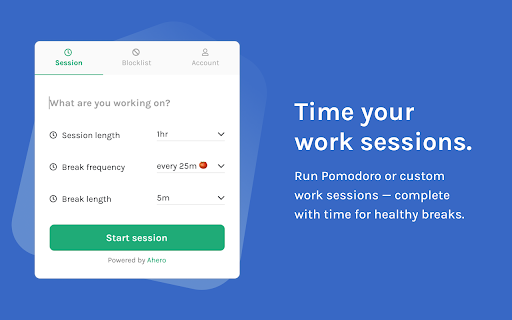
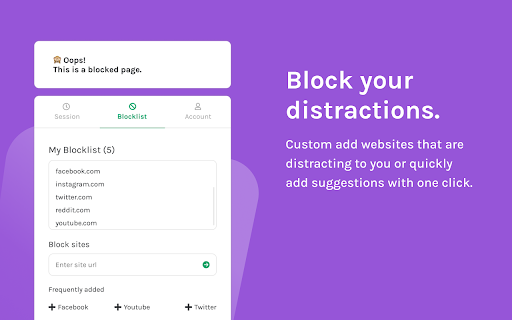
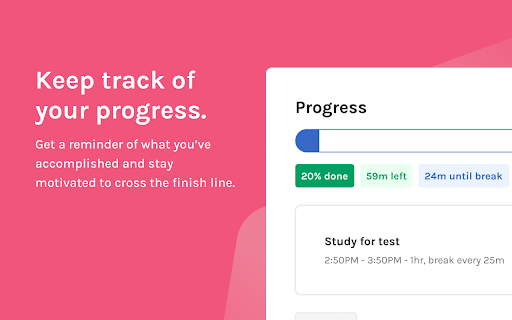
Block distracting sites and run Pomodoro sessions - as uninterrupted as possible. Digital distractions are one of our biggest beasts to tackle today. While the Internet and the computer are great sources of education, productivity, and creation, they are also great sources of distractions in which anything you could think of is just one click away. That’s why it’s essential to take preventative measures and eliminate these digital distractions during focus time. With the Mini Pomodoro Blocker, you can do just that! ✅ Runs focus sessions and Pomodoro sessions ✅ Times healthy breaks ✅ Blocks distracting sites and redirects your focus ✅ Allows for custom site entry Free vs. Pro The Mini Pomodoro Blocker is available for free with limited features. You can run unlimited sessions and block up to 3 distracting sites. The Pro version is available for an affordable $5 one-time fee. By purchasing the pro version, you’ll have the Mini Pomodoro Blocker without any limits and access to future features like metrics and tagging. Thank you so much for your time and your consideration. Have any questions or feedback? Feel free to email me at allison.thesidekickapp@gmail.com and I'll get back to you.

Focus: Pomodoro Timer, Website Blocker
Helps you be focused and productive Set a pomodoro timer and block distracting websites to help you be productive. Pomodoro Timer - Set a work time and a break time - Plays a sound when focus or break session ends - Focus and break times are configurable Website Blocker - Blocks distracting websites during your focus and/or break session - Big social media sites are blocked by default - Add custom websites to block or disable default ones

Unlimited Focus: Website Blocker & Pomodoro
Distractions delay dreams. Boost your focus for free with Unlimited Focus: Website Blocker and Pomodoro Timer Ever felt the pull of endless distractions while trying to focus? Dive into a world of productivity with Unlimited Focus! Wave goodbye to unwanted websites and harness the power of the Pomodoro technique. Your limitless concentration journey starts here! Features: • Start right away with our predefined blocklist • Block any website you want • Block an unlimited number of websites • Customize the block duration • Use our pomodoro timer to fully focus during your study sessions • Fully customizable durations and unlimited sessions

New Tab: Pomodoro Timer & Site Blocker for Chrome
Optimize your New Tab Page with a Focus Timer and Site Blocker for Chrome. Manage your todo list and stay productive every day. Stop losing hours to mindless browsing and fragmented focus. Ashdeck is designed to help you stay focused by blocking distracting websites & apps using a Pomodoro timer for structured work sessions, and tracking your progress. It transforms your new tab into a personalized productivity workspace, keeping you organized, motivated, and distraction-free. ✅ Why Choose Ashdeck? Unlike traditional productivity tools that live in separate apps, Ashdeck integrates directly into your Chrome New Tab—right where your work actually happens. Every time you open a new tab, you’re greeted with a calm, purpose-built environment designed to help you block distractions, structure your time, and move tasks forward without friction. Ashdeck combines a powerful site blocker, a Pomodoro-focus timer, task management, and science-backed soundscapes into one minimalist, privacy-focused experience. Whether you’re a tech professional, a remote worker or freelancer working from home, a student studying for exams, or a founder juggling multiple priorities, or someone with ADHD, Ashdeck helps you regain control of your attention. It provides the structure you need to stay focused and manage your todo list with ease. By transforming your browser into a personalized productivity hub, Ashdeck eliminates digital noise, reinforces healthy work rhythms, and keeps your goals visible—so focus becomes a habit, not a constant struggle. ✅ What Makes Ashdeck Different? 🔹Lives inside the Chrome New Tab instead of a separate app 🔹Combines blocking, focus, tasks, and sound in one simple workspace 🔹Minimalist, calm design with no feature overload 🔹Built specifically for browser-based work and deep focus 🔹Open source and privacy-first, with no invasive tracking ✅ Key Features for Deep Work 👉Custom New Tab: Transform your browser into a beautifully designed new tab that helps you feel calm, focused, and inspired. Ashdeck replaces distracting blank screens with a minimalist, productive workspace tailored to your workflow. 👉Strict Site Blocker for Chrome: Instantly block time-wasting websites or schedule focus sessions. Our site blocker ensures you don't stray from your work during critical hours. 👉Integrated Pomodoro Timer: Built on the Pomodoro technique, this pomodoro timer allows you to toggle between deep work and restorative breaks to prevent burnout. 👉Intelligent Todo List/ Tasks & Reminders: Align your daily tasks with your focus sessions. Track your progress in real-time and see exactly how much you've accomplished. 👉Science-Backed Soundscapes: Boost your concentration with binaural beats and ambient sounds (white noise, nature, café vibes) designed to deepen your creative flow. 👥 Who Is Ashdeck For? ➤Professionals: Create a disciplined digital workspace and improve your daily output. ➤Students: Use the site blocker for Chrome to stay away from social media while studying with a structured pomodoro timer. ➤ADHD Support: Benefit from a structured New Tab that minimizes visual noise and provides clear, timed intervals. ➤Creatives: Use the pomodoro timer and binaural audio to enter a flow state faster. 🛠️ How to Get Started: 1. Add to Chrome: Install the Ashdeck extension in seconds. Set Your New Tab: Grant permission to let Ashdeck organize your dashboard. 2. Pin the Extension – Keep Ashdeck accessible from your toolbar. 3. Define Your Limits: Activate the site blocker for Chrome for your most distracting URLs. 4. Start Your Pomodoro Timer: Choose your work interval and get to work. 5. Achieve Your Goals: Watch your productivity soar as you check off your todo list. Instead of creating yet another app that demands your attention, we asked a different question:

Pomegranate
Pomegranate started as a passion project to help me stay focused and I’m glad it’s helping others too.… Pomegranate started as a passion project to help me stay focused and I’m glad it’s helping others too. If you find it useful and want to support continued development, you help buy me a beer with a small donation: Ever find yourself typing “facebook.com” without thinking? Yeah, same. That’s where Pomegranate comes in. It’s your focus-enhancing sidekick that helps you reclaim your attention and actually get things done. At its core, Pomegranate is a website blocker with a twist. It uses the proven structure of the Pomodoro® Technique, where you focus for set periods of time and take short or long breaks in between. When willpower isn’t enough, Pomegranate adds tools like custom redirect links (send yourself to a "nails on a chalkboard" video if that helps) or Exclusive Mode, which simply blocks distracting sites without timers or fuss. Features: Website Blocker With a little honest encouragement when you slip up. Pomodoro® Timer Includes short and long break intervals and progress tracking. Redirect Mode Send blocked sites to a URL of your choice. Use it creatively or punitively. Exclusive Mode Turns off timer functionality and just blocks websites in the background. Wildcard URL Blocking Block entire domains with partial keywords. For example, typing “facebook” will block anything containing that word, not just “facebook.com”. Focus Stats See how many pomodoros and breaks you’ve completed.
