
iiamdlbonhenkdcalhfpkbhgffdmkign

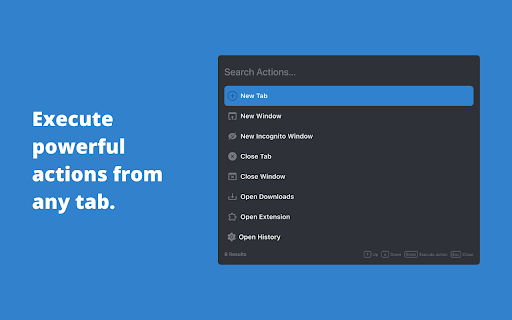
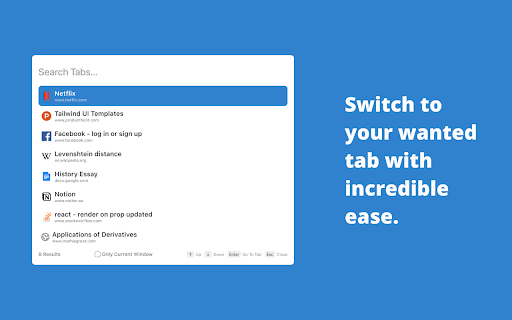
A tab manager at your service. Note: This is a beta release. The full product will be launched on in early 2023. You can now press Ctrl + Shift + H to search through your most recent history from any tab! Meet Tab Butler - your all-in-one productivity assistant designed to improve the way you use your browser. With one shortcut, you can now search through all your open tabs with ease and switch to any of them with a single key press or click. You can also perform powerful actions from any tab, allowing you to remember only one easy shortcut instead of multiple difficult ones. Tab Butler is designed to help you get the most out of your browser and increase your productivity to new levels like never before. With Tab Butler, you can transform your browsing experience for good and find what you want, when you want it. - Search and switch to your wanted tab with incredible ease - Search through you most recent history like never before - Pin, close, and mute your tabs right from any tab - Filter tabs based on certain properties (muted, pinned, playing audio) for quicker access - Perform various browser actions from any tab - Updated UI - Web Searching right from any tab - Browse your history and bookmarks from any tab - More powerful l and personalized actions And so much more! - To toggle the Tab Search Modal to search your open tabs, press Cmd + Shift + Space (Ctrl + Shift + Space on Windows and Linux). - To toggle the Tab Action Modal to execute actions, press Option + Shift + Space (Alt + Shift + K on Windows and Linux). - To toggle the Tab History Modal to search through your recent history, press Ctrl + Shift + H. - In the Tab Search Modal, type: - “\pinned” to get all the pinned tab - “\muted” to get all muted tabs - “\audible” to get all tabs getting audio If you would like to provide any feedback, report an issue, or request a feature, please feel free to leave us a review or use this form: https://forms.gle/LTXYy9XqbBYu6ZLQA Tab Butler is a proud open-source project. If you would like to contribute to Tab Butler, please head over to https://github.com/MItchellMarkGeorge/TabButler

TabTabTab - All In One Tab Manager
Supports your browsing by improving tab management. Lost in a sea of tabs? Feel overwhelmed by their sheer number? TabTabTab is here to revolutionize the way you manage tabs. Experience a seamless, organized, and efficient browsing like never before. * Comprehensive Tab Overview: View all your windows and tabs, including those grouped, in one unified list. * Flexible Drag & Drop: Organize your tabs freely - be it pinned, grouped, or standalone. * Window and Group Save & Restore: Quickly save and restore your tab groups and window sessions, ensuring a seamless continuation of your work. * Automatic Tab Grouping: Tabs are automatically organized based on domain or subdomain, making it easier to manage and navigate your tabs. * Duplicate Tab Alert: Avoid clutter with automated alerts for duplicate tabs. Effortlessly close duplicates to streamline your browsing. * Window Merge: Combine multiple browser windows into one with a single click, organizing scattered tabs into a cohesive session. * Time Tracking: Keep track of how long it's been since you last accessed a tab. * Essential Tab Operations: URL copying, pinning, grouping, and more. * Screenshot Tool: Quickly capture the active tab's visible area. * Efficient Navigation & Search: Jump to or find your desired tabs in seconds. * Automatic Cleanup: Auto-remove tabs you haven't accessed based on your preferences. * Side Panel Tab Overview: Easily access a list of your tabs through a convenient side panel. * Dark Mode: Switch to a darker, more focused look whenever you wish. The source code for TabTabTab is public on GitHub at the following link.

Tabius - Automatic Tab Grouping Assistant
An Automatic Tab Grouping Extension for Your Browser. Tabius is a customizable and easy to use Tab Grouping assistant for Chrome. It is also open source! If you use tab grouping or couldn't use it due to lack of options, Tabius is a must have extension for you. The extension is packed with useful features like: ✔️ Automatically create new tab groups when you open a link in a new tab. ✔️ Auto Collapse inactive tab groups. ✔️ Limit the browser to only create groups if the new tab matches the original tab's domain. ✔️ Create custom tab grouping rules: always create tab groups with a specific name and color from your favorite websites! ✔️ Save your favorite tab groups and restore them for later use! ✔️ Don't want to create tab groups from a specific site? Create a blacklist from the settings or add the site to the blacklist right from the toolbar! ✔️ Option to close an existing tab group when there is only 1 tab left in it. ✔️ Limit maximum number of tabs allowed in a group. ✔️ Automatically name tab groups based on domain/subdomain or the full URL. ✔️ View current tab groups and act upon them by clicking on the extension icon right from the toolbar. ✔️ Sync all your settings, tab groups, and custom lists with browser. ✔️ ..and many more features. I created this extension from my need. I use tab groups all the time and the extension helps enhance this feature. If you have any questions or feedback, feel free to email me: dev@faisalbin.com. This extension is made with ❤️ in Munich. What's new in v2.0.1 - You can now use the opener tab's title as the group name. To do so, select "Group Opener's title" from Settings>Group Naming Convention What's new in version 2.0 - Tabius has gone through a major redesign. - The extension has been rebuilt from the ground up. - You can now save your favorite tab groups for later. - Amend saved tab groups. - The popup is now more useful. - "nameless" group naming option. - Fixes scrolling issue if custom rules get too long. - Lots of bug fixes.

TabTab - Tab Management Tool
Your productivity tool, save your browser tabs anytime, anywhere. TabTab: A tab management tool Your productivity tool, save your browser tabs anytime, anywhere. A more convenient tab management tool than bookmarks. You can add tabs to your favorites by simply dragging and dropping. Supports tab group management and one-click opening of tab groups. More intuitive view, tiling your favorite tabs. Supports remote data synchronization, self-hosted data synchronization protects your privacy and security.

Tabsence: Inactive Tab Manager
Makes your Browser clutter-free by closing tabs you are not using. Say goodbye to tab overload and hello to a faster, more efficient browser! Tabsence helps you keep your browser clutter-free by automatically closing tabs after they’ve been inactive for a set period, saving both your time and system resources. Simply set a time limit—choose between minutes, hours, or days—and Tabsence will take care of the rest. By reducing the number of unused tabs running in the background, you’ll free up valuable RAM and improve your browser's performance. Custom Time Limits: Define inactivity thresholds to suit your workflow. Automatic Tab Cleanup: Let Tabsence close idle tabs, freeing up your browser. Boost Efficiency: Reduce memory usage and improve performance by closing unnecessary tabs. Simple & Minimal Design: A clean, user-friendly interface for quick setup. Reclaim your focus, save memory, and enjoy a decluttered browsing experience with Tabsence—your tabs, your rules.
