
ihpkfgphnppljkdhnjgiieicnhlkfdig

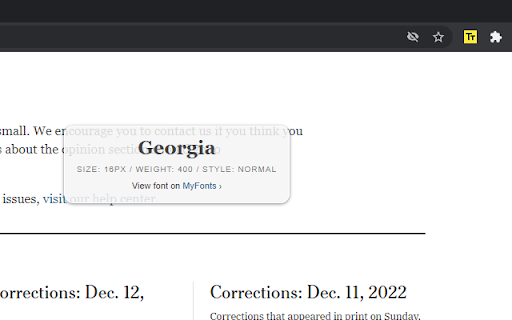
Font Finder RPO extension helps you detect/find fonts used on web pages. Features: Find fonts on a web page Find text size on a web page How to use: 1. Install "Font Finder PRO" chrome extension. 2. Open any website. 3. Open "Font Finder PRO" from "Extensions list". Find the extension's icon using the puzzle icon. 4. Click "Start" button to activate Font Finder MODE. 5. Select or click to text on a web page.

FontFinder
FontFinder is a powerful font identifier and detector for any webpage. This handy font finder tool would help you improve workflow significantly. Whether you're a designer, developer, or typography lover, FontFinder Online shows you exactly which typeface your browser displays. Have you ever wondered what the font on a site is? With this font finder, you'll quickly discover exactly what font you're looking at. To make things even easier, FontFinder includes a helpful AI assistant. It'll guide you through using the extension, help you solve any issues, and ensure you're taking full advantage of all its features. • Identify a Typeface: Click on any text to quickly recognise the typeface and view its properties. • Properties Detection: Use the font identifier to uncover family, size, weight, and style. • Change Styles: Modify the typography in selected elements to test new looks. • Copy Details: Effortlessly copy styles for your projects. • Context Menu Access: Right-click to access FontFinder online features instantly. • AI Assistant Support: Get instant help using FontFinder effectively. 🤔 Have you ever thought, "What font is this?" This tool comes with advanced recognition technology to help you find fonts easily. We have no need to guess or spend time looking for them; fontfinder serves as a reliable recognizer within your browser. And if you need step-by-step guidance, the built-in AI support is ready to help. 1️⃣ Activate the Extension: Click on the FontFinder icon in your toolbar. 2️⃣ Select Text: To recognize the styles, hover over and click on any text element. 3️⃣ View Details: A popup will appear, displaying detailed information. 4️⃣ Modify Text Styles: You can change the typography of the text by entering new options. 5️⃣ Copy Information: Use the copy function to save details for future reference. 6️⃣ Ask for Assistance: If you need it, you can seek support from the AI assistant, who will provide solutions quickly. • Web Designers: See how others design. • Developers: Debug text rendering across platforms. • Content Creators: Discover new features and enhance your work. • Typography Enthusiasts: Recognise fonts you love and add to your collection. • Marketing & Branding Teams: Use font finder and answer "What the font?" quickly. • Accessibility Experts: Use font recognition to find readable ones and comply with design standards. ➤ Minimalistic Design: font finder tool keeps typography examination distraction-free and easy to use. ➤ Mode Switch: Quickly toggle between modes to optimize visibility and comfort. ➤ Instant Font Recognition: Accurately identify typography choices with the built-in font detector. ➤ AI Assistant: Get immediate help troubleshooting issues and making the most of the font recognizer. When you need to detect or recognize typefaces, FontFinder is your ideal handy tool. It helps you understand typography so your design process is more straightforward. And if you're stuck, the AI help center will give you clear step-by-step instructions. Q1: Can I use FontFinder offline? ✅ Yes, the extension doesn't require the internet to work with pages. Q2: How do I change the design on a webpage using FontFinder? ✅ Use the "Change Fonts" feature to define a new option for the selected element. Q3: What if I have trouble using FontFinder? ✅ The AI assistant for FontFinder is here to help. Just ask for troubleshooting steps or feature explanations. • Fast & Easy: Quickly spot details — no more guessing or hunting around. • Get Things Done Faster: Instantly find issues and make your tasks easier. • Friendly AI Helper: Stuck? No worries — FontFinder's AI buddy has your back! • Lives in Your Browser: No need for extra software; it's right there when you want to identify a font. • Runs Everywhere: This useful tool just works, whether you use Windows, macOS, or Linux. 🔒 Privacy and Security: • No Data Collection: FontFinder runs entirely within your browser and never sends sensitive data to external servers. Whether asking "What's the font?" on a page or trying to discover fonts that catch your eye, FontFinder brings webpage exploration to your fingertips. And with its AI-powered assistant ready to help, you can learn how to use each feature of font recogniser effectively. 🌟 Start using FontFinder today and elevate your understanding of web typography!

Font Detector – What font is this?
Font Detector is a fast and free font finder tool that helps you identify any font on a webpage instantly. What font is used here? Whether you're a designer, developer, or just curious about typography, this lightweight Chrome extension gives you everything you need to discover, analyze, and reuse the fonts you find online — with just one click. No more guessing what the font or what type was used — simply hover, click, and instantly get detailed typography info, including font family, size, style, color, and spacing. 1. Install the extension from the Chrome Web Store 2. Click the Font Detector icon in your toolbar 3. Hover over any text or click it to see full font details 4. Copy font data with one click 5. Press ESC or click “Exit” to turn it off With Font Detector, you can: 💝 Detect fonts on hover or click — see results in a tooltip or popup instantly 🌤 Get full typography information: • Font family • Font size and line height • Weight and style (italic, bold, etc.) • Text and background color (HEX, RGB) • Letter spacing, word spacing, alignment, decoration, transformation 🗌 Copy font family data and CSS with one click 🌍 Works on any website, including pages using Google Fonts, web-safe fonts, or custom-embedded fonts 🧹 Supports live text (not images) — ideal for clean and accurate font detection 🆗 Finally answer: What font is this? – Find out what the typeface is on any web page in seconds! 🎯 Built for Designers, Developers, and Typography Lovers Whether you're building a brand, coding a frontend, or admiring a beautiful headline and wondering what font or what type was used — Font Detector helps you analyze and capture fonts quickly and effortlessly. It’s perfect for: 🎨 Web & Graphic Designers – identify and replicate fonts for consistent branding 💻 Frontend Developers – copy ready-to-use font CSS directly to your stylesheet 📈 Marketers & Creators – ensure visual consistency across all assets 👨🎓 Students & Typography Enthusiasts – learn from real-world font usage examples ⚡ Instant font detection on hover or click 🧠 Accurate font matcher powered by real-time CSS inspection 🌟 100% Free — no premium plans, no feature limits, no sign-up required 🔐 Privacy-friendly — no tracking, no data collection, no cookies 🚀 Lightweight and fast — based on Manifest V3, optimized for Chrome 🔄 Regular updates keep the tool accurate and compatible with the latest font technologies 💻 Works offline — all detection happens locally in your browser It’s that simple — no coding required. Whether you're asking "what the font is that?" or need to identify what the typeface is on a client’s site — you'll get answers instantly. Is it really free? → Yes, Font Detector is 100% free and has no premium tier. Does it work on all websites? → Yes, it can detect fonts on any page with selectable (live) text. Can I copy font CSS? → Yes! One click lets you copy font family, size, color, spacing, and more. Is it safe? → Absolutely. The extension doesn’t track or collect any personal data. Does it work offline? → Yes, font detection happens locally in your browser. 🚀 Try Font Detector Today – Your Free Font Detection Tool Font Detector is trusted by thousands of professionals who need a simple, accurate, and free way to explore and copy font styles from across the web. Whether you're working on a website, brand guide, or just wondering what font is this, this tool saves you time and helps you make better design decisions. 👉 Install Font Detector now — the best free font finder for Chrome!

Font Snatcher
Identify and inspect fonts on any website. Ever visited a web page and wondered what font was being used to design it? Fontsnatcher is a lightweight browser extension that allows you to find out what font is being used on a webpage simply by pointing and clicking. You never have to waste time on digging through a bunch of code in your Chrome Dev Tools to find the name of a font ever again, now you can just snatch it! Just activate the extension and discover the fonts for the text you want! ✓ Find out the font you've always wondered about ✓ Test it out and play around with it in-app ✓ Discover new fonts similar to it ✓ Bring out your creativity ✓ All for free!

Font Recognition
Use the Font Recognition to quickly identify types on any page. Our font Finder also makes it easy to download the identified font. 🖋️ Your Ultimate Font Finder Tool Are you a designer, developer, or just curious about typefaces? The ideal Google Chrome extension for identify types on any webpage in seconds. With just a few clicks, you’ll never have to ask “what the font?” again. Our powerful tool is a must for anyone who works with typography. 🔍 Instant Identifier With our extension, discovering typefaces is easier than ever. Just hover over any text, and the extension’s type detector will instantly display the typeface name, size, weight, and more. Whether you're asking "what font is this?" or using it as a quick font picker, Extension gives you precise information with ease. 💻 How It Works 1️⃣ Install the extension on Chrome. 2️⃣ Visit any webpage and hover over the text you want to identify. 3️⃣ Instantly see the typeface name and details in real-time. Our Chrome Extension provides all the essential details, including size and style, so you never have to wonder "what font" again. 🎨 Designed for Designers and Developers Font Recognition is perfect for anyone working with web design or typography. Use it to quickly find a typethat matches your needs, helping to ensure consistent branding or find new creative inspiration. You’ll never have to ask “what the font” when you have our extension. 🛠️ Effortless Font Detector Fast: Get results instantly. Accurate: Identify font precisely. Simple: No technical skills required. App is more than just a “font finder.” It’s the easiest way to find typefaces on any webpage and identify all its key properties. 🌍 Works Everywhere Whether you're browsing blogs, business sites, or e-commerce stores, Extension can identify types on any webpage. From classic to modern typefaces, this font picker works globally and across multiple websites, making it easier to find a type. 📚 Why Use Type Recognition? Quick Detection: Find typefaces fast. Detailed Info: Size, weight, and more. User-Friendly: Simple interface. Boost Productivity: No more guessing. Perfect for Designers: Essential tool for creatives. No more wondering "what type is this"— Soft provides an easy answer every time. 🔧 Advanced Features ➤ Detect multiple typefaces on the same page. ➤ Identify both web and local typefaces. ➤ Save type details for later use. Whether you’re trying to find font for a new project or analyzing typography on a webpage, Font Recognition gives you all the tools you need to succeed. 📊 Analyze Typography App offers more than just an answer to “font what the.” It provides in-depth analysis of typography, helping you make informed design decisions. From typeface weight to line height, you’ll get all the information you need to fine-tune your designs. 🌟 Top Benefits Easy to Use: No learning curve. Accurate Results: Instant data. Detailed: Get typeface size, style, and more. Global Support: Works on all websites. Extension is more than a simple type finder. It’s a robust recognition tool designed to give you all the answers you need in one place. If you’re wondering "what type" on a webpage - this app will provide the solution every time. Font Recognition is the best tool for font identifier, making your design process smoother and more efficient. 📱 Mobile-Friendly Extension works seamlessly on both desktop and mobile versions of Chrome. Identify typeface on the go and make your design work more flexible across devices. 🆓 Completely Free Font Detector is a free tool, allowing everyone to use its full range of features without hidden fees or subscriptions. Whether you’re a professional or just curious about type , this extension is designed for everyone. 🎉 Join Thousands of Users App is trusted by thousands of designers, developers, and typography enthusiasts. Download the extension today and enjoy the convenience of using it! 🧐 FAQs 🔍 Can I detect multiple types on a page? Yes, you can identify type with ease. 🔑 How accurate is App? Ext Delivers highly accurate type details, from names to sizes and styles. 💻 Does it work on dynamic websites? Yes, Font Recognition can identify types on dynamic content as well. 🌐 Can I find types in different languages? Typeface Recognition works across different languages and supports a wide range of styles globally. 🌐 Is it easy for beginners? Absolutely! The simple interface makes it accessible to everyone. Now, you’ll never have to wonder "what font is this?" again! Download Extension and start font identifier instantly!
