
ihjbdbhnanglcpgoobmlojmfjlbnlkgk


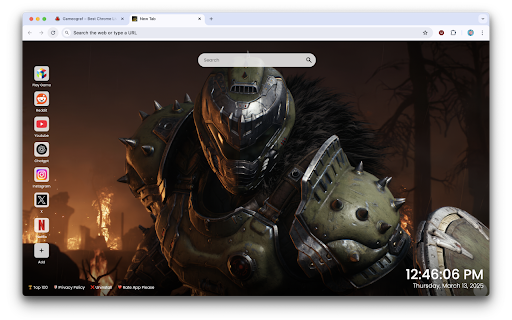


Transform your browser with DOOM The Dark Ages wallpapers, featuring epic HD scenes from the legendary game on every new tab Transform your browser with DOOM The Dark Ages wallpapers! Experience epic scenes from the legendary game in stunning, high-definition images every time you open a new tab. DOOM The Dark Ages Wallpapers New Tab brings the gritty, dark atmosphere of the DOOM universe to your screen. Relive the intense action and atmosphere of the iconic game as you immerse yourself in its powerful graphics and haunting designs. ⭐ Extension Features 🖼️ HD Wallpapers – A hand-picked selection of DOOM The Dark Ages wallpapers to energize your browser experience. 🔍 Integrated Search Bar – Access the web instantly while enjoying your DOOM theme. 🕒 Clock & Date Display – Stay on track with a stylish, built-in clock and date feature. 📌 Customizable Shortcuts – Add your go-to websites for quick access. ⚡ Optimized for Speed – Keep your browser running fast and smooth while showcasing DOOM visuals. 🌐 More Options 🎨 Explore More Extensions – Discover more at https://gameograf.com. 🔒 Privacy Policy – Check out our privacy policy at https://gameograf.com/privacy-policy/. 🛠️ Support – Contact us at https://gameograf.com/contact-us/. ❌ Uninstall – Remove the extension via Chrome settings. About Us Gameograf.com offers unique Chrome new tab extensions and themes. Explore categories like anime, fantasy, music, cars, gaming, K-pop, sports, and more. Google Chrome Affiliate Program Disclosure Upon installation, this extension may open gameograf.com to inform users about features and similar content. All redirects serve user interest and require consent, in accordance with Chrome’s affiliate guidelines.

Doom
Battle through the depths of hell in Doom, the revolutionary first-person shooter that changed gaming forever. Step back into 1993 and relive one of the most influential video games ever made. DOOM (DOS) puts you in the boots of a lone Space Marine stationed on Mars, where secret experiments have opened gateways to Hell. Armed with iconic weapons and fast reflexes, you’ll fight through dark corridors, demonic enemies, and maze-like levels packed with nonstop action. This Chrome extension lets you play the original DOS version of DOOM directly in your browser — no installation needed. Enjoy authentic retro graphics, classic MIDI music, and the fast-paced gameplay that defined an entire genre. Runs instantly in your browser Classic controls and true old-school action Faithful retro experience for both fans and newcomers Jump in and clear the UAC Mars base of demonic invasion — if you dare.

Crucible Blade Live Wallpaper - Doom Eternal Slayer Sword HD
Live wallpaper with Crucible Blade Doom Slayer sword themes. Animated Doom Eternal Argent energy weapon FPS game designs. Power up your new tab with Doom Eternal's legendary Crucible Blade live wallpaper. Perfect for Doom Slayer fans, Doom Eternal players, FPS game enthusiasts, id Software followers, and anyone who loves the iconic Argent energy sword from one of gaming's most intense action experiences. Features: • HD Animated Wallpaper – Crucible Blade and Doom Slayer sword in a stunning dynamic animated background with Argent energy glow • Popular Website Shortcuts – Quick access to YouTube, Instagram, Twitter, ChatGPT, and more • Custom Website Shortcut – Add your favorite websites for faster, customized browsing • Search Bar – Search directly from your new tab using your default search engine • Clock & Date Display – Keep track of time with a stylish and minimal clock and calendar • More Options – Easy links to privacy policy, uninstall instructions, more extensions, and feedback How to Use: 1. Click "Add to Chrome" to install the extension 2. Open a new tab to witness the Crucible Blade's powerful Argent energy 3. Browse with ease using the built-in shortcuts and search bar 4. Personalize your tab with your most-visited websites Rip and tear through your browsing experience with the power of the Doom Slayer!

The Jukebox – Minecraft Music Player
Get a Minecraft Jukebox in your browser! 🎵 Play every classic Minecraft music disc plus the ambient soundtracks right from your browser. 🪩 Queue songs and keep the vibe going while you keep browsing. 📏 Pick a comfy UI size and enjoy smooth playback with handy skip, rewind, and progress controls. This is an unofficial fan-made extension and is not approved by or associated with Mojang or Microsoft. This extension does not redistribute unauthorized copies of Minecraft music. Minecraft and all associated assets are the property of Mojang Studios and Microsoft. No copyright infringement is intended.

Night Sun - Easy Dark Mode
The easiest way to switch Chrome to dark mode. Switch to night / day mode with one click. The easiest way to switch Chrome to dark mode. With just one click, effortlessly toggle between night and day modes, enhancing your browsing experience with a darker interface for night-time or a lighter one for the day. This extension is safe to use, and installation is simple. To install, just click 'Add to Chrome' and enjoy an instant transformation to dark mode. If you ever want to remove it, simply go to your Chrome extensions menu, click 'Remove,' and the extension will be safely uninstalled without affecting your browser settings. Take care of your eyes. Adjust your screen brightness by selecting from a list of eye-friendly colors or choosing a custom shade that suits you. Night Shift transforms your screen's colors into warm, eye-soothing tones. You can set it to switch automatically based on a schedule or customize the color theme for specific websites. Night Shift Mode suggests a comfortable color palette for dark environments, and you can also personalize it by selecting any color from the settings page. Working on a computer at night can strain your eyes or disturb others in the same room. Night Shift Mode is a great way to reduce screen brightness and protect your eyes. Since Dark Mode isn't always suitable for all websites, applying warm tones across all sites is the best alternative for a more comfortable viewing experience. Screen Shader Mode—pure comfort for your eyes!
