
igpmimjncdhfalkhfofpnljdeblphgcm
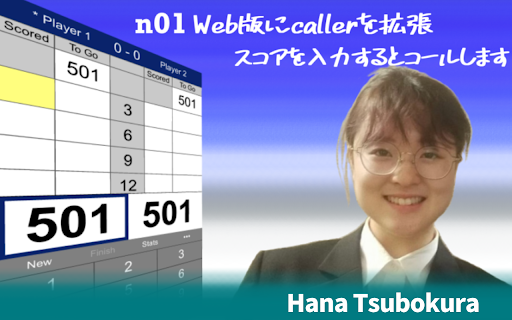
Extend caller to n01 web! When you enter the score, it will be called by the voice of "Hana Tsubokura" who was the caller at the PDC World Championship representative selection. [About inquiries and bug reports of this extension] For inquiries and bug reports, please DM to twitter @NAOKI_MIKUMA. Please do not contact nakka.com or nakka about this extension. 【分かっている不具合や今後検討する機能】 ・オンライン対戦にてミドルになった際、「You Required…」とコールしてしまう。

Tools for Autodarts
Tools for Autodarts enhances the gaming experience on autodarts.io Enhance your gaming experience on autodarts.io with quality-of-life features, customization options, and advanced functionality. Match Customization - Color Customization for darts and scores - Streaming Mode with green screen support - Virtual Board Surround - Darts Zoom with configurable positions - Hide Menu & Automatic Fullscreen - Adjustable UI Elements Audio & Visual Effects - Professional Caller: Voice announcements for scores and checkouts in multiple languages - Sound FX: Ambient sound effects for game events - Custom Animations: Display GIFs for special events (180s, bulls, busts) - Sound & Animation Upload: Add your own custom effects Utility Features - Settings Import/Export - Clipboard Support for sharing configurations Note: Tools for Autodarts is developed by the community and is not an integral part of the official Autodarts platform.

NAMINT quicksearch
A simple OSINT tool for searching info based on selected text (select 2 or 3 words) i.e. name, optional nickname, and surname This add-on automatically makes links for searching with a name and surname (or optionally first name, nickname and surname) with different methods. It also makes links for probable logins made with the selected 2 or 3 words. With this add-on, searching sites with just a name is made easier.

Autodarts Themes
Loads the active Autodarts theme from the local web panel and applies it to play.autodarts.io. Applies the active theme from your local Autodarts web panel to play.autodarts.io Autodarts Themes applies the active theme selected in your local Autodarts web panel to https://play.autodarts.io/. Main features: • Loads the currently selected theme from your local Autodarts web panel • Applies the theme only on play.autodarts.io • Caches the last active CSS locally for faster loading • Keeps the last cached theme available if the local panel is temporarily unreachable • Designed for Autodarts players using Chrome or Chromium How it works: The extension reads the active CSS theme from your local Autodarts web panel at http://10.77.0.1/ and injects that styling into play.autodarts.io. This extension does not add unrelated browser features. Its only purpose is to apply Autodarts themes from the local web panel.

OnSIP Call Assistant
OnSIP customers can maximize workday efficiency with click-to-call, caller ID popups, and Zendesk integration. This extension offers the ability to click-to-call phone numbers in a web page and displays caller-ID browser notifications for incoming calls. Zendesk users can take advantage of automatic ticket generation with caller identifying information. To use this plugin, you MUST be an OnSIP CUSTOMER. 1. Click-to-Call: No more dialing! Phone numbers on web pages turn into clickable links for an instant call 2. Caller ID Browser Notifications: Popups will alert you of incoming calls (can disable) 3. Zendesk Integration: Auto generates tickets with enhanced caller ID OnSIP Call Assistant Instructions: 1. You must be an OnSIP (www.onsip.com) customer to use this plugin. 2. Download the extension. 3. Single-click on the extension's icon to toggle the extension ON or OFF 4. In your Chrome browser, select Window > Extensions > Options under “OnSIP Call Assistant” to open the "Settings" page where you can enter your SIP address and password. 5. At the top of the browser, confirm to allow browser pop-up notifications. Otherwise, you will not receive Caller ID popups. 6. After installing the extension, all phone numbers on the pages you visit will be converted into links, which will initiate a phone call when you click them. A phone number link will be easily recognizable by the phone icon, which will appear when you hover your mouse over it. OnSIP Call Assistant with Zendesk Instructions: 1. If you have a Zendesk account, go back to the Options menu. (In Chrome, select Window > Extensions > Find OnSIP Call Assistant > Options. Or, right click on the Call Assistant icon in the top right hand corner of your browser and select 'Options') 2. Select the Applications Integrations dropdown and choose Zendesk Integration. 3. Enter your Zendesk URL, Zendesk Email Account, Zendesk API token in the appropriate fields. Note: If you have any questions about either of these fields, simply hover over the question mark for a tip. 4. Once you have entered the appropriate fields, click Save. 5. Now, all inbound calls will auto-generate a ticket with caller identification info. The ticket will be assigned to the agent (you) who answered the call and opened in the agent's (your) portal Visit our Zendesk Integration page at https://info.onsip.com/zendesk for a video demo.
