
ignbemmolegaffpapcfpbadjnijbalfl
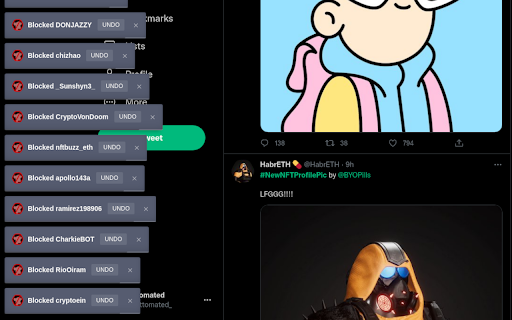
Chrome extension to auto-block NFT profile pictures on Twitter Tired of seeing hexagonal profile pictures? This extension automatically blocks or mutes every user that you come across with a verified NFT profile picture.

YouTube MrBeastify
Enhance your browsing experience with MrBeastifier. Is your browser experience boring? Are you having trouble finding engaging click-baity videos? Fear no more. This extension adds famous youtuber MrBeast to every thumbnail. Compatible with all browsers If you are experiencing issues, report them on Github For discussion about this extension, go to my Discord: http://discord.gg/bQvtauxXWp Notes: - This extension was inspired by Unnecessary Inventions: http://www.youtube.com/@UnnecessaryInventions - This extension is unofficial and not affiliated with MrBeast or YouTube. Source: https://github.com/MagicJinn/MrBeastify-Youtube

Indie Wiki Buddy
Indie Wiki Buddy helps you discover quality, independent wikis through alerts, redirects, and search filtering. On an internet dominated by ads and corporate-run websites, Indie Wiki Buddy is a browser extension that helps you easily find and support independent wikis. When you visit a wiki on Fandom or Fextralife, this extension will notify or automatically redirect you to quality independent wikis when they're available. Indie Wiki Buddy will also filter results across ten search engines (including Google, Bing, and DuckDuckGo), to help guide you to click on results from independent wikis. Indie Wiki Buddy supports over 650 independent wikis across over 20 languages. And you're in full control -- you can choose your experience wiki-by-wiki! Indie Wiki Buddy also supports BreezeWiki, an affiliated service that renders Fandom wikis without ads or bloat. This helps give you a more enjoyable reading experience when an independent wiki isn't available. Please visit the Indie Wiki Buddy website (https://getindie.wiki) for full details, guidance, FAQ, contact info, and how to submit wikis to be included in the extension. Fandom is a trademark of Fandom, Inc. Fextralife is a trademark of Kinbundo Limited. Indie Wiki Buddy is not affiliated with either site.

Control Panel for Twitter
Gives you more control over Twitter and adds missing features and UI improvements Control Panel for Twitter is a browser extension for Twitter - its main goals are to reduce the amount of algorithmic content you see, give you more control over your timeline and make the UI less distracting. By default, your Home timeline will be the reverse-chronological "Following" timeline, which will only contain tweets and quote tweets from the people you follow. The algorithmic "For you" timeline will be hidden, and Control Panel for Twitter will keep you on "Following" if Twitter tries to automatically take you off it. Everything is configurable, so start by opening the options popup and customizing to your liking. Changes you make in the options will be applied immediately. • Use the "Following" (chronological) timeline by default • Hide the "For you" (algorithmic) timeline • Retweets • Show in separate tab / Hide • Quote Tweets • Show in separate tab / Hide • Enable muting of Quote Tweets • Hide "See new Tweets" • Hide "Who to follow", "Follow some Topics" etc. in the timeline • Hide inline prompts in the timeline • Full-width timeline content • Hide the sidebar and let timeline content go full-width • Add "Add muted word" to the "More" menu • Fast blocking (skips confirm dialog) • Hide quotes and replies to blocked and muted accounts • Hide Retweets in user profiles • Retweets in Lists • Default to "Latest" tab in Search • Hide the quoted tweet when viewing Quote Tweets • Redirect to twitter.com • Tweak new layout • Hide Toggle navigation • Replace X branding changes • Hide Views under tweets • Hide "Verified" Notifications and Followers tabs • Restore headlines under external links • Restore Quote Tweets link under Tweets • Restore other links under Tweets • Default sorting of replies • Latest / Likes • Premium blue checks • Replace with Twitter Blue logo / Hide • Hide Premium blue check replies • Hide Premium upsells • Hide Grok • Hide Jobs • Hide Subscriptions • Don't use the Chirp font • Disable bold and italic text in tweets • Use normal text font style in navigation bar • Navigation density • Comfortable / Compact • Use normal font weight in dropdown menus • Uninvert Follow / Following buttons • Monochrome / Themed • Unblur sensitive content • Hide sidebar contents • Hide Explore page contents and use it only for searching • Hide "Discover more" tweets • Hide metrics • Reduced interaction mode • Hide the action bar under tweets – replies are now the only means of interacting • Hide the Compose Tweet button • Disable the home timeline • Find yourself wasting too much time on Twitter? Try preventing use of the home timeline • Notifications • Hide badges only / Hide Hide UI items you don't use • Bookmark button under tweets • Share button under tweets • "View post engagements" under your tweets • Tweet box in timeline • Account switcher • Messages drawer • Explore • Communities • Hide "More" menu items you don't use TWITTER, TWEET and RETWEET are trademarks of Twitter Inc. or its affiliates

Twitch Chat pronouns
To set your pronouns you should check https://pronouns.alejo.io/
