
igjakjamlajfpoccceeccmdnmgnmepba



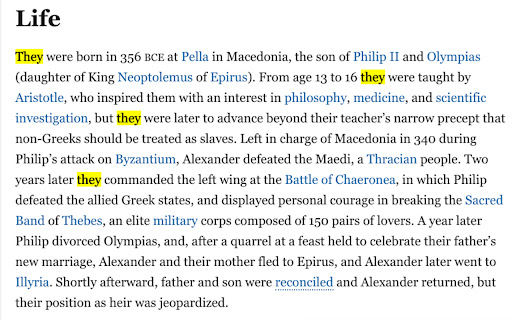
PronounPal modifies the gendered pronouns "he/him" and "she/her" on any webpage and replacing them with the gender-neutral… PronounPal modifies the gendered pronouns "he/him" and "she/her" on any webpage and replacing them with the gender-neutral "they/them". This is a small but significant step towards making the web a more welcoming place for everyone, regardless of their gender identity. This extension is incredibly simple to use, yet very powerful. With just one click, it scans the text on the webpage you're viewing and transforms gender-specific pronouns to gender-neutral ones. For example, if a webpage reads "She likes to read books", PronounPal would change it to "They like to read books". Another example would be if the text on a page reads "He likes to wash his car on his free time", the extension would change it to "They like to wash their car on their free time." In addition to changing pronouns, PronounPal also makes sure that the resulting sentences are grammatically correct, capitalizing pronouns at the beginning of sentences and ensuring the proper use of "were" with "they". The goal of PronounPal is to help users feel more comfortable while navigating the internet. We believe that language is a powerful tool, and by choosing to use inclusive language, we can contribute to a more understanding and accepting online environment. Whether you're someone who prefers they/them pronouns, a supporter of gender neutrality, or a user who just wants to see what the web would look like with gender-neutral language, PronounPal is a perfect companion. Experience the web in a new, more inclusive way with PronounPal. Install it today and join us in promoting gender neutrality one webpage at a time!

Text Twist
Replace words on web pages with your preferred alternatives. Text Twist – Rewrite the Web Your Way Shape any webpage instantly. Swap words, filter slang, simplify jargon, or rewrite names you don’t want to see. Your browsing, your rules. What’s New in 2.0 • Your dictionaries now save automatically inside the browser — no more exporting/importing local files • Your presets sync across your devices (home, office, laptop) as long as you’re logged into the same browser account • A redesigned, more elegant interface with a refined color palette Key Features • Replace any word or phrase on any site • Filter out slang or terms you don’t want to see • Simplify jargon and technical language • Bulk swaps for fast editing • Clean, intuitive UI • Changes apply instantly on reload • Automatic cloud-synced storage (via your browser profile) Browse the web exactly how you want it: cleaner, clearer, personalized. Text Twist puts you in control.

Name Updater
Hide and update old names This is an extension for hiding and replacing any visible instances of your deadname while browsing the internet. This includes changing names on email and other accounts, swapping within email addresses, and hiding autofilled input fields for account logins that may use an old usernames or emails. To configure, right click the extension icon and go to the options page. There, you can input any number of name substitutions you'd like to make, and configure which websites are filtered. As a general rule for the config, you can be very non-specific with capitalization etc, and just add more rows for specific cases. The most specific rules will be applied first! The extension icon works as a way to quickly see the config for a website you're browsing, and you can click it to toggle filtering entirely on or off.

X Word Replacer
Quickly multi-highlighting and replacing words in web pages X Words Replacer is a tool for office used for search and replace words in any field of text (input, textarea, paragraph...) on web pages.

Word Replacer Max
Seamlessly replace text on any web page. ⚡️ Smart Text Replacement Set up rules to automatically transform text across the web. 🌐 Domain Controls Specify which sites your rules apply to using allow or block lists. 🤝 Share & Import Exchange rule sets with friends and teammates to share useful replacements. 🎯 Pattern Matching Fine-tune rules using whole word, case sensitivity, or regular expressions for exact control. 🎨 Visual Styling Optionally highlight changes with styles such as bold, italic, underline, or background colors to make them stand out. 🌗 Dark Mode Eye comfort for all times of day. 1. Install Word Replacer Max 2. Click the extension icon in your toolbar 3. Create your first replacement rule 4. Start browsing with your personalized web experience ❯ Simple to use but powerful when you need it ❯ Full control over where replacements happen ❯ Your rules stay private on your device ❯ Open source code on GitHub: https://github.com/dan-lovelace/word-replacer-max
