
igfcbpdchlohbhjdfbcimhbpajlglaac
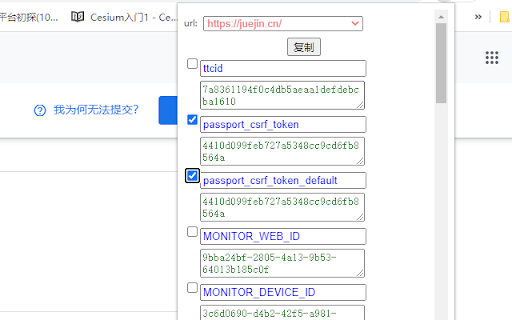
一个Chrome插件,可以将当前窗口其它tab页的cookie复制到当前tab页。 A Chrome plugin that copies cookies from other tabs of the current window to the current… 一个Chrome插件,可以将当前窗口其它tab页的cookie复制到当前tab页。 A Chrome plugin that copies cookies from other tabs of the current window to the current tab. 选择目标页面并勾选需要复制的cookie后点击复制即可将cookie复制到当讲页面。 可在复制前修改cookie。

划词翻译
一站式划词 / 截图 / 网页全文 / 音视频 AI 翻译扩展,支持谷歌、DeepL、ChatGPT、百度、有道等 22 个国内外主流翻译服务,且均可用于全文翻译。能在 PDF 里使用。 划词翻译最初发布于 2013 年,距今已有 11 年历史,且仍在持续更新当中。 - 内置高准确度的谷歌翻译,能确保翻译结果跟 translate.google.com 是一致的。 - 鼠标划词功能,支持丰富的设置项,比如黑 / 白名单、关闭鼠标划词后通过快捷键来触发翻译等。 - 鼠标悬浮取词。 - 语音朗读。 - 内置独立翻译窗口,用于翻译浏览器外的文本。可以勾选持续监听剪切板,在任意程序复制文本即可自动弹出并翻译。 - 网页全文翻译,可以切换原文 / 译文 / 双语对照、自动开启等。 - 截图 / 图片翻译。 - 内置 PDF 阅读器,用于在 PDF 文件上实现鼠标划词、鼠标悬浮取词、截图翻译等功能。对 PDF 进行全文翻译的功能正在加紧开发中。 - 麦克风翻译。 - 音视频翻译(内测中),翻译网页中的音频 / 视频。 - 支持历史记录和收藏夹。收藏夹内容可以导出成多种文件,例如 json 和 csv。 完整功能介绍请查看 https://hcfy.ai/docs/guides/summary/ 英文单词会提供音标、详细释义、美音 / 英音朗读和词根,词根可以被点击,点击后即可查看词根的翻译结果。如果你需要,划词翻译也可以在划词后自动朗读被划选的单词。 默认使用弹窗在文本附近显示翻译结果,也可以固定在一处显示。 支持在任意程序里复制文本后,按下 Ctrl + Shfit + 1(macOS 将 Ctrl 改为 Command)查看翻译结果,无需切换回浏览器。这个快捷键是可以修改的。 支持历史记录和收藏夹,这两个功能也可以关闭。 如果你遇到了问题或者想要新的功能,可以在评论区留言,我基本上都会答复。官网(https://hcfy.ai)里也有其它反馈渠道。

Kimi Explorer
Kimi Explorer: Highlight for explanations, explain screen areas, summarize articles, and find inspire writing - All in one! 🔎 Got questions?Highlight and ask Kimi : - Easily highlight the text you have questions about to get context-specific answers without having to switch back and forth between pages while browsing. 🖼️ Selecting an area? Capture to share with Kimi: - Quickly capture page content and ask questions using the screenshot shortcut, enabling seamless problem resolution. 📚 Reading documents? Summarize with Kimi : - Click the floating bubble on the right side or use the shortcut key to quickly summon the dialogue box and summarize the entire document to reduce reading time. 📝 Writing articles? Get inspired by Kimi : - Switch freely between "Sider Panel" mode and "Overlay" mode in the plugin settings page, available at your side in any scenario you need. ⭐️ How to use Kimi? 1. Click "Add to Chrome" in the top right corner and pin Kimi to the toolbar for easy access. 2. Log in to your Kimi account. 3. Press Command⌘/Alt + K to summon Kimi. 4. Start working! 🌘 If you have any suggestions or feedback about the plugin, feel free to leave us a comment, or contact us via email at any time, kimi.extension@moonshot.cn

Cookie Manager
Cookie Manager. Support Edit、Add、Delete and Search Cookie, Export/Import Cookies. CookieManager is a cookie manager. You can add, delete, edit, search, protect and block cookies!

Cookie Tool
单击插件下Get Cookie条目,就可以获取当前页面的Cookie并粘贴至剪切板. 可以直接粘贴进postman等工具发起请求 单击插件下Get Cookie条目,就可以获取当前页面的Cookie并粘贴至剪切板. 可以直接粘贴进postman等工具发起请求
