
ifofkleafhmamganjnoaaipdmffifcgc
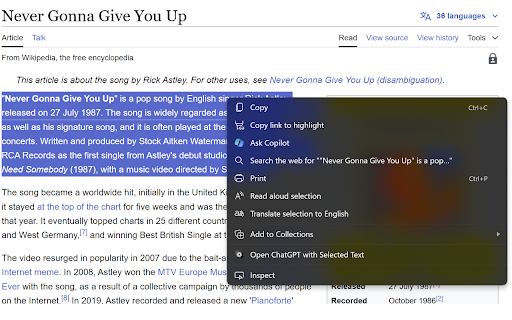

🌐 Select to AI: Context Menu for ChatGPT, Gemini & Perplexity Effortlessly access your favorite AI assistants (ChatGPT, Gemini, or Perplexity) directly from your right-click context menu. Perfect for quick explanations, summaries, translations, or fact-checking without breaking your flow. ✅ Simple, Free, and Privacy-Focused This lightweight browser extension is designed to boost productivity while respecting user privacy. It’s completely free and does not track or store any user data. ✨ Key Features: 🤖 Multi-Model Support: Choose between ChatGPT, Google Gemini, or Perplexity AI depending on your needs. 🖱️ specific View Modes: Open the AI in the standard Chrome Side Panel (keep your browsing context!), a floating Popup Window, or a New Tab. ⚡ Auto-Send: Option to automatically submit the selected text as soon as the AI opens. 📝 Instant Productivity: Get summaries, translations, or code explanations instantly. 🎨 Customizable: Enable/disable specific services or switch between Light/Dark mode settings. 🔒 No Data Collection: The extension is privacy-focused and does not store, collect, or share any user data. 💯 100% Free: No hidden fees, subscriptions, or restrictions. 🛠️ How It Works: 1. Select text on any webpage. 2. Right-click and hover over "Select to AI". 3. Click your preferred service (ChatGPT, Gemini, or Perplexity). 4. The AI opens in your chosen mode (Side Panel, Window, or Tab) with the text pre-filled and ready to go. *Pro Tip: If you only enable one service in the settings, the menu item moves to the top level for even faster access!* 🔑 Minimal Permissions: The extension uses minimal permissions (Context Menus, Storage, Side Panel) ensuring a secure experience. 📬 Support and Feedback For any support, bug reports, or feature requests, feel free to contact arnavprak@gmail.com. We appreciate your feedback to continuously improve the extension.

ChatGPT Context Menu
Are you frequently using ChatGPT to request suggestions like "Come up with blog posts based on " or seeking explanations with "Explain "? If so, this extension is perfect for you! Set your own custom prompts and simply highlight the text you need, right-click, and select "Ask ChatGPT" — it's that easy! This extension adds a context menu (right-click) option to 'Ask ChatGPT' which sends your selected text to a ChatGPT chat window, formatting the prompt based on user-configurable options. To use the GPT 4 model, enter a ChatID for a GPT4 chat in the extension options. This also ensures that the same chat is used every time, making the extension more reliable as it helps avoid "one message at a time" errors. To get a ChatID, exchange a few messages with ChatGPT; you'll find the ID in the URL (e.g., chat.openai.com/chat/). Feedback is welcome, please feel free to leave a review with any suggestions or bug reports. Yes I am aware that this is terribly written :3 Planned additions in order of how much I can be bothered to add them (most to least): - Multiple Context menu options - Option to change inner text of context menu button - Toggle to open a ChatGPT iFrame that persists in the background, instead of a New Tab - Plugin functionality (I'm waiting for beta access)

ChatGPT Xtra
This extension enhances ChatGPT user experience by adding interactive and efficient features for better ChatGPT use. "ChatGPT Xtra" is a Chrome extension designed to enhance the user experience on chat.openai.com by integrating convenient features for a more interactive and efficient conversation with ChatGPT. Key features include Image attachment from web pages: This feature allows users to seamlessly attach images directly from any web page to new chat. By simply right-clicking on an image and selecting from the context menu. Prompt combination with selected text: This feature allows users to combine their own typed prompt with text selected from any web page. When browsing online, users can highlight text, right click to access the context menu and choose to send that text along with their prompt to ChatGPT. Overall, "ChatGPT Xtra" enhances the functionality of chat.openai.com by making it more user-friendly and versatile, especially for those who frequently reference external content or wish to incorporate multimedia elements into their conversations with ChatGPT.

Search with ChatGPT
A simple extension to copy the selected text from any webpage and search with ChatGPT automatically. A simple extension to copy the selected text from any webpage and search with ChatGPT automatically.

Selected Text to ChatGPT
Send selected text to ChatGPT and show the response. 🚫 Hinweis: Die Erweiterung funktioniert nicht auf internen Chrome-Seiten wie chrome://extensions/ oder URLs, die mit chrome-extension:// beginnen. Das liegt an technischen Einschränkungen des Browsers.
