
ifgfomjbhfndhoeefobmiaclhnhiknbl
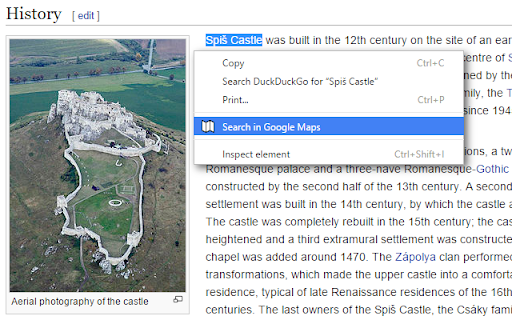
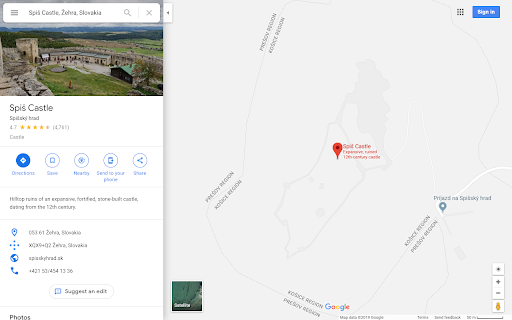
Right click some selected text and use that for a secure search using Google Maps. After installing this extension there'll be a new entry in your context menu (right-click menu) when some selected (highlighted) text was right-clicked. Selecting this menu option will start a Google Maps search. - v4.0 (2025-12-22): Open the results tab directly next to the active tab

Google Search Maps Button
Adds back the Maps button to Google search pages and makes the search result map images clickable again for seamless navigation. The "Google Search Maps Button" Chrome extension brings the Google Maps button back to the Google Search navigation bar for users in Europe. If you've found the Google Maps button gone or missing from your search experience, this extension is designed to address exactly that. What it Does: This extension ensures you can access Google Maps with just one click from the Google Search page. It also makes map images clickable within search results, significantly improving your navigation experience. Why it's Needed: In response to the Digital Markets Act (DMA), which is aimed at fostering fair competition and innovation, the Google Maps shortcut was removed for European users. This tool effectively restores that lost convenience. Privacy and Security: Operating without saving any user data, the extension ensures your privacy and security are protected. For anyone who's noticed the Google Maps button gone from the Google Search navigation bar in Europe, this extension provides a straightforward and effective solution, seamlessly reintegrating this essential feature into your browsing routine. Troubleshooting steps if the extension is not working: 1. Check Plugin Status: Make sure that the plugin is enabled in your Chrome browser. 2. Verify Site Access: Open the details for this plugin under "My Extensions" and ensure that "Site Access" is enabled. NB! For Opera users: Go to the Manage Extension section and tick the „Allow access to search page results” option. Otherwise the plugin wont work. If you'd like to say thanks, you can do so via PayPal at henripp94@gmail.com. I'm truly grateful for any support, though it's absolutely not necessary or expected.

Right Click Search Google in New Tab
Adds a right click menu option to search for the selected text on Google in a new tab Adds an option to search selected text on Google in a new tab (as per the old default behaviour when right clicking on selected text).

Google Maps Quick Search: Popup, Right-Click & Shortcut
Save time with instant access to Google Maps—use the quick popup or simply select text to search, eliminating extra steps and making navigation effortless! Google Maps Quick Search is your go-to Chrome extension for lightning-fast access to Google Maps—right from your browser. Whether you’re researching locations, planning trips, or just need directions in a hurry. Key Features: • Popup Search: Open the popup and search a location or a destination. • Context Menu Access: Select and right-click to search for a location, making navigation effortless. • Keyboard Shortcut: Customize your own shortcut for immediate access and immediate search —no extra clicks required. Experience a smoother, more efficient browsing journey and never miss a beat. Install now and navigate smarter! Your privacy is our priority: no ads, no tracking, and all data is stored locally on your device. If you enjoy the ad-free experience, please consider donating to help support and maintain the project!

Google Maps QuickClick - Search to Maps
Instantly open Google Maps from the Search page by clicking on a map image or the Maps tab. Revive the direct Google Maps access with this simple extension. Click on Maps tab re-integrated below the search bar or on any static or interactive map in your Google search results to open Google Maps instantly. Key Features: - The Maps tab displays instantly without layout shift and remains reliably positioned - Multilingual support: The Maps tab is localized for 52 languages - All map images (static and dynamic) within search results are clickable, navigating directly to Google Maps Customization Options: - Toggle the display of the Maps tab on or off - Select whether maps open in a new tab - Enable or disable localization for the Maps tab Additional Features: - Precise location mapping, even for incomplete or misspelled address searches - Accurately handles searches for distant locations, ensuring the correct place is shown on Google Maps - Multi-map Support: Multiple map images on a search results page are all clickable and accurately linked to their respective locations - Supports dark mode Opera Compatibility: Opera users can also enjoy full functionality by enabling the "Allow access to search page results" option in the Opera extension settings. v1.5.6 - Restore the correct order of tabs after Google added "AI Mode" v1.5.5 - Restores the Maps tab after Google’s latest Search UI update v1.5.4 - Fixed extension startup issues in Opera GX - Improved extension initialization and stability across different browsers - Added support for Google's new dynamic map previews in search results v1.5.3 - Add support for all Google domains v1.5.2 - The Maps tab is displayed with the correct style across all variations of the tab bar - The Maps tab remains stably placed, regardless of the active tab - There is no desynchronization of Maps tab styles when switching between dark and light modes
