
ifcjpjhkldldffkhflkkbmaganigpgna
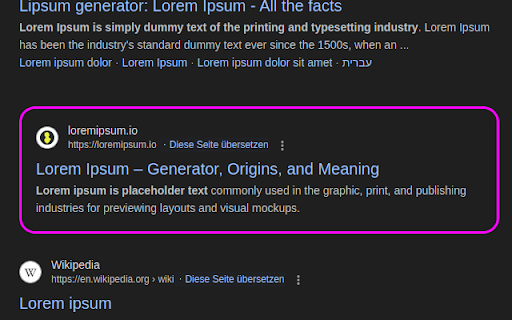

Navigate conveniently with arrow keys through search results of various search engines. Pages like Google or Ecosia are supported. ArrowKeys For Search is a browser extension for various search engines. While searching on the web, you can navigate through the corresponding search results conveniently via the arrow keys. It's also possible to return to the searchbar via those keys. With Enter a result can be 'clicked', if selected. --- Features --- customize the selection border in simple or custom css mode navigate through the results with up and down arrow keys press enter to open desired result navigate back to the searchbar with arrowup

Auto Fullscreen - Fullscreen Any Page
Auto fullscreen any page on load, navigation, or click-and-hold. Works everywhere - not just videos. ✨ Features: 🖥️ Auto-fullscreen on any page load 👆 Click and hold anywhere to toggle fullscreen (configurable hold time) 🔄 SPA navigation detection - works on YouTube, Odysee, and other single-page apps ⬆️ Exit by moving cursor to the top edge of the screen 🛡️ Smart blocking - won't fullscreen when clicking links, buttons, or form inputs 💫 Visual charge ring animation during hold 🎨 Customizable hold time and theme color ⚙️ Settings open in a full tab, not a tiny popup 🔧 How it works: Uses Chrome's window fullscreen API to maximize your browser. Window size is saved before entering fullscreen and automatically restored on exit. 🔒 Privacy: Only requires storage permission for your settings. No data collection, no external requests. 📋 Permissions: 💾 Storage - save your preferences

Keyboard Shortcuts
Set custom keyboard shortcuts for Chrome: View extension options, or browse to chrome://extensions/shortcuts to set. This extension adds the ability to set 25 different custom keyboard shortcuts for Chrome. By design, this extension does not require any additional Chrome permissions at all. Everything is performed locally in Chrome, so it does not need access to any sites or data. All 25 keyboard shortcut settings are optional and can be changed at any time. All keyboard shortcuts can be changed at chrome://extensions/shortcuts. You can navigate there via your address bar, or by selecting options from the Keyboard Shortcuts extension. Select previous tab Select next tab Move current tab left Move current tab right Open Chrome Bookmarks (chrome://bookmarks) Open Chrome Downloads (chrome://downloads) Open Extensions (chrome://extensions) Open Extension Shortcuts (chrome://extensions/shortcuts) Open Chrome Flags (chrome://flags) Open Chrome Help (chrome://help) Open Chrome History (chrome://history) Open Chrome Settings (chrome://settings) Close current tab New tab Unload tab from memory Duplicate current tab Go back to the previous page Go forward to the next page Move current tab to first Move current tab to last Mute / Unmute current tab Pin / Unpin current tab Reload tab New window New incognito window Extension icon made by Freepik from www.flaticon.com

Google Search Keyboard Shortcuts
1.1.20 - Updated Google selectors - Web result with child links 1.1.18 - Further restricted domains the extension will run on 1.1.17 - Added option to include a space at the end of search query when focusing the search box - Updated selectors 1.1.14 - Fixed bug where first result would be skipped if auto focus first was not selected - Fixed array index out of bounds exception after last result - Added back navigation for footer links. Don't highlight footer links - Pulled addResultHighlight, findContainer back into their own methods - Removed focus/text property separation. Selector guarantees they'll always be the same - Style updates - Added safeguard to detect outdated selectors - Pulled all selectors out into their own properties 1.1.13 - Fix for issue #23. Updated Google selectors 1.1.12 - Fix for issue #19. Updated Google selectors 1.1.11 - Fix for issue #16. Updated Google selectors 1.1.9 - Don't wrap when arrow is prepended to search results - Bug Fix: Display marker when first result is automatically selected - Fix issue #8 - Only activate the first link for each result (don't focus "Translate" or other links) 1.1.6 - Added support for news, books, and video search results. - Prevent hotkeys from triggering when modifier is active - Prevent hotkeys from triggering when using calculator 1.1.5 - Scroll to the selected search result if it's not fully visible - Added an option to automatically select the first search result 1.1.2 - Fixed issue navigating between results when "People also searched for" was displayed 1.1.1 - Don't activate search if a modifier key is used (i.e., CMD+C) - Remove selected result outline if another styling method is chosen - Focus footer navigation links after search results - Change "J/K" setting to "VIM Style" - option now causes "/" to focus the search box 1.1.0 - Added styling for active search result (option may be toggled on or off) - Allow search box activation to be disabled - Allow customization of navigation hotkeys (TABS, ARROWS, and J/K) - Self-documentation of shortcuts - all available shortcuts (and customization) is displayed on the options page - Updated icons - Fixed error where result navigation would not work properly if an Ad was displayed - Added support for Google Scholar

Always Right
Always open new tabs immediately to the right of the active tab. New tabs should always open to the immediate right of the current tab. And now they will. Usually when I open new tabs, it's not because a lightning bolt struck, and I must switch from my current activity to a new and different one. Most of the time the new tab is directly related to what I'm currently doing, so when Firefox (or a Chromium-based browser) opens tabs at the end of 50 tabs, they're almost guaranteed to be far from the tabs I was working with. I then find myself hunting around for the tabs I was just at, sometimes trying long and RSI-inducing drag-and-drop operations to regroup things. Sure, if I wanted to strictly manage things, I could always have separate tab groups in this tab set, but often my workflow is more organic than that, and I end up in this place, and I should be able to continue working with the software in the way that my mind expects it to work. So maybe this isn't for you, but I'm Always Right.
