
iepkmhnkbldjmmgaekphkbiffjehajal
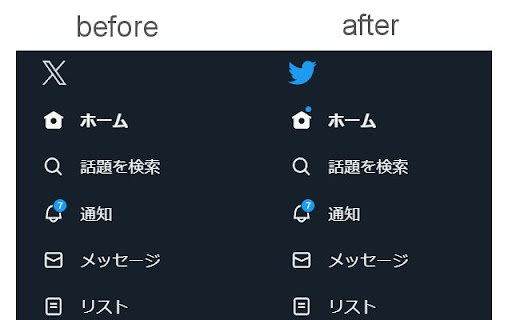

Let's change twitter icon from X to the bird! The new X icon on Twitter will be replaced by the original bird icon that has been used for a long time. This will provide benefits to users who prefer the bird to the X, as well as users who prefer the original icon.

Clean-Spam-Link-Tweet
ツイート(返信)から悪質なリンクが記載されたツイートを可視化してナイト系スパム等のリンクを踏む事を阻止します。 FireFox版もあります!: https://addons.mozilla.org/ja/firefox/addon/clean-spam-link-tweet/ iOS/iPadOS版もあります!: https://apps.apple.com/jp/app/clean-spam-link-tweet/id6503911724 Twitter上に良く出現するbnc[.]lt等の「ナイト系」等と呼ばれる悪意のあるスパムリンクを分かりやすく可視化する事により、リンクを踏んでしまう事を未然に防ぐことや画面上から消し去る事ができる拡張機能です。 990種類以上のスパムリンク阻止が可能です。 アラビア文字が含まれた「インプレ稼ぎ(ゾンビ)」と呼ばれる悪意のある返信も設定次第である程度消し去ることができます。 搭載機能 ・スパムリンク阻止 ・スパムリンク非表示機能

Twitter UI Customizer
Improve the customizability of your Twitter UI

Control Panel for Twitter
Gives you more control over Twitter and adds missing features and UI improvements Control Panel for Twitter is a browser extension for Twitter - its main goals are to reduce the amount of algorithmic content you see, give you more control over your timeline and make the UI less distracting. By default, your Home timeline will be the reverse-chronological "Following" timeline, which will only contain tweets and quote tweets from the people you follow. The algorithmic "For you" timeline will be hidden, and Control Panel for Twitter will keep you on "Following" if Twitter tries to automatically take you off it. Everything is configurable, so start by opening the options popup and customizing to your liking. Changes you make in the options will be applied immediately. • Use the "Following" (chronological) timeline by default • Hide the "For you" (algorithmic) timeline • Retweets • Show in separate tab / Hide • Quote Tweets • Show in separate tab / Hide • Enable muting of Quote Tweets • Hide "See new Tweets" • Hide "Who to follow", "Follow some Topics" etc. in the timeline • Hide inline prompts in the timeline • Full-width timeline content • Hide the sidebar and let timeline content go full-width • Add "Add muted word" to the "More" menu • Fast blocking (skips confirm dialog) • Hide quotes and replies to blocked and muted accounts • Hide Retweets in user profiles • Retweets in Lists • Default to "Latest" tab in Search • Hide the quoted tweet when viewing Quote Tweets • Redirect to twitter.com • Tweak new layout • Hide Toggle navigation • Replace X branding changes • Hide Views under tweets • Hide "Verified" Notifications and Followers tabs • Restore headlines under external links • Restore Quote Tweets link under Tweets • Restore other links under Tweets • Default sorting of replies • Latest / Likes • Premium blue checks • Replace with Twitter Blue logo / Hide • Hide Premium blue check replies • Hide Premium upsells • Hide Grok • Hide Jobs • Hide Subscriptions • Don't use the Chirp font • Disable bold and italic text in tweets • Use normal text font style in navigation bar • Navigation density • Comfortable / Compact • Use normal font weight in dropdown menus • Uninvert Follow / Following buttons • Monochrome / Themed • Unblur sensitive content • Hide sidebar contents • Hide Explore page contents and use it only for searching • Hide "Discover more" tweets • Hide metrics • Reduced interaction mode • Hide the action bar under tweets – replies are now the only means of interacting • Hide the Compose Tweet button • Disable the home timeline • Find yourself wasting too much time on Twitter? Try preventing use of the home timeline • Notifications • Hide badges only / Hide Hide UI items you don't use • Bookmark button under tweets • Share button under tweets • "View post engagements" under your tweets • Tweet box in timeline • Account switcher • Messages drawer • Explore • Communities • Hide "More" menu items you don't use TWITTER, TWEET and RETWEET are trademarks of Twitter Inc. or its affiliates

People翻訳
インターネットの人格をコントロールできる翻訳ツール。情報まみれのネットにうんざりなあなたに。 情報まみれのインターネットにうんざりしたら。 —— People翻訳は、情報が氾濫する現代のインターネットに逆らう翻訳ツールです。 サイト上のテキストを特定のルールにしたがって書き換えることでノイズを入れ、程よい情報濃度へ変換。あなたのネットサーフィンをちょっと快適にします。 さあ、インターネットの人格をコントロールしましょう。 ================================ 機能 特定の正規表現に基づいて、HTMLのテキスト要素を自動で書き換えます。 free版では計3種類、pro版では計16種類の翻訳機能が使用できます。 翻訳モード(全16種類) [free版] ・ネッコ翻訳 すべての存在がネコ化します。 ・限界翻訳 限界化したオタクのような文言に書き換わります。 ・偽中国語翻訳 ひらがなとカタカナが消え去ります。 [pro版] ・ウホホ翻訳 すべての存在がゴリラ化します。 ・オジサン翻訳 オジサン構文に則り愉快な口調に書き換わります。 ・メスガキ翻訳 生意気なガキのような口調に書き換わります。 ・騒音翻訳 すべてのサイトが叫び出します。 ・世紀末翻訳 世界中が混沌と化します。 ・奴翻訳 みんながみんなを煽り散らかします。 ・採点翻訳 勝手にすべてを採点します。 ・赤ちゃん翻訳 すべての存在が乳児化します。ときどきグズります。 ・ギャル翻訳 すべての日本語文字が平成ギャル文字に書き換わります。 ・アナグラム 一文ごとに文字をシャッフルします。読まずともなんとなく情報が入ってきます。 ・文字化け翻訳 全体が文字化けしたかのような表示に変換されます。 ・のり弁文書 すべての文字が黒塗りになり、隠ぺいされたようになります。 ・ぬぬぬぬ すべての文字が「ぬ」になります。
