
iefhgallkigeckhabdnhmplccmckiidg
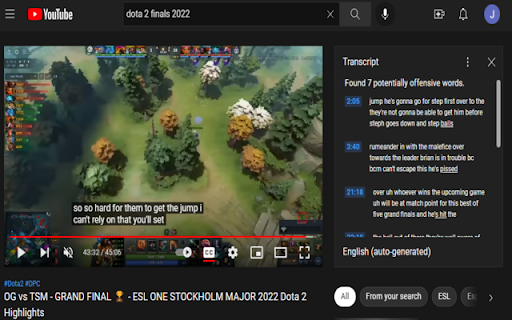
Parses transcripts on a youtube video and checks it for harmful language. To use this extension. Click on the extension icon while on a youtube video page with an open transcripts panel. The extension will filter out all of the non-offensive transcript segments and underline the offensive words in the remaining transcript.

YouTube Dubbing – Translate & Dub
YouTube Dubbing is a browser extension that translates and dubs online videos in real time. No need to read subtitles—just listen in your native language and understand foreign videos instantly, as naturally as watching local content. Open any video on YouTube, Bilibili, Udemy, or Coursera—YouTube Dubbing automatically translates the subtitles and plays AI dubbing with no extra steps. Just hit play to start. ★ Free — Dub up to 5 videos per day for free, perfect for everyday watching and language learners. ★ Premium — Unlimited videos, AI subtitle enhancement (GPT / Claude), preserve background audio, smart multi-speaker detection, and priority customer support. Core features: - One-click translation & dubbing — Press play to automatically translate subtitles and start dubbing, saving time and effort. - AI subtitle enhancement (Premium) — Even if a video has no subtitles (YouTube & Bilibili), AI can generate subtitles automatically and then translate and dub them. - Multi-model translation (Premium) — Supports leading LLMs like GPT and Claude for more natural and accurate translations. - Rich voice library — Male and female voices, multiple regional accents, automatically matched to the best voice for the target language. - Adaptive playback speed — Dubbing stays in sync at 0.5× to 2× speed. - Preserve background audio (Premium) — Keep original music and sound effects for a more immersive experience. - Smart multi-speaker detection (Premium) — Distinguish different speakers and assign different voices for richer, more natural dialogue. - Cross-platform support — Available on Chrome, Firefox, and Android. - Multi-site support — Works with major platforms like YouTube, Bilibili, Udemy, Coursera, and more. - Universal video dubbing — Even when a video is not covered by the extension’s built-in one-click support, YouTube Dubbing can intelligently detect the media source and guide you to download the video and upload it to our server for subtitle recognition. You will receive an email when processing is complete, then come back and watch. - Subtitle Summary — Subtitle Summary is not limited to YouTube; any website supported by the extension can summarize subtitle content. - Subtitle Editor — If the translation or dubbing still is not satisfactory, copy subtitles from Subtitle Editor to your preferred AI model for translation, then paste them back and save. After manually enabling “skip translation for same-language subtitles,” the extension can dub with your custom subtitles.

YouTube Video Transcript
Transcribe youtube videos to text with YouTube Video Transcript. Extract, download, and convert online video transcripts easily. 🔎 Looking for an effortless way to get transcript of video content? Our YouTube transcript extractor is here to help! Transform any video into a readable text format in seconds. Generate full transcript from YouTube video with just a click. Our extension simplifies the process, saving you valuable time and effort. ➤ Instant Transcription: Convert YouTube videos to text in seconds. ➤ Accurate Results: Our advanced YouTube transcript extractor ensures precise text conversion. ➤ User-Friendly Interface: Simple and intuitive, even for beginners. ➤ Multi-Language Support: Generate full transcripts from YouTube videos in multiple languages. ➤ Downloadable Texts: Get youtube video transcript for offline use or future reference. Whether you're a researcher, content creator, or student, this YouTube transcriber is perfect for you. Use it to: 1️⃣ Take Study Notes: Copy text from YouTube videos for study materials. 2️⃣ Create Content: Use YouTube video transcripts to develop blogs or scripts. 3️⃣ Enhance Accessibility: Convert YouTube video dialog to scripts for easy accessibility. 4️⃣ Extract Insights: Use the YouTube video script extractor for research and analysis. 🔹 Save time by getting the key points from lengthy videos. 🔹 Quickly review the main ideas without reading the full transcript. 🔹 Use summaries for research, note-taking, or creating study materials. 🔹 Improve productivity by focusing only on the most important information. With just a few clicks, you can extract transcripts. Here's how to get started: 1. Install the extension and open a YouTube video. 2. Click the extension icon and let it analyze the video. 3. Access the full transcript of the video in seconds. 4. Copy, save, or download the transcription for your needs. ✳️ Save hours of effort with automated YouTube transcripts. ✳️ Get accurate, word-for-word text for any video. ✳️ Convert YouTube video to text for accessibility or study. ✳️ Access a complete transcript of youtube video transcript, even for long content. ✳️ Extract YouTube transcripts without hassle. ❓ Q: How to get a transcript of a YouTube video? 👉 A: Simply install the extension, open your desired video, and let the YouTube transcript extractor do the work for you. ❓ Q: Can I transcribe YouTube video to text in multiple languages? 👉 A: Yes, the tool supports various languages, making it easy to get transcripts for diverse YouTube content. ❓ Q: Is it possible to download YouTube transcripts? 👉 A: Absolutely. You can download the transcript of YouTube videos for offline use. • No more struggling to extract transcript from YouTube. • Easily transcribe YouTube videos for documentation and accessibility. • Convert YouTube video dialog to scripts in real-time. • Generate full transcripts from YouTube videos for content creation. • Seamlessly copy text from YouTube videos for any purpose. 💥 How This Extension Stands Out ▸ Speed: Quickly generate a YouTube video to transcript without delays. ▸ Simplicity: A few clicks are all it takes to get a transcript of a YouTube video. ▸ Versatility: Perfect for students, professionals, researchers, and creators. ▸ Accessibility: Easily transcribe YouTube videos to text, enhancing accessibility for all. 💡 Use Cases for YouTube Video Transcription ☑️ Researchers can extract transcripts from YouTube to analyze data. ☑️ Educators can generate transcripts for YouTube videos to support learning materials. ☑️ Content creators can use YouTube video scripts for new projects. ☑️ Businesses can transcribe YouTube video to text for team collaboration. 💪 Unlock the Power of YouTube Transcripts With this Chrome extension, you can do more than just watch videos. You can transform them into actionable insights, study materials, and creative content. Whether you want to get a transcript for YouTube videos or convert YouTube dialog into text, this tool has got you covered. Don’t miss out on the opportunity to enhance your productivity. Download the extension now and experience the easiest way to transcribe YouTube videos to text. Get started today and discover the difference with this powerful YouTube video transcript generator.

YouTube To Text
🚀 Quick Start Tips 1. Install extension by button “Add to Chrome” 2. Open any youtube video 3. Click button “Transcribe video” 4. Get youtube transcript with time codes! Here are 🔟 reasons to choose Youtube to Text 1️⃣ Transcribe and convert YouTube videos to text format 2️⃣ Explore and search through the textual content to quickly find the information you need 3️⃣ Supporting multiple languages, you can even transcribe videos with captions or automatically generated subtitles 4️⃣ Save transcriptions, create playlists, and organize your textual content for easy access 5️⃣ Create сlosed сaptions for improved accessibility 6️⃣ For language learners, youtube to text is an excellent tool for practicing listening and reading skills. 7️⃣ No ads and respect your privacy 8️⃣ Easy to use 9️⃣ Find the right moment in the video through text search 🔟 Powerful features special designed for work and educational scenarios 📝Save Your Time ➤ As a content creator, time is precious. The extension streamlines your workflow by providing an accurate transcription of your YouTube videos. Use the transcript as a foundation for editing or repurposing content, saving you hours of manual transcribing and ensuring your messaging is on point. ➤ The youtube to text is perfect for anyone who needs to transcribe YouTube videos on a regular basis. Whether you're researcher, or student, this extension will save you time and effort by automatically converting your videos into text format. ➤ The process of transcribing a YouTube video to text is simple with this extension. Once installed, all you need to do is open the YouTube video you want to transcribe and click on the Youtube to text icon in your browser. The extension will then automatically start transcribing the video into text format 📈 Boost Accessibility and Reach ➤ Captions and transcripts are crucial for enhancing accessibility and catering to a diverse audience. By converting YouTube videos into accurate text transcripts, the Youtube to Text enables you to add subtitles or captions to your videos with ease. Reach a wider audience and make your content available to individuals who are deaf, hard of hearing, or prefer to consume content in a text-based format. 📖 Learn from the Best ➤ With the Youtube to Text, you can gain valuable insights from industry experts, thought leaders, and influencers. Transcribe their captivating talks, interviews, and presentations to capture their wisdom and knowledge in a textual format. Get inspired, learn new skills, and emerge as a motivated and informed individual. ➤ Converting YouTube videos to text transcripts opens up a whole new world of possibilities. With the ability to search for specific keywords, phrases, or quotes within the transcript, you can quickly locate and extract valuable information. Uncover new insights, gather research data, or spark creativity by analyzing and referencing the content within the transcript. 🖥️ Enhance Video SEO ➤ Did you know that transcribed content can significantly improve the search engine optimization (SEO) of your YouTube videos? With the Youtube to Text, you can convert your videos to text, generate keyword-rich transcripts, and maximize your visibility in search results. Drive more organic traffic to your channel and expand your online presence. 📂 Organize and Archive with Ease ➤ Text transcripts act as valuable reference materials, helping you organize and archive content effectively. Use the Youtube to Text to convert YouTube videos into text, and seamlessly integrate them into your personal knowledge base or external note-taking platforms. Access important information with a simple search, making knowledge retrieval a breeze. ❓ Frequently Asked Questions: 📌 How does is it work? 💡 YouTube to text is a Chrome extension that allows you to convert youtube videos to text format. By transcribing youtube video, it provides you with a textual representation of the video's content, making it easier to read and search for specific information. 📌 Can I use it for free? 💡 Yes, extension is available as a free Chrome extension 📌 How do I install? 💡 To install YouTube to Text, go to the Chrome Web Store and select "Add to Chrome". It will be added to your browser, and you can start using it. 📌 Can extension transcribe any YouTube video? 💡 Yes, It can transcribe and convert any YouTube video to text format. It supports multiple languages 📌 Is my privacy protected when using extension? 💡 Absolutely! Extension operates locally within your browser, ensuring the privacy and security of your personal information. It does not collect or store any user data. 📌 Are there any limitations to the length or number of videos I can transcribe? 💡 There are no specific limitations imposed by the extension on the length or number of videos you can transcribe. You can convert multiple videos, regardless of their duration. 🚀 The Youtube to Text may come with additional features and capabilities, so be sure to explore all the exciting possibilities available to you. If you have any questions or need assistance, reach out to us. Embrace extension, and let your transcription adventures begin!

YouTube Text Tools - Video Transcript and Summary
YouTube to text: transcribe YouTube video to text, get YouTube transcript with AI summary. Convert YouTube video to text free. 1. Install the extension by clicking on the "Add to Chrome" button. 2. Open any YouTube video. 3. Click "Transcribe" and get YouTube transcript with time codes, automatic scrolling and translations! 1️⃣ Transcribe YouTube Video to Text ➖ YouTube to Text converts any YouTube video to text format instantly. Get an accurate YouTube transcript of spoken content — perfect for those who prefer reading or need a written record. Our YouTube video transcriber supports all videos with captions in multiple languages. 2️⃣ Convert YouTube Video to Text with One Click ➖ Simply open any video and click to convert YouTube video to text. The transcript appears alongside the video with clickable timestamps. This YouTube to text converter makes it easy to jump to any point in the video. 3️⃣ Search Through Video Transcript ➖ Navigate quickly through the YouTube transcript to find specific information without watching the entire video. Search for keywords in the transcript — each result links to its timestamp, so you can jump directly to the relevant moment. 4️⃣ Copy Transcript to Note-Taking Apps ➖ Easily copy the YouTube video transcript to your favorite note-taking apps, personal knowledge bases, or AI summarizers. Get transcript of YouTube video and use it for research, study, or content creation. 5️⃣ Learn Foreign Languages ➖ Transcribe YouTube video in any language and read along while listening. YouTube to Text is an excellent tool for language learners to practice listening and reading skills simultaneously, improving comprehension and pronunciation. 6️⃣ Auto-Scroll Transcript with Video Playback ➖ The transcript syncs with video playback and scrolls automatically. Read the YouTube transcript in real time without manual adjustments — perfect for multitasking learners and professionals. 7️⃣ Get Video Summary with AI ➖ Generate a concise AI summary of any YouTube video. Absorb key insights from lengthy videos in seconds. This YouTube video to text transcription feature distills hours of content into digestible summaries. 8️⃣ Free YouTube Video to Text Converter ➖ YouTube to Text is completely free to use with no ads. Enjoy an uninterrupted experience — no distractions, just accurate video to text transcription. 📝 Save Time with YouTube Transcript ➖ Stop manually transcribing videos. YouTube to Text provides instant, accurate transcription of any YouTube video to text format. Whether you're a content creator, student, or researcher — get transcript from YouTube video in seconds. 📈 YouTube Video to Text for Content Creators ➖ Transcribe YouTube video to text and repurpose content for blogs, articles, or social media. Use the YouTube transcript as a foundation for editing, saving hours of manual transcription work. 📖 Get Transcript of YouTube Video for Research ➖ Convert YouTube video to text and search for specific keywords, quotes, or insights within the transcript. YouTube to Text is ideal for academics, students, and professionals who need to extract information from video content efficiently. 🖥️ YouTube Video Transcriber for Any Language ➖ Our YouTube to text extension supports multiple languages. Transcribe YouTube video with captions or automatically generated subtitles in English, Spanish, Korean, Vietnamese, and 50+ other languages. ❓ How to transcribe YouTube video to text? 💡 Install YouTube to Text Chrome extension, open any YouTube video, and click "Transcribe". You'll get the full YouTube transcript with timestamps instantly. ❓ Can I convert any YouTube video to text? 💡 Yes! YouTube to Text can transcribe any YouTube video with captions into text format and supports multiple languages. Get transcript of YouTube video — whether it has manual or auto-generated captions. ❓ Is this YouTube to text converter free? 💡 Yes, YouTube to Text is completely free to use. We plan to introduce some premium features in the future. ❓ How to get transcript from YouTube video? 💡 Simply install the extension, open a YouTube video, and the transcript appears automatically. You can copy, search, and navigate through the YouTube video transcript with ease. ❓ Does this YouTube video transcriber keep my data private? 💡 Absolutely! The extension works locally in your browser. We don't collect or store any user data. Your privacy is our priority.
