
idpcgabojogahgmhdgnjkmdliaeeofka

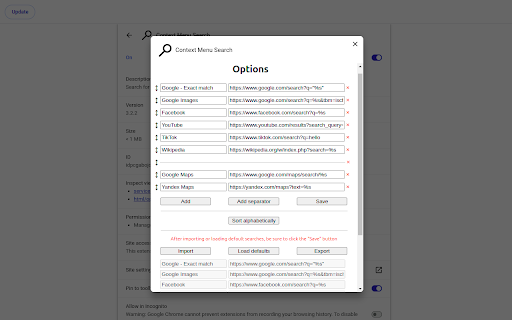
Search for selected text or image URL using the context menu Use the context menu to search for selected text or image URL in various search engines 1) exporting and importing search engines requires the "Manage your downloads" permission 2) export added search engines to avoid losing them when updating the extension If you have any questions, please contact me by email

Trufflepiggy - Quick Search
The all-in-one search tool: select and search. Find on multiple websites at once. Easy anonymous setup. Cross-browser sync. ############# NEW in Quick Search v1.9.10: ✅ Update to webExtension MV3, which makes this addon future proof for 2024 and beyond. 🔄 Replaced webRequests with declarativeNetRequests for instant search and more(still only available for beta tester, public one will be with v2.0) ⚠️ KNOWN ISSUES: Depending on your chosen options if the service worker/background script goes to sleep it loses it's knowledge which previous tabs have been opened by the addon. So those can't be auto-closed if you have chosen this option. This info might be stored in the addon storage in a later update but isn't critical for your daily searches. ############# 👁🗨 Get a detailed feature and permission overview on our Quick Search product page: https://trufflepiggy.com/quicksearch Easily boost your productivity and search like a pro with our full-featured search-extension: ⌚️ Save time: Just select and search. No need to open a new search engine tab inbetween, reenter search terms or wait for results you don't want. 📚 Search on multiple sites at once: compare prices and translations and search for images, movies, or papers on all your favourite websites at once with just one click. 🔍 Search via overlay, context menu (right click), or omnibar. You don't need all options. Just turn them off in our addon options. 🖼 Reverse-image search. Just right click on any image and find it instantly on Google images, Tineye, Yandex, Baidu or Bing. 🏎 Quick Access to our complete search library. You want to search on a site thats not among your favourite list? Easy just type "!sitename" or any abbreviation to quickly find and access any site search. 💰Save money: check if the sale price is really the cheapest or if your other favourite and trusted shopping sites have better offers. Often used e.g. to compare Steam Sales with GOG and Humble Bundle prices 👌. ❤️ Use your fav input: you can use Trufflepiggy entirely by keyboard, mouse or mixed. Whatever suits you best. ✍️ Personalise: select from or a growing list of searches or add your own within seconds. 🏆 Another great PRO feature is that you can select text in links. Just click and hold and you can select any text within a link and without any keyboard interaction. 🔨 This product is under active development. There are many features on its way. If you have ideas, suggestions please drop us a line on facebook or twitter. More infos about us on our website. Version 1.9.*: 🌟 You can now delay the opening of search tabs for multiline and group-searches. ✅ New option to activate the first or last loaded item of a group search. 🖼️ Favicons for search-groups. 🔘 You can now temporarily unselect single search-items of a group search. 🐞 Fixed Google Reverse Image URL. 🌟 New lighter, brighter more compact design. 🌟 Multiline Search to search multiple search-terms at once. 🌟 Draggable overlay. 🌟 New options: turn on/off the extras section independently for overlay and context menu, change the conversion timer to make links a selectable text. 🌟 Search all reverse-image search-items at once from your context menu. 🌟 Replaces deprecated webExtension API calls 🏎 v1.7 now loads the overlay locally. A huge speed improvement especially for users outside of Europe. 🌟 v1.7.9 adds encoded plus4space search rule 🌟 v1.7.7 adds more new search-rules: URLs without protocol encoded/unencoded when search term is empty, use - instead of space. 🌟 Quick PDF fix for some new Chromium issues. 🌟 Bugfix when using QuickSearch as website launcher. 🌟 New Search rules: replace spaces with + or _ . 🌟 Custom shortcuts: based on your feedback we have added the option to add 100% custom shortcuts. You can even set different shortcuts based on the OSes you use: one for your Windows/Linux browser and one for your macOS browsers. 🌟 Auto-option loading on options page: When you change your Trufflepiggy - Quick Search options you don't have to reload the options page to see the new settings in action. 🌟 Improved auto-sync: when you keep your browser running for a long period of time it will sync new updated settings or search-items after 24 hours. 🌟 New option to load the latest version from the cloud. 🌟 Improved link2text conversion thanks to feedback from Fausto. 🌟 Link2text conversions can now be reverted also by using the ESC-key 🌟 Security update by replacing innerHTML setters with DOMParser. 🌟 v1.6.3 adds support for multiple search-term occurences in search URLs. 🌟 Improved sync across all your devices and browsers. your setup and search-items now sync whenever you start your browser or switch your account. 🌟 Added manual sync from your context menu. 🌟 Works even if you don't use your native Chrome sync and our anonymous profiles. 🌟 Context Search is fully integrated - so you can search via overlay, context menu (right click) or from your omnibox. 🌟 Anonymous profiles - use everything completely anonymously 🌟 Cross browser & cross device: Quick Search uses native Chrome sync but also allows you to share you setup among different browsers like Firefox, Opera and Safari. 🌟 Favicons for all your search-items 🌟 Now also syncs with the latest Microsoft Edge browser 🌟 Fixing a bug that stores unnecessary information inside chrome.storage

Search Site WE
Search within the current subdomain or within the entire domain. Search Site WE provides facilities to search within the current subdomain or within the entire domain, using a selected search engine. TOOLBAR BUTTON AND POPUP PANEL After installation, there will be a new green 'magnifying-glass' button on the main toolbar. To search within a site, first click on the toolbar button to show the popup panel, then type the search terms into the text box, and then click on either of the search buttons. Normally, the text box is filled with the text from the previous search. However, if text in the page is selected before opening the popup panel, the text box will be filled with the selected text. To search within a site, first select some text within the web page, then right-click on the selected text and choose the 'Search Site WE' menu item, and then click on either of the search sub-menu items. In the Options page, there are options to specify the default search settings. To open the toolbar button popup panel, press Alt+K. Distributed under the GNU General Public License version 2. See LICENCE.txt file and http://www.gnu.org/licenses/

Selection Search
Search for the selected text in search engines With this extension you can easily search for text you have selected. When some text is selected you can left click the selected text to get a popup where you can choose a search engine to search with. In the options page you can customize the look of the menu, which mouse button that should activate the menu, which search engines to show, and a lot of other things. When you install this extension you will get a warning that this extension can: "Access your data on all websites." This is needed because the code for the popup-menu needs to be added to every website for it to work. If you want to report a bug/issue, please use the following site: https://github.com/Pitmairen/selection-search/issues Alternatively you can use the support section on this site (chrome web store), but I get no notifications about new posts, so I may not notice the message. Some people have asked for ways to make donations to the project. If you want to make a donation you can do so by buying me a coffee: https://www.buymeacoffee.com/pitmairen 0.9.7 - Improve support for IME input in toolbar popup (See issue #173) - Change to use a html class to shown/hidden the popup menu to make it easier to override the display property of the popup with custom CSS. 0.9.6 - Fix issue where icons in some cases could fail to load because the fallback icon loading did not work. This may improve the icon loading for some users. 0.9.5 - Add option to trigger "open all" feature on submenus with middle click only. - Make back button in toolbar button go back only one level at the time - Fix issue where "open all" on sub menus could crash if the submenu contained separators - Change default search engines on new installs to use https 0.9.4 - Add ability to customize the toolbar popup with css - Include separators in the toolbar popup. Hidden by default, but can be made visible with custom css. 0.9.3 - Fix issue where some icons failing to load could trigger a loop in the image loading, which could cause high CPU usage and pages failing to load. 0.9.2 - Improvements to icon loading. The icons are now loaded in the background worker, similar to how it was done in the 0.8.* versions of the extensions. This should make the icons load faster and with less chance of icons failing to load. Note: The icons are cached in the sessions store provided by the browser. This storage has limited capacity. If you have a lot of search engines or have many large custom icons, you can hit the limit. This will cause some icons to fail to load. If this happens try to use smaller icons if you have custom icons. If that does not help report the issue as it may be possible to make the usage of the storage more efficient if necessary. You can also hit the limit if you make a lot of changes to your search engines in one go, but this should be fixable by just restarting the browser as this will cleanup old entries in the storage. 0.9.1 - Fix issue with context menu items requiring two clicks to work - Fix issue where the context menu items was not added properly - Fix issue where hitting enter in the toolbar search box would not open the first search engine - Changed icon loading to use the icon urls directly, instead of loading the icons in the background, as the background loading does not work properly with manifest v3. This will probably also fix some issues where custom svg images would not load. 0.9.0 - Major rewrite of internals to migrate the extension to manifest V3, as required by Chrome for the extension to continue to work. - No new features or bug fixes in this release. 0.8.63 - Added new buttons to allow adding new search engines/separators/submenus at specific positions in the search engine list 0.8.61 - Added option to enable the search engine popup blacklist/whitelist to also affect the search engine hotkeys. The options is located under Popup menu -> Advanced -> Blacklist/whitelist. 0.5.58 - Fix issue where the popup could be partially positioned outside the top of the browser window and become unreachable. Mostly an issue for very large popup menus with many search engines. 0.8.57 - Fix mycroft integration. - Add an additional source for search engine icons that is used if the default source does not have an icon. 0.8.56 - Added special search engine marker for sites requiring encodings other than UTF-8. Simply append {SPECIALENCODING} to the end of the search engine url. This enables the feature and the browser should be able to auto detect the correct encoding. 0.8.55: - Possible fix for freezing tabs for searches opened in new foreground tab 0.8.53: - Added option to open search in new window - Make it possible to add search url to the submenu root item. If a search url is added it will open when clicking the submenu root item, unless the openall on click option is checked. - Improved replacement of bracket placeholders ({%s}). If "}" must be used inside the placeholder it can now be escaped using "}". - Improved regexp placeholder replace converter. The old "re:" converter still works for backwards compatibility. The new improved converter is called "replace:", and is documented under "More Variables" at the top of the options page. 0.8.51: - Fix issue with saving changed settings on options page For full changelog see:

Trufflepiggy - Context Search
The context search for all of us: quick, easy & fully customizable. Perfect for translations, price comparisons, image searches,… Trufflepiggy - Context Search is the swiss army knife addon for your context menu. It unites many context menu extensions like Wikipedia Search, Google Translation, Reverse Image Search, Amazon Shopping, Price comparisons... into one powerful WebExtension. Also features group searches to find on multiple websites at once. 🔨 Further improvements to our MV3 migration regarding omnibox search and Web Search wake up. 🌟 Select any text and right click to quickly search it on your favourite websites. A huge timesaver. 📚 Multi search: easily create groups with multiple websites and search on all at once. 📑 Tons of options how to open your new searches in current or new tab, background tab, (private) window or background window,... 🖼 Search images on TinEye, Yandex, Baidu, Bing or Google. (Reverse Image Search) ✅ Supports Chrome Sync. 💯 Super easy setup: choose from 100s of user generated searches or add your own. Just drag & drop your items, reorder or delete. It's super convenient. 📕 Full PDF Support. 🏠 If you don't select any text you can use Context Search to instantly go to the startpage of your chosen searches 🌎 The only addon that allows you to sync your setup across browsers(Firefox, Chrome and Opera) (Requires optional and free Trufflepiggy account) 🐽 Perfectly integrates with Trufflepiggy - Web Search: if you want to the edit the selected text or need a site that's not been added to your context menu just open and edit the text in Web Search, where you can access all our searches via !SITENAME. 🦊 + 🎭 Also available for Firefox and Opera. 🛠 Last but not least this extension is under active development so if you have ideas, need a feature let us know. --------------------------------------------------------------- Right-click on any selected text, words or images and do a search on your favourite search engines and websites right from your context menu . If you don't select any text you can quickly open the startpage of the site or use the current pageUrl for searches to quickly check Whois entries, Google Pagespeed any much more. Just check it out. Easily personalize your menu with 100s of user generated searches or add your own in a few seconds. If you need help or have ideas just contact me. I speak english and german. This extension is under active development and many great improvements are on its way. Last but not least this extension has been developed with privacy in mind. Try it out and search safe. Q: Can I add my own sites/searches? A: Yes of course. On the edit screen go to "Available Searches" klick on the input field and search for the sites you want to add. If it isn't already available a form where you can create new searches will appear. For a step by step introduction watch our editor screencast: https://www.youtube.com/watch?v=OYZ_qnivQvg --------------------------------------------------------------- 👓 We respect your privacy - by default our extension only needs the most basic permissions and access to our website for editing and syncing. Enjoy Trufflepiggy - Context Search and leave a review when you like it. Thanks and quick and easy searching, 🎬 Context Search v0.9.5+ update video: https://www.youtube.com/watch?v=denM2MLQGbY 🌟 You can now delay the opening of search tabs for multiline and group-searches. ✅ New option to activate the first or last loaded item of a group search. 🖼️ Favicons for search-groups (Web Search). 🔘 You can now temporarily unselect single search-items of a group search (Web Search). 🐞 Fixed Google Reverse Image URL. 🔥 Based on your feedback we have made the extras section to search on the current active domain and subdomain optional. 🌋 𝗛𝗢𝗧 & 𝗡𝗘𝗪 release 0.9.*: 🌟 Update to webExtension MV3, which makes this addon future proof for 2024 and beyond. 🔨 Hot fix for v0.9.8. Service worker should now always awake properly and permission requests should only occur once per browser if at all. Sorry for the inconvenience. 🌋 𝗛𝗢𝗧 & 𝗡𝗘𝗪 release 0.8.*: 🔥 Search all reverse-image search-items at once from your context menu. 🌋 𝗛𝗢𝗧 & 𝗡𝗘𝗪 release 0.7.*: 🛠 Quick fix for Chromium related PDF bug. 🔥 0.7.1. adds two new search-rules to replace spaces with + and _. 🔥 0.7.2 adds more new search-rules: URLs without protocol encoded/unencoded when search term is empty, use - instead of space 🔥 0.7.4 adds encoded plus4space search rule 🌋 𝗛𝗢𝗧 & 𝗡𝗘𝗪 release 0.6.*: 🔥 v0.6.5 fixes an option page bug and also adds direct links to edit your search-items. 🔥 v0.6.4 improves syncing between devices. 🔥 v0.6.3 adds support for multiple occurences of the same search-term. 🔥 Improved sync across all your devices and browsers. Your setup and search-items now sync whenever you start your browser or switch your account. 🔥 Added manual sync from your context menu. 🔥 Works with our anonymous profiles and even if you don't use native Chrome sync. 🌋 𝗛𝗢𝗧 & 𝗡𝗘𝗪 release 0.5.*: 🔥 0.5.3 fixes a bug saving addon informations in native storage 🔥 0.5.2 adds fix when selecting non-breaking spaces 🔥 You can now close tabs on search. 🔥 Search on the current sub-domain only. 🔥 Minor bugfixes. 🔥 More details at https://trufflepiggy.com/contextsearch/updatenews?version=0.5.0 🌋 𝗛𝗢𝗧 & 𝗡𝗘𝗪 release 0.4.*: 🔥 You can now use your search-truffles directly from the omnibox (a.k.a address bar or omnibar). E.g.: "t az ps4" searches for Playstation 4 on Amazon. Watch the omnibox feature introduction video at https://www.youtube.com/watch?v=LeFd2NNRzyE 🔥 Open multiple search-truffles or search-groups from the omnibox. 🔥 Use any abbreviation you like instead of the full name in the omnibox. 🌋 𝗛𝗢𝗧 & 𝗡𝗘𝗪 release 0.3.*: 🔥 Web Search now also supports opening group searches via the extension. 🔥 Plenty of new editor features: test searches before adding them, quickly filter your items, tags to easily identify which of your searches are public, pending approval, or are private, group editing with instant update of your setup. 🔥 Any Trufflepiggy editor now updates both extensions: Quick Search and Context Search. 🔥 v0.3.2 fixes a bug where search items got duplicated after updating the extension until you restarted the browser or opened the editor. 🌋 𝗛𝗢𝗧 & 𝗡𝗘𝗪 release 0.2: 🔥 Improved keyboard support. Type > to directly access Context Search when context menu is open. 🔥 New browser-action option: set where to open a blank Web Search when clicking on the Context Search extension icon. 🔥 Users without account should see much less account option dialogues. 🌋 𝗛𝗢𝗧 & 𝗡𝗘𝗪 release 0.1.2 + 0.1.0: 🔥 Revamped internal option menu: directly access settings and change searches. 🔥 Open new searches now also in background tab, or (private) windows. 🔥 Search images on TinEye, Yandex, Baidu, Bing or Google. ---------------------------------------------------------------
