
idoljmjdnkjaoppbooklhpamhkijoobi
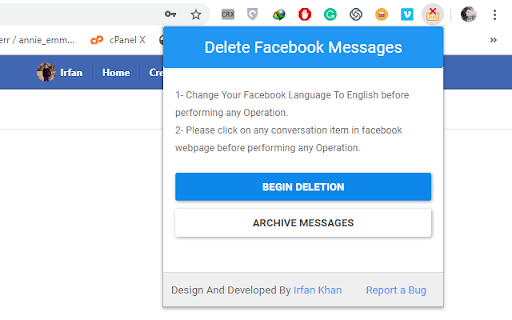
This extension allows you to delete or archive all of your facebook messages in one click. This extension offers the convenience of deleting or archiving all your Facebook messages with a single click. **Compatible with the new Facebook user interface.** **Works flawlessly with page inbox as well.** Here's how you can utilize this extension: 1. Install the "Delete Facebook Messages" extension for your Chrome browser. 2. Visit https://www.facebook.com/messages. 3. Click on the icon of the "Delete Facebook Messages" extension. 4. Select "Begin Deletion" to delete all of your messages. 5. Choose "Archive Messages" to archive all of your messages. Please ensure that your Facebook language is set to English before initiating any operations. For any assistance, bug reports, or suggestions, please feel free to contact us.

Delete Facebook Messages
Effortlessly delete, hide, and manage your messages, including buy/sell and hidden messages, with ease. 🧭 User-Friendly Interface Clean, simple, and intuitive design—no learning curve required. ⚡ Fast & Efficient Performance Optimized for speed to handle message actions quickly and smoothly. 🔒 Privacy-Focused Runs locally in your browser—your data stays private and secure. 🎯 Precise Control Select, manage, and organize messages exactly the way you want. 🖥️ Lightweight & Stable Minimal system resource usage for a smooth browsing experience. 🔄 Regular Compatibility Updates Built to stay compatible with platform changes and browser updates. 🎁 Free Trial Available Test the extension risk-free—manage up to 5 messages for free before upgrading. 🔧 How the Extension Works 1️⃣ Download the Extension Install the extension from the Chrome Web Store. 2️⃣ Click the Extension Icon Open the extension by clicking its icon in your browser toolbar. 3️⃣ Navigate to the Messages Page If you’re not already there, click “Go to Messages Page.” 4️⃣ Explore the Tabs Access four default tabs starting with “Messages.” The interface guides you smoothly through each feature with ease. 🚫 This extension is not authorized

Delete Facebook Messages (Turbo)
Turbo tool to delete 🗑️, archive 📂, or restore 🔓 messages in bulk for a fast, clean, and organized inbox. ✨ ✅ Turbo Speed Performance Bulk delete 🗑️, archive 📂, or restore 🔓 messages quickly with smooth Turbo processing. ✅ Smart & Easy to Use Clean, modern, and advanced UI designed for simple one-click actions. ✅ 100% Browser-Based Works directly inside your browser without external software or complicated setup. ✅ No Sign-Up Required No account creation, no login, and no personal data collection. ✅ Privacy Focused Your messages and activity are not saved on external servers. ✅ Dark & Light Mode Enjoy a beautiful interface with both dark 🌙 and light ☀️ themes. ✅ Bulk Inbox Management Manage delete, archive, unarchive, and Buy/Sell conversations easily. ✅ Stop Anytime Pause or stop the process instantly whenever you want. 1️⃣ Install the extension. 2️⃣ The extension will automatically open the Messages page. 3️⃣ Click the extension icon from your browser toolbar. 4️⃣ You will see options like: 5️⃣ Choose the action you want to perform. 6️⃣ You can stop the process anytime using the Stop button. ⚠️ Note: This extension is an independent tool and is not authorized by any platform.

Delete Facebook Messages Pro
🔄 2026 Updated & Improved 🚀 — The most advanced extension ✨ with a unique, easy-to-use UI 🎨 and powerful combined functionality to delete 🗑️ & archive 📦 messages. ⭐ Smooth & User-Friendly UI 🎨 — Unique, clean, and easy to navigate. ⭐ Fast & Time-Saving ⚡ — Manage all selected chats with just one click. ⭐ Keep Important Chats 💡 — Safeguard what matters while cleaning the rest. ⭐ Live Chat Preview 👀 — See selected chats as images at the bottom in real-time, with animated text above each image showing selection status. ⭐ Live Processing Popup 📊 — Watch the progress live in a professional popup while each chat is archived/deleted with smooth animations. ⭐ No Sign-In Required 🚫 — Use the extension instantly without logging in. ⭐ Free Trial 🎁 — Try it free with a 5-use limit before upgrading. 📖 How It Works 1️⃣ Download the Extension 📥 — Add it to your Chrome browser. 2️⃣ Click the Extension Icon 🔧 — Open the features from your toolbar. 3️⃣ Open Messages Page 📩 — Or click "Go to Messages Page" if it’s not open. 4️⃣ Add Checkboxes ✅ — Two checkboxes appear: Archive 📦 & Delete 🗑️. 5️⃣ Select Messages 📑 — Choose individually or use “Toggle All” for bulk selection. Selected chats appear as images at the bottom with animated text above each. Watch the popup display live progress while chats are processed with smooth removal animations from the list. ⚠️ Note: This extension operates independently and is not officially authorized or endorsed by Facebook.

Delete All Archived Chats on Facebook 2026
🗑️ Effortlessly clear all types of your archived chats on Facebook with just a click. ✅ About the Extension: 🗑️ Simplify Your Messages with Ease! 🚀 The "Delete All Archived Chats on Facebook 2026" extension helps you declutter your inbox by efficiently deleting all types of archived messages, including Mrkplc archived messages, spam archived messages, and more! 🌍✨ 🔥 Key Advantages: ✅ 🌍 Multilingual Support – Works in all languages! ✅ ⚡ Instant Cleanup – Remove all archived messages with just a few clicks! ✅ 🖥️ User-Friendly – A simple & intuitive interface for effortless use. ✅ 🔑 No Sign-In Required – Start deleting messages immediately without logging in! ✅ 🎁 Free Trial – Try the extension by deleting up to 5 archived messages for free! ✅ ⏳ Saves Time – No need for manual deletion—let the extension do it for you! 📌 How to Use: 1️⃣ 🔗 Install the Extension – Add it to your Chrome browser. 2️⃣ 📌 Click the Extension Icon – Open it from your browser toolbar. 3️⃣ 📂 Navigate to Facebook – Click "Go to Facebook Page" if not already open. 4️⃣ 🗃️ Open Archived Chats – Click "Load Archived Chats" to prepare messages for deletion. 5️⃣ 🗑️ Start Deletion – Click "Start Messages Deletion" to remove archived messages. 6️⃣ ⏹️ Stop Anytime – Use "Stop Messages Deletion" if you wish to halt the process. ⚖️ Copyright Notice: This extension and all associated UI, design, logic, and source code are proprietary and protected works; any unauthorized reproduction, modification, redistribution, reverse-engineering, or commercial use is strictly forbidden. ❗ Note: This extension is not authorized by Facebook.
