
idlgfgmjjleagmkkfekibaincekfienk

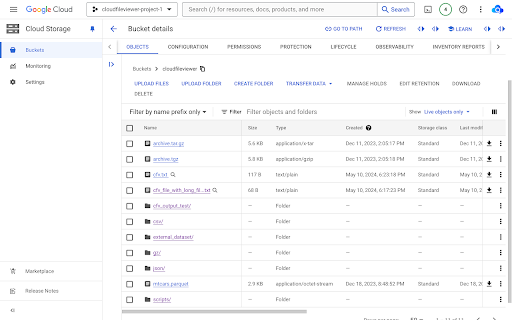
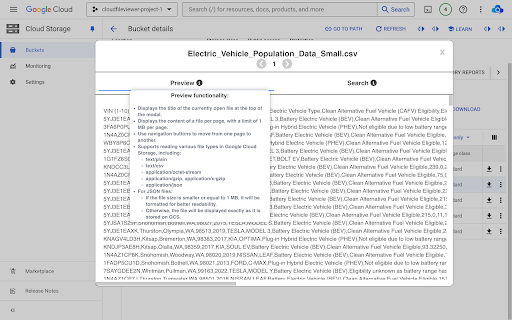
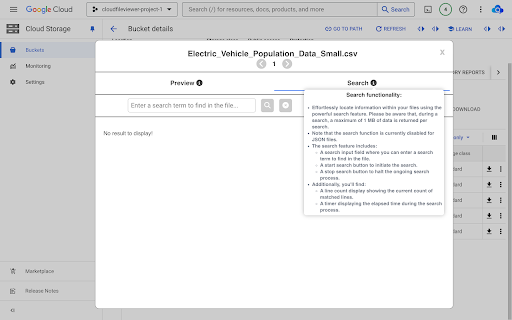

Chrome extension for easy file viewing on Google Cloud Storage with improved UI, stats, pagination, and search features. Cloud File Viewer is a Chrome extension that allows you to quickly preview and manage files stored in Google Cloud Storage (GCS) without downloading them. Ideal for developers, data engineers, and cloud professionals, this tool streamlines your workflow with an intuitive and optimized interface. ✨ What’s New? • 🎨 Revamped UI for a more modern and user-friendly experience. • 📊 New! Weekly usage statistics to track and compare your activity. 🔹 Key Features: • ⚡ Instant file preview for text/csv, json, gzip, and more. • 📁 Quick access to your recent storage buckets. • 🔍 Optimized filename display for better readability. • 🔗 Seamless integration with Google Cloud Platform. ✔ No need to download files just to check their content. ✔ Save bandwidth and time with efficient previews. ✔ Gain insights into your usage with real-time statistics. ✔ Enjoy an improved and intuitive UI. ✔ Maintain full privacy—no data is collected or stored. 🔹 Try it now and simplify your Google Cloud Storage experience! 🚀 Revolutionize your interaction with Google Cloud Storage today! 📥 Download Cloud File Viewer now to elevate your productivity and simplify your Google Cloud Storage experience. 💼 Maximize efficiency – simplify with Cloud File Viewer.

Enhanced Image Viewer
Features: ✓ Position images in center or top left corner ✓ Set custom background color ✓ Zoom, rotate, pan and scroll images with improved controls ✓ Flip images horizontally and vertically ✓ Pixelate images for viewing pixel art and lossless formats ✓ Hide scrollbars ✓ View images in the current tab ✓ Works with local files and incognito mode ✓ Enhances images on Reddit • No more headers and footers on images opened directly • Works with single images and image galleries in an overlay ✓ Enhances images on image hosting sites • Skips the continue button • Shows the image full-screen automatically Feel free to leave any feedback you might have on the support page or contact us by email.

Plerdy UX & Usability Testing
Use the Plerdy UX & Usability Testing Chrome extension to enhance site design with heatmaps, scroll tracking, and screenshots. Plerdy UX & Usability Testing Chrome Extension helps you evaluate website usability and predict how users are likely to interact with your pages—no coding required. This tool is perfect for marketers, UX designers, product managers, and site owners who want to optimize layouts, boost engagement, and improve conversions. What’s inside? 1. Heatmap Analysis (prediction) – Identify likely click hotspots and overlooked elements using learned interaction patterns. 2. Scroll-Depth Tracking (prediction) – See where attention is expected to drop and how far users are likely to scroll. 3. AI UX Tips (page-wide analysis) – Get a prioritized list of actionable suggestions to improve usability and conversion rate optimization (CRO). 4. A/B Testing Ideas – Generate testable website usability variations and estimate potential impact before making changes. 5. Screenshot Tool – Capture full-page screenshots, add comments and arrows, and share for fast feedback. How it works? Open any website, click the extension icon, and instantly generate AI-predicted behavior maps (heatmaps & scroll depth) plus a full-page UX review. This analysis simulates user behavior based on learned interaction patterns—not real user data—so you can quickly spot usability issues and behavior tracking opportunities. For real on-site analytics (actual user clicks, sessions, and conversion data), connect Plerdy’s website analytics script. Combine AI-based usability insights with real user behavior analytics to refine flows and drive higher conversions. Why teams use Plerdy? 1. Predictive UX & usability testing without coding 2. Independent, page-wide CRO and usability tips 3. Faster research cycles with website analytics insights 4. Clear visuals to align teams on what to fix first Trusted by over 315+ G2 reviewers, Plerdy empowers teams worldwide to create more user-centered websites. Try this free usability testing extension now and optimize your site’s performance today!

Autofill
Use Autofill Google Chrome extension to save form data and fill online forms, documents, and blanks with simple autocomplete. 🚀 Autofill is a practical autofill for chrome tool for people who repeatedly enter the same information on the same websites at work. It’s built for predictable autofilling, not “smart guesses.” For dashboards, portals, or internal systems, it supports quick fill while keeping you in control. Simple by design, even for teams. 🧩 Typical situations where it helps: • Re-entering the same contact details • Updating records in stable web UIs • Submitting similar requests again and again ✍️ Instead of retyping values, save them once and reuse them later. Autofill keeps the workflow explicit: you decide when data is saved and when it’s applied. Many users discover it searching autofill chrome; others by typing autofil. Either way, this autofill extension is built for repeat work, not one-off experiments—and it stays under your control. 🎛️ Clear control list: ✔️ Manual save, manual fill ✔️ Separate data per site ✔️ Multiple profiles for different routines ✔️ Data stored inside the extension ✔️ Form savers approach: save once, restore later ✅ How it works in everyday use: → Open an autofill form page you use often → Fill in the values you want to reuse → Click “Save data” for the current site and profile → Come back later and click “Fill form” → It autofills matching fields in one action → Use it again on other autofill forms on the same site 🧹 If the wrong profile is selected—or auto fill wasn’t intended—use the “Clear” button to empty values on the current page and start over quickly without losing your place. This is useful when you switch accounts, change environments, or reset a fillout form without refreshing the site 🙂. 🧠 This tool does not try to predict meaning or do AI-based auto complete. Built-in chrome autofill can be helpful, but some websites rely on—or block—browser suggestion behavior through the html autocomplete attribute. The approach here is different: saved values are restored intentionally, so results are easier to verify. 🧷 Profiles are made for routine workflows: I. Separate work and personal datasets II. Different customers or accounts III. Multiple users on one browser IV. A controlled automatic form filler mode 🛡️ It works best on stable pages where fields don’t constantly change on fillout forms. On dynamic sites, inputs may appear late or be rebuilt, so you may need to fill out the form again after the page loads and run autofill again. 📌 Where it’s most useful: ➢ Government portals with long pages and repeated details ➢ HR, recruiting, and onboarding platforms you revisit during a cycle ➢ SaaS admin consoles and back-office tools where you repeatedly autofill web forms ➢ Banking and insurance sites with structured pages and stable fields ➢ CRM / ERP systems with repeat submissions across teams 🧭 Designed around clear boundaries, it restores only what you saved for the same website and profile, so behavior stays easy to understand. That keeps form fill predictable on the sites you actually use. Data stays inside the extension. For a lightweight autofill app experience in Chrome, use profiles and one-click actions without mixing sites. 🔎 If you’re comparing options, treat this as a controlled form filler chrome extension for pages you revisit. Some tools try to guess fields automatically. Autofill focuses on consistent results, fewer surprises, and a quick way to clear everything. That’s what separates it from many autofill form chrom extensions. 🧩 If you searched for an autocomplete extension chrome users can control, this provides a “save then restore” model rather than predictive suggestions. If you want something you can repeat and verify, the goal is to be boring in the best way—without extra guessing ✅. 📊 Google Sheets support is available for spreadsheet-style workflows. You can save values from tables and paste them back later for the same table template. Some users search for google sheets autofill, but in this case it means reuse of stored cell values (copy/paste style), not the Sheets fill-handle feature. 🏁 If you need an autofill chrome extension that is straightforward, profile-based, and easy to reverse with “Clear,” this auto fill form extension is designed for predictable repetition on the websites you actually use. It’s a form filler extension built for repeat work in daily admin tasks.

Reader Mode for Google Chrome™
Strips away clutter like buttons, background images, and changes the page's text size, contrast and layout for better readability Do you want to view a news article online without the advertisements etc all blocking the actual article? Simply install our software Reader Mode for Google Chrome™ and our software will help you remove all the clutter away from a webpage. This is a simple chrome reader mode software which allows you to focus on the text. Switch to reader view instantly once you install our software. To get started, here are the few simple steps to follow Install the software Reader Mode for Google Chrome™ Go to the website you want to use Reader Mode Click on our software icon/right click and choose "Reader Mode" Our software will automatically remove the advertisements, leaving behind only the article for you to focus on. Disclaimer: Please note this extension is NOT made by Google and is made by an independent development team. All copyrights belong to their respective owners. Google doesn’t endorse or sponsor this Chrome extension. Reader Mode for Google Chrome™ is not owned by, is not licensed by and is not a subsidiary of Google Inc.
