
idjehecnhghbndalgpfmhahnhkcfeeie
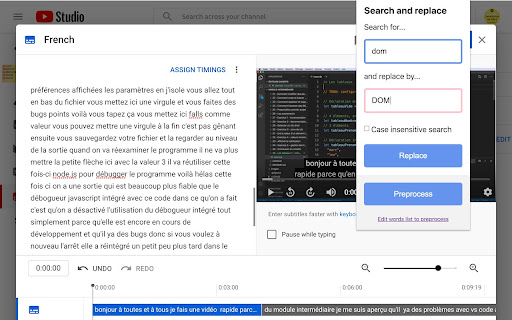

Fix misspelled words in YouTube transcripts with a single click! Fix all misspelled words and expressions of YouTube transcripts (subtitles) right from the online YouTube editor with one single click. Create your own personal list of misspelled words that must be replaced in your video and process them all with one click: huge time saver! This extension works only when you are on the official online YouTube subtitle editor website. FEATURES: - Fix misspelled words in your entire transcript with one click - Store a list of common misspelled words and fix all of them with one click (preprocess feature) - Create the start of a sentence easily: click on a word, tap twice on CTRL! It will make the first letter of the word in uppercase and add a dot at the end of the previous word if needed. KEYBOARD SHORTCUTS - Open the extension panel with CTRL+SHIFT+F - Click on the first word of a sentence, tap twice on CTRL to create the start of a sentence HOW DOES IT WORKS? 1. Log yourself into YouTube 2. Open YouTube Studio 3. Select the "Subtitles" category on the left panel 4. Select the video you want to edit the subtitles from (at this step the URL should start by https://studio.youtube.com/channel//translations or https://studio.youtube.com/video//translations) 5. Click on the "edit" or "duplicate and edit" button next to the subtitle your want to edit 6. WARNING: You MUST use the mode "edit as text" for the extension to work properly. So tap on this button in order to put the entire text of subtitles in one big block of text. That way the extension can search and replace in the whole text otherwise it will modify only a part of the text that is currently displayed in the interface. 7. You can now use this extension, enjoy!

YouTube™ Dual Subtitles
YouTube bilingual subtitles, simultaneous display of two languages, supports custom styles. YouTube bilingual subtitles, simultaneous display of two languages, supports custom styles.

Online Subtitles
Watch your favorite movies and shows online with subtitles. Watch your favorite movies and shows online with subtitles. Automatically finds video on web pages and adds functionality to upload subtitles (.srt, charset utf-8). Includes many options, such as subtitle color, position and time adjustment. Works only with html5 video. Graphic design by Tetyana Starchenko. ver 0.1.7: - select a subtitle encoding - shortcut (g, h) for decrease and increase the time of the subtitles (ty Leo Caseiro) - small css and js fixes ver 0.1.8: - updated to manifest v3 - added support dragging subtitels across the screen

Youtube Subtitle Download Helper
This extension allows you to download captions data from Youtube. You can download captions data in multiple file formats. This extension allows you to download captions data from Youtube. Click the YouTube Subtitle Download Helper icon on the video page where you want to download subtitles. You can select and download available languages and file formats. Supported file formats are .srt, .vtt, .csv, .txt, .lrc. This extension doesn't show ads and send user's data anywhere. If subtitles are present in your video but the extension doesn't work properly, try disabling adblock. This extension is open source software. You can see the source code here. https://github.com/kyamashiro/youtube-subtitle-download-helper change note: v2.0.0 - Resolved the problem of subtitle retrieval failure. Introduced an in-screen download button. Users can now configure the default subtitle retrieval language and file format. v1.1.0 - Fix problem that prevented download. v1.0.6 - Fixed the problem of download failures due to same origin errors. v1.0.5 - Support LRC file format.

EasySubs – Learn languages by watching films and series
Customizable subtitles and a popup dictionary to master your vocabulary while watching YouTube or Netflix. Open-source and free. Improve your language skills by watching TV shows and movies with subtitles. Enjoy seamless experience – point over a word to get it translated, the video playback will be automatically paused. You can even translate the whole phrase by clicking on it. Do you have a subtitle file in your native language? Upload it and easily sync it with the video if needed. – TRANSLATION: Hover over or click on subtitles for single-word or full-sentence translations. – WORD PRONUNCIATION: Improve your listening and speaking skills with correct pronunciations. – VOCABULARY EXPORT: Export words to language learning services like Anki, LinguaLeo, and Puzzle English. – UPLOAD YOUR OWN SUBTITLES: Supports .SRT and .VTT formats. – SMART AUTO-PAUSE: Hover over a word, and the video will pause automatically. – SUBTITLE PROGRESS BAR: Navigate subtitles easily. Click to rewind the video to the desired point. – MANUAL SUBTITLE SYNC: Adjust subtitles if they’re out of sync with the video. – REWIND AND FAST-FORWARD BY SUBTITLES: Use the right arrow key to replay the last sentence. – SHOW ALL AVAILABLE SUBTITLES: Access all subtitles and audio tracks on Netflix, regardless of region. – YouTube (videos and originals) – Netflix – Coursera – KinoPub …and more coming soon. Please note that some services may not be available in your region or may require a subscription (e.g., Netflix). We are not affiliated with these services. ❤️ QUESTIONS AND FEEDBACK EasySubs is a completely free, open-source Chrome extension with no ads or hidden costs. If you like it, please leave a positive review – it helps a lot. – Send your feedback to support@easysubs.cc – Ask your question in our Telegram group: @easysubs_ext – Contribute to the project – find more details on our GitHub page: https://github.com/Nitrino/easysubs
