
idgiodaooapkmmipoahlcmggofokcilg
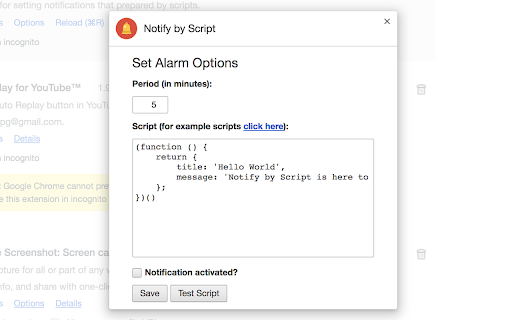
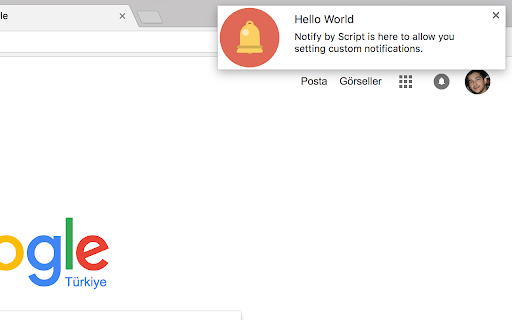
Extension for setting notifications that prepared by scripts. Notify by Script is here to allow you setting alarms with custom scripted notifications. For example information, visit https://github.com/ufuk/notify-by-script#notify-by-script

Starify Links
Add star badges to links to GitHub, GitLab, Chrome Web Store, Reddit, and more Scans all links on a page and adds a stars badges to links pointing to GitHub user/project, Subreddits, Chrome/Firefox Extensions, Youtube Channels/Videos, Bluesky actors, Twitch players, HackerNews users, etc... Runs immediately on Google search results, StackOverflow sites, Github.com, npmjs.com etc. Use Alt+Shift+S or click the extension icon to activate on other pages. All badges and the shortcut are configurable.

Notinote - Get notified for important tasks!
Use new tab screen as a note taking tool and get notified for important tasks. Are you struggling to keep track of important tasks and reminders? Meet Notinote, your new go-to tool for simple and effective note-taking. With Notinote, you can easily manage your notes and stay on top of your priorities. Key Features: 📌 Priority-Based Notes: Change the priority of your notes with a single click. High-priority notes are highlighted in red or yellow. 🔔 Periodic Notifications: Get regular Chrome notifications for high-priority notes. The default reminder interval is every hour, but you can customize it in the options. 🔒 Private and Secure: Your memos are stored locally on your device and are never sent to any server, ensuring complete privacy. ✔️ Easy Completion and Restoration: Mark your memos as complete with a right-click. If needed, restore them back with the same action. Why Choose Notinote? 🧩 User-Friendly Interface: Navigate through your notes effortlessly. ⚙️ Customizable Settings: Adjust the notification frequency to suit your needs. 🚀 Reliable Performance: Enjoy a seamless and bug-free experience. 📈 Productivity Booster: Regular notifications help you remember and complete important tasks. 📝 Add a Note: Simply type your memo and save it. 🔄 Set Priority: Click on the note to change its priority. High-priority notes will trigger periodic notifications. ⚙️ Customize Notifications: Go to options to adjust the notification frequency. Get Started Today! Download Notinote now and never miss an important task again. Stay organized, prioritize your tasks, and boost your productivity with ease. Support and Contact: Have questions or need support? Please leave a comment

Academic Notion
Are you tired of copying and pasting info of research papers into your Notion database? Academic Notion automates this process for you, so you can use Notion like a real reference management software like Zotero. 1. Visit a research paper platform that is supported and click the icon of Academic Notion 2. Select the paper(s) you want to upload to your Notion database 3. Authorize Academic Notion to access your database and set the correspondence between columns of your database and fields of a paper. (This step only needs to be done once.) Note: Academic Notion is still in an early stage. The currently supported platforms are:

Vocab Master
Reminds you vocabulary while you are surfing. Reminds you English vocabulary while you surfing. Activate reminder and set reminder period. It will popup a random vocabulary from your selected vocabulary list. Most of vocabulary items have example usages beside simple definition in English.
