
iddmabhekhhonkmomaklnflhhgbfnioe

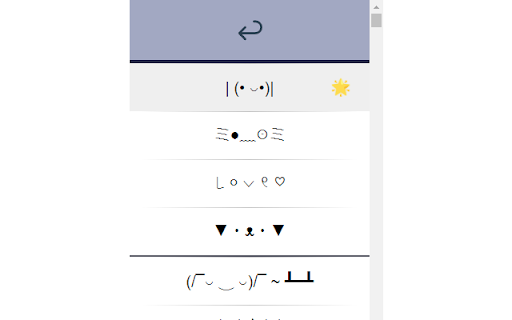
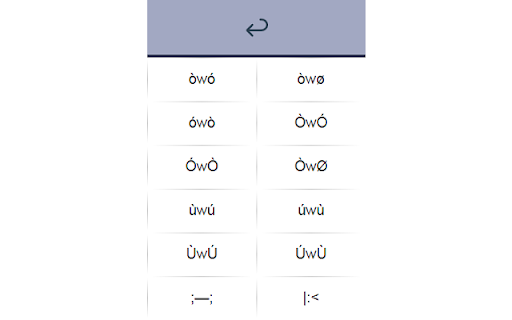
Copy cute, silly, weird ASCII emotes directly to your clipboard. Copy cute, silly, weird ASCII emotes directly to your clipboard with a single click. You may also favorite them to find them easily later.

Pets Chrome
🐾 Pets for Chrome is an application that adds cute and cuddly pets right into your browser. 😻 Pets for Chrome is an application that adds cute and cuddly pets right into your browser. With our plugin, you can now own a pet. Get your very own funny chrome pet today and brighten up your day! 🐈🐈🐈 Our plugin offers a variety of cute pets to choose from, each with their own unique personality and quirks. You can easily switch between pets to keep things interesting and even interact with them by petting, playing, and dragging them around your screen. 🐾 Whether you're looking for a quick distraction during a busy workday or just want to add some fun and personality to your browser, Pets for Chrome has got you covered. Our plugin is user-friendly and easy to use, and you can display or hide your pet whenever you want. Say goodbye to boring and uninspired workspaces and hello to your new furry friend with Pets for Chrome. Download our plugin today and discover a whole new world of virtual pet ownership! 🐾 With this plugin you can: - Interact with it ! - Drag it when you want on the screen ! - You can display or hide it when you want ! - Add size for pets in the icon menu - Add reset position button in the icon menu

Kawaii Faces (✿◠‿◠)
Collection of cool and stylish (▰˘◡˘▰) kawaii and text faces for your Instagram, facebook, twitter bio, profile name or comments. On this Kawaii Faces and Text Faces extension, you will get a huge collection of text faces, which you can use in your daily communication on social media platforms or send a text message. With these text faces, you can present your mood and make your chat unique and cool. Here are some examples of Kawaii text faces (✿◠‿◠) (ノ◕ヮ◕)ノ*:・゚✧ \(^○^)人(^○^)/ (づ。◕‿‿◕。)づ ヽ༼ ຈل͜ຈ༼ ▀̿̿Ĺ̯̿̿▀̿ ̿༽Ɵ͆ل͜Ɵ͆ ༽ノ

Joke Of The Day
Enjoy New Jokes Daily - A fresh joke every day to brighten your mood! Start your day off right with Joke Of The Day! Need a joke to share with your family, friends, co-workers, or team? Open a new tab and instantly get a hilarious joke tailored to the season. Jokes refresh every 12 hours, so check back often for something new. Want more? Upgrade to Premium for unlimited jokes for life.

Web Paint Tool - draw online
Draw rectangle, circle, lines and others shapes or add text on any web pages, then make screenshot the result. Web Paint Tool is absolutely free lightweight digital program to created various drawing that comes loaded with brushes, fonts, shapes, and other resources. Our Paint Tool extension has a simple and easy to use design. It is not confusing and easily recognisable tool icons (pencil, paint bucket, eraser and others tool) are used in the app which makes it easy for everyone to use. Paint online or add information on a webpage to highlight moments, then take a screenshot of a full webpage or just a selected area with an option to download or share it. Fully customized screenshot that could be printed, saved or sent instantly. It contains the tools you need: - Pencil tool - draw custom lines - Text tool - add annotation - Emoji - add fine emoji on any web pages - Bucket fill tool - fill shapes and drawn with any color from palette - Line tool - put start and end point to paint straight line - Quadratic curve - draw a quadratic curve with the selected line width - Bezier curve - paint a bezier curve with the selected line width - Polygon tool - paint a polygon with the selected line width - Ellipse tool - draw an ellipse or a circle with the selected line width - Eyedropper tool - pick a color from the web page or your drawings - Screenshot tool - screenshot maker allows saving result in PN or JPG All tools as in MS Paint but only in your browser. You can mark shapes with the magic marker, write with the text tool and more. After you are done. Take screenshot of your work so that your friends can see your creativity as well. You can share your images on Pinterest board. Want to share your screen for cases like reporting technical issues, making product demos or how-to tutorials? Here are reasons to choose Paint and Screenshot Tool: - Hot-keys to each tool - Current drawings are automatically saved - Save drawing with a Screenshot option ( take a screenshot of a full page or capture selected area.) Screen capture. - Download image to your PC or Print - Crop the necessary area of an image and save it Annotate on any webpage and save it as a screenshot! Annotate the Web was created to allow users to annotate any webpage and save it as an image. Page Marker for Chrome Important After installation / update Paint Tool, please reload the active tabs in your browser for the extension to work. Paint on web and Screenshot Tool in simple manner and without any difficulties. Draw online with our new and absolutely free extension for chrome browser. Known as a web paint or paint online tool extension is a useful have for students, teammates and everyone who works with websites content, as you could easily learn or save information, create custom tutorials or paper notes, if you’d decided to print it. Please rate our Paint Tool extension if you like it. Happy painting everyone.
