
idcegoalhgmlennibnbpanopockoccgp
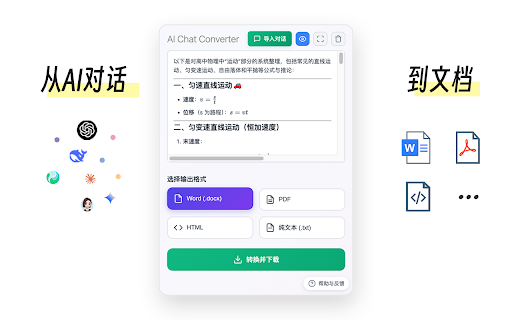


将AI对话转换为word、pdf、html等格式 功能特性: 🔄 多格式转换 - 支持转换为 Word (.docx)、PDF、HTML、纯文本 (.txt) 格式 使用方法: 1、点击浏览器工具栏中的 AI Chat Converter 图标 2、在文本框中输入或粘贴 AI 对话内容(Markdown格式) 3、选择想要的输出格式(Word、PDF、HTML、纯文本) 4、点击「转换并下载」按钮 5、文件将自动下载到您的设备 故障排除: 常见问题 Q: 转换失败怎么办? A: 检查网络连接,确保 Markdown 内容格式正确 Q: 公式无法转换? A: 确保公式部分用“$$”包裹

AI Exporter: Save ChatGPT, Gemini to PDF, Word, MD and Notion
Export ChatGPT, Claude, Gemini and NotebookLM chats to PDF/Word/Markdown/Txt. Supports content selection, and Notion sync, download. 📌 Introduction Want to save your AI conversations forever? AI Exporter is a professional browser extension supporting 10+ major platforms including ChatGPT, Gemini, Claude, and NotebookLM. With just one click, export your AI chats perfectly to PDF (Latex supported), Word, Markdown (MD), JSON, Image, or sync directly to Notion. Never worry about losing your chat history again. Archive, share, and edit your AI knowledge assets with ease. 🔥 Popular Features 🆕 Precise Timestamps: Automatically extracts and displays the exact creation time of each session, making your history fully traceable for better timeline management. 🆕 Super-Long Chat Export: Engineered to handle massive conversations effortlessly without crashing or truncating, ensuring every detail of your deep dives is captured. 🆕 Accurate Model Versioning: Displays the specific AI model version used in each session (e.g., Gemini 3 Pro, ChatGPT 2.5 thinking) in exported docs, making academic research and sourcing more rigorous. 🆕 Cross-Platform Collection: Sidebar mode lets you save chats locally with one click for multi-model comparison and merged exports. 🆕 Deep Research Export: Full support for downloading content from ChatGPT Deep Research and Gemini Deep Research modes. 🆕 Stylish Templates: Choose from Highlight, Dark, Note, and other beautiful templates for a professional look. 🆕 Extensive Compatibility: Supports 10+ sites, including DeepSeek, Perplexity, Copilot, Google AI Studio, and more. ✨ Powerful Export Experience ✅ Perfect PDF Layout: Automatically handles Latex formulas and code highlighting while maintaining the native UI feel. ✅ Sync to Notion: Seamlessly bridge AI and your knowledge base by turning chats into Notion pages instantly. ✅ Flexible Selection: Skip the fluff—select only what you need with multi-selection support. ✅ Image & Text Preservation: Perfectly retains images and charts; supports generating long-image sharing cards. ✅ Local Knowledge Base: Save important AI inspirations to a local database for instant offline preview. ✅ Search Overviews Backup: One-click backup for Google Search AI Overviews results. 📌 Why Choose AI Exporter? 👨💻 Community Focused: We listen to user feedback with frequent updates for a reliable experience. 🎓 Academic Friendly: Precisely identify and export academic discussions with complex Latex formulas. 👨💻 Dev Empowered: Export Markdown with one click; code snippets can be seamlessly integrated into your docs. 📊 Knowledge Accumulation: Quickly backup data analysis and reports to build your personal AI think tank. 📢 Preserve Inspiration: Save full image-text chats as beautifully formatted PDFs for easy sharing. 🌟 Install for free now and give your AI assets a permanent home!

AI Chat Exporter – PDF, DOCX & Sheets
Save and export ChatGPT conversations instantly Export your AI conversations into professional formats with clean formatting, code blocks, tables, and images preserved. Perfect for researchers, developers, students, and professionals who want to archive or reuse AI conversations. • Export to PDF with professional layout • Export to DOCX (Microsoft Word) • Export to Excel spreadsheets • Export to Google Docs • Export to Notion • Compose Gmail with conversation • Preserve code blocks, tables, and formatting • Include images in exports • Export single messages or full conversations • 10 free exports for registered users • Monthly: $5/month – Unlimited exports • Yearly: $30/year – Best value (save 50%) • AI conversation content is processed locally in your browser • Conversation content is NEVER transmitted to our servers • Exported files are generated directly on your device • Account and license data are securely stored for authentication and subscription management • OAuth tokens (Google, Notion) remain stored locally in your browser • We do not sell or share personal data with third parties This extension may collect limited account and technical information such as: • Email address • License key and subscription status • Anonymous device identifier • IP address (used for fraud prevention) This information is used only for authentication, subscription management, and abuse prevention. 1. Install the extension 2. Open a supported AI platform (ChatGPT, Claude, Gemini, Grok, DeepSeek) 3. Click the export button in the conversation interface 4. Choose your export format 5. Your conversation is saved instantly 🎯 PERFECT FOR ⭐ Love the extension? Please leave a 5-star review! 🔄 We regularly release updates with new export formats and platform compatibility. This extension is an independent tool and is not affiliated with OpenAI, Anthropic, Google, xAI, or DeepSeek.

ChatPDF - ChatGPT for PDF
Use ChatPDF: AI summarizer to chat with PDF, extract insights, and get AI summary. Simplify your pdf reading! ⚡ Introducing ChatPDF, the revolutionary Google Chrome extension and powerful AI tool that transforms the way you interact with PDF files (powered by ChatGPT models). ⭐ With ChatPDF, you can now upload file and ask your pdf about its content using AI chat technology. ⭐ This innovative tool is perfect for students, professionals, and anyone looking to streamline their document analysis process. Chat PDF allows you to chat with PDF in a way that feels natural and intuitive. Just upload your file, and you can start asking questions about its contents (like in ChatGPT). The AI understands the context and provides you with precise answers, making information retrieval a breeze. Imagine being able to dive deep into any document without the hassle of manual searching! ✨ 1️⃣ Upload and Ask ChatPDF With Chat to pdf (powered by ChatGPT), you can easily upload any file and ask anything. Want to know specific details? Just type your question, and watch as the AI provides instant answers. 2️⃣ Conversations Our advanced Pdf ai chat capability allows you to engage in meaningful dialogues about the document. Whether you need a quick summary or detailed explanations, AI technology has you covered. 3️⃣ Smart Document Summarization Use the AI summarizer feature to generate concise summaries of your documents. This AI summarizer quickly distills the essential points, helping you grasp the main ideas without spending hours reading. 4️⃣ Versatile Use Cases of ChatPDF Our extension is designed to meet a variety of needs. Here are some practical applications: ▪️ Research Assistance: Quickly extract relevant information from research papers. ▪️ Study Aid: Use AI (ChatGPT) Pdf summarizer notes to aid in exam preparation. ▪️ Contract Review: Get clarity on legal terms in contracts with a simple question. ▪️ Report Analysis: Analyze complex reports effortlessly by asking ChatPDF targeted questions. ▪️ User Manuals: Navigate through user manuals and find instructions with ease. ️ 5️⃣ Engaging With the pdf chat feature, you can transform any document into an interactive experience. Imagine discussing the contents of a textbook or a business report as if you were talking to a knowledgeable friend! 💬 📍 Step 1: Install the extension from the Chrome Web Store. 📍 Step 2: Upload your desired file directly through the extension. 📍 Step 3: Start asking questions about the document. Use prompts like: ➤ What are the main arguments in this paper? ➤ Can you summarize the conclusion? ➤ What statistics are mentioned? 🔍 📃 Time-Saving: No more tedious reading. Get straight to the answers you need. 📃 Convenience: Access ChatPDF free of charge and elevate your document-reading experience. 📃 Enhanced Learning: Great for students who want to maximize their study efficiency. 📃 Accessibility: Perfect for anyone looking to extract information from PDFs without hassle. 💪 The Power of AI Harness the power of AI summary for your needs with ChatGPT. With Doc reading AI capabilities, chat to pdf ai offers a unique blend of efficiency and ease of use. This AI not only helps in summarizing content but also facilitates discussions about the material, making it an indispensable tool for anyone working with documents regularly. 💡 Choosing ChatPDF means opting for a smarter way to handle your documents. Experience the benefits of: 💡 AI tool capabilities for enhanced interaction. 💡 The ability to Chat with any document and get tailored responses. 💡 Comprehensive pdf features that allow for effective learning and information retention. In today's fast-paced world, efficient document management is crucial. ChatPDF provides a groundbreaking solution for anyone looking to optimize their file interactions. Whether you're preparing for exams, conducting research, or managing business documents, Chat PDF is your go-to extension. Upload your files, engage in insightful discussions, and unlock the full potential of your documents today! Start your journey towards more effective text handling and enjoy the seamless integration of AI in your reading experience. Get ready to transform the way you handle documents forever! 🚀

ChatGPT Exporter - ChatGPT to PDF, MD, and more
Transform your ChatGPT conversations into beautifully formatted, shareable files effortlessly! Whether for work, study, or personal reference, ChatGPT Exporter is the ultimate tool to download ChatGPT results as PDF, Markdown, Text, CSV, or JSON formats. ChatGPT is an advanced language model developed by OpenAI that can converse with humans like a human. ChatGPT conversations can be used for various purposes, such as research, training, or entertainment. However, extracting these conversations from ChatGPT can be a challenging task, especially if you have a large number of conversations or need to extract specific conversations only. 🖨️ Beautiful, Professional PDFs - No Unnecessary Clutter: Generated PDFs are free of distracting browser UI elements. - Customizable PDF Settings: a. Set your preferred filename—no need to rename files post-download. b. Define the content title, even if it's different from the conversation name. c. Adjust the PDF format (size and orientation). d. Choose between dark or light mode without altering the ChatGPT interface. e. Includes page numbers for easier navigation in long PDFs. f. Set page margins (Normal, Narrow, Wide) to match your formatting needs. g. Fine-tune font size with percentage-based scaling for better readability or space-saving. h. Choose your preferred font family for improved aesthetics or accessibility. i. Optionally include a table of contents for better structure and navigation. j. Add user info (name and/or email) for documentation or attribution. k. Control the visibility of date and time—choose to hide or display with custom formatting. l. Show per-message timestamps so you know exactly when each message was sent. m. Remove page numbers or interface icons for a cleaner, presentation-ready output. n. Page break per prompt option for better document structure and readability. o. Automatic CJK font rendering for Chinese, Japanese, and Korean content. p. Include or exclude Deep Research references to keep exports focused. q. Show or hide Web Search sources depending on your needs. r. Optionally include Thought Process / reasoning steps for full transparency. ✅ Selective Content Download Export only the parts of the conversation you need. Unlike other extensions, you're not forced to download the entire chat—just select the specific responses you want! Shift+click to quickly select a range of messages. 📂 Versatile File Format Support Export your ChatGPT conversations in multiple formats, including: - PDF - Markdown - Text (TXT) - CSV - JSON 📋 Copy to Clipboard Skip the download step entirely! Copy your exported content directly to your clipboard for instant use in other applications. 🔬 Preserves Advanced Content & Features Retains essential ChatGPT formatting and automatically extracts advanced features: - Canvas, mathematical formulas (block and inline) - Code blocks with syntax highlighting - Tables and structured content - Deep Research reports with full source citations (converted to footnotes in Markdown) - Web Search source links and references - Thought Process / reasoning steps from O1 and other reasoning models 👥 Group Conversation Support Export both regular chats and group conversations. The extension automatically detects group chats and identifies messages from different users and AI assistants. 🔓 Anonymous GPT Conversations No login? No problem! Download your GPT chats before logging in to ensure your data is captured seamlessly. 🌟 Modern, Polished Interface A clean, modern UI design that blends seamlessly with ChatGPT's look and feel. Smooth interactions and intuitive controls for beginners and advanced users alike. 🌍 Available in 34 Languages The extension interface supports 34 languages, and exported files maintain text in your chosen language, making it ideal for international users. ⚡ Performance You Can Count On - Lightweight extension that won't slow down your browser. - Optimized PDF export for long conversations. - Fast and smooth export across all formats. 💰 Free to Use with Optional Premium - Most features are completely free to use. - Markdown, Text, JSON, and CSV exports are always free. - PDF export: 3 free exports per day. Additional exports require a small fee to help cover tool maintenance costs. - For more details, visit our pricing page. 🎯 Use Cases and Benefits 📊 Ideal for Professionals Save customer interaction logs, brainstorming sessions, or project ideas. Share polished PDFs or Markdown files with colleagues or clients. 📚 Perfect for Students & Educators Archive study notes or Q&A sessions for later review. Save Deep Research reports with cited sources for academic reference. Export code snippets, formulas, or tables for assignments. 💻 For Developers Export JSON or CSV for data manipulation or analysis. Preserve code snippets with syntax highlighting in Markdown or PDFs. Save Thought Process reasoning steps to understand AI decision paths. ✍️ Content Creators' Companion Effortlessly save ideas or scripts. Use Markdown files directly in content management systems (CMS). Copy content directly to clipboard for quick pasting into blogs, social media, or writing apps. 1️⃣ Can I export only part of the conversation? Absolutely! Use the checkbox feature to select specific responses for export. Shift+click to select a range of messages at once. 2️⃣ Can I export Deep Research reports and Web Search sources? Yes! The extension automatically extracts Deep Research reports with full citations, Web Search source links, and Thought Process reasoning steps from ChatGPT's API. 3️⃣ Does it support group conversations? Yes! The extension automatically detects group chats and exports them with proper role identification for each participant. 4️⃣ Are canvas, formulas, code, and tables retained? Yes! All rich content—canvas, formulas, code blocks, and tables—is preserved in the export. 5️⃣ What browsers does ChatGPT Exporter support? We officially support Chrome. It also works on Edge, Brave, and other Chromium-based browsers via the Chrome Web Store. 6️⃣ How do you handle my conversation data? I have privacy concerns. We never store your data. PDF exports are processed temporarily on our server and deleted immediately. All other formats are handled entirely in your browser. 7️⃣ Do I need to log in to use the extension? Most features work without logging in. Only PDF export requires signing into the extension. Other formats like Markdown, Text, CSV, and JSON don't require login. 8️⃣ Can I use ChatGPT Exporter for free? Yes, most features are free. PDF export provides 3 free exports per day. Additional exports require a small fee to help cover tool maintenance costs. For more details, visit our pricing page. ✨ Why Choose ChatGPT Exporter? With unmatched versatility, advanced features, and a focus on user experience, ChatGPT Exporter is the only extension you'll ever need to save and share your ChatGPT results. 🔗 Install now and experience the difference! v5.0 1. Completely redesigned UI — modern, polished look that blends naturally with ChatGPT 2. Improved dark mode support across all UI components 3. Smoother interactions and faster response v4.0 1. Added Deep Research report export with full source citations 2. Added Web Search source link export 3. Added Thought Process / reasoning steps export 4. Added toggle settings to include or exclude each feature in exports 5. Improved PDF download speed and reliability v3.0 1. Added group conversation export support 2. Added Shift+click to select a range of messages 3. Improved PDF stability for long conversations 4. Improved CJK (Chinese, Japanese, Korean) font rendering in PDFs 5. Fixed PDF rendering issues with special characters and Unicode 6. Fixed filename encoding for Japanese and other non-Latin characters v2.27.0 1. Enabled several PDF options by default for a better out-of-box experience v2.26.1 1. Fixed date formatting for non-PDF exports v2.26.0 1. Improved PDF date and time formatting with timezone support v2.25.0 1. Added page break per prompt setting for PDF exports 2. Improved PDF layout with better margins and page breaks 3. Enhanced deep research report formatting in PDFs v2.24.0 1. Fixed image rendering for PDF v2.23.0 1. Fixed message selector compatibility issues 2. Enhanced PDF styling for thinking processes and user messages v2.20.0 1. Added download location setting 2. Added auto-open thought process option 3. Reorganized settings into common and PDF-specific sections 4. Improved markdown formatting by removing duplicate line breaks 5. Enhanced PDF styling for thinking processes and typography v2.19.0 1. Added support for exporting conversation links 2. Added font family selection for PDF exports v2.18.0 1. Users can now input name and email for all export formats 2. Added a toggle to show/hide export buttons v2.17.1 1. Added "None" option for the select button 2. Selecting now automatically expands all "Thought Process" sections v2.15.0 1. Added keyboard shortcut for the PDF export button 2. Fixed several bugs v2.13.0 1. Added support for setting a filename prefix v2.12.0 1. Users can now input name and email for PDF generation v2.8.0 1. Added common settings section in the extension options and popup window v2.7.0 1. Users can now input any font size 2. Improved performance and reduced export wait time v2.6.0 1. Added option to remove page numbers from PDF footers 2. Added option to remove conversation role icons in PDFs v2.5.0 1. Added export options for user info (name and email) 2. Added export options for date info: creation, modification, or export time v2.4.0 1. Now remembers user selections and export options for quicker future use v2.2.0 1. Added table of contents to PDF exports 2. Improved code block styling with syntax highlighting and line wrapping v2.1.0 1. Added localization for multiple languages 2. Tutorial page now opens on first install
