
iclicmdkaboklhbheioegllihihnhbaj


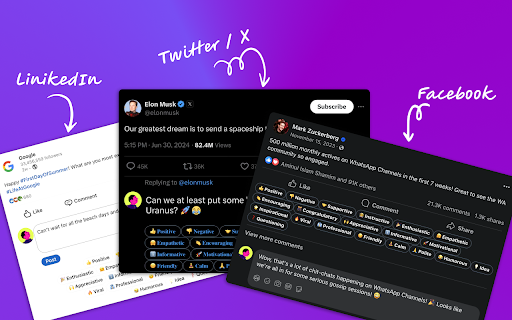


Boost Your LinkedIn, Twitter and Facebook Engagement with Commento.Social. AI-powered social media extension for everyone. Commento.social is a browser extension available for Chrome and Firefox that uses AI models to help you write better social media posts and reply to comments faster. Why Use Commento.Social? Social media is a crowded space, and standing out isn’t easy. Writing thoughtful comments takes time, but generic responses won’t help you build meaningful connections. **Commento.Social** generates insightful, relevant comments, helping you connect with potential clients and industry leaders effortlessly. Built for Social Media Growth AI is the future of social media marketing. Our platform is designed to help you grow your social media presence with cutting-edge AI technology. - Human like interactions and responses - Fast response time - Guaranteed growth in followers - Advanced analytics and insights Key Features - Smart AI Comments – Generate meaningful, context-aware responses instantly. - Second Brain (NEW) – Save and recall past comments for consistency in conversations (Premium feature). - Customizable Responses – Adjust tone, length, and keywords for personalized engagement. - Easy Integration – Works seamlessly within LinkedIn’s comment field. Benefits ✅ Save Time – No more struggling with the perfect response. ✅ Enhance Engagement – Build stronger connections with high-quality comments. ✅ Stay Visible – Keep yourself top-of-mind with potential clients and partners. ✅ Boost Networking – Turn interactions into valuable relationships. Simple Installation & Setup 1. Add to Chrome – Install the extension with a click. 2. Pin It – Keep it handy in your browser toolbar. 3. Log in and go to LinkedIn – Start using Commento.Social immediately. 4. Customize Your Preferences – Adjust comment style, tone, and keywords. FAQs Q: How does Commento.Social improve LinkedIn engagement? A: It generates smart, personalized comments to help you build meaningful relationships without spending hours crafting responses. Q: Are the comments unique? A: Yes! The AI analyzes each post and generates insightful, customized replies. Q: Is my data secure? A: Absolutely. We prioritize privacy and comply with all data protection regulations. Q: Can it generate comments in multiple languages? A: Yes! Commento.Social supports all major languages for global networking. Elevate Your LinkedIn Presence Today! Install Commento.Social and start engaging smarter, not harder. Let AI handle the comments while you focus on growing your business.

klarity
Your AI voice assistant Turn your voice into productivity gold. Boost efficiency, create content faster, and unlock your potential.

Argumentor AI
Argumentor AI – See the Other Side. Sharpen Your Arguments. Ever read a political article and think: “How can anyone see this… Argumentor AI – See the Other Side. Sharpen Your Arguments. Ever read a political article and think: “How can anyone see this differently?” Or wished you had stronger talking points for your next debate? Argumentor AI is your personal AI-powered political sparring partner. With one click, it helps you analyze any political article—from either side of the aisle—and equips you with the arguments and strategies you need to engage in smarter, more informed debates. 1. Choose Your Opponent: 2. Load the Article: - Argumentor AI can auto-scrape text from the current tab - Or you can paste in any article you want to analyze ✅ - 3 points a liberal or conservative might argue based on the article 🔥 Perfect For: - Political debaters, students, and enthusiasts - Anyone who wants to understand the other side—or push back more effectively 🚀 - Premium Plan: Unlimited access for just $5/month No ads. No clutter. Just thoughtful, AI-generated political insight when you need it most. - AI-crafted arguments and strategies - Clean, fast, and intuitive user experience Whether you're arguing at the dinner table, prepping for a podcast, or just trying to wrap your head around the other side’s logic—Argumentor AI helps you show up ready.

NoBridge – Private Chat, Calls & Screen Sharing
Peer-to-peer browser extension for private chat, audio calls, screen sharing, and file transfers — no logins or installs. 🌟 Connect Instantly. Share Effortlessly. Chat & Call with Ease. 🌟 Introducing NoBridge — your next-level, ultra-simplified tool for private file sharing, real-time chat, high-quality audio calls, and screen sharing. ➡️ Real-Time Messaging – Instant, smooth, and intuitive — messaging that just works. 💬✨ ➡️ Effortless File Sharing – Send up to 1GB of files at a time — photos, documents, videos — all in a click. 📂🚀 ➡️ Crystal-Clear Audio Calls – Talk in high fidelity right from your browser. No downloads, no delays. 📞🎶 ➡️ Screen Sharing (NEW!) – Share your screen instantly — perfect for walkthroughs, support, or quick demos. 🖥️👀 ➡️ Beautifully Responsive UI – Clean, modern design that works seamlessly across desktop and mobile. 📱💻🎨 ➡️ Privacy First, Always – Everything is 100% peer-to-peer. No servers. No data stored. Just you and your connection. 🔒🛡️ ➡️ Open NoBridge & copy your unique ID 🆔 ➡️ Share your ID with the person you want to connect with 🤝 ➡️ Enter their ID to connect instantly 🔗 ➡️ Start chatting, calling, screen sharing, or sending files — no hassle, no setup 💬 ➡️ End-to-end encrypted communication 🔒 ➡️ No cloud storage, no third parties involved ☁️🚫 ➡️ All data is wiped once the session ends 🧹 ➡️ What happens in your session stays in your session ✅ ➡️ Download NoBridge today and experience the future of secure, frictionless communication 🚀 ➡️ No logins. No uploads. No trace. 🛑 ➡️ Just your browser — and a better connection. 🌍 ➡️ Let’s talk. Let’s share. Let’s connect — with NoBridge. 🙌

PeekTube
Preview YouTube videos with chapters, sharing, and customizable viewing options. PeekTube - Smarter YouTube Browsing 🚀 PeekTube is a powerful Chrome extension that enhances your YouTube experience by providing instant video previews and chapter navigation when you hover over thumbnails. It helps you quickly find the content you need by displaying chapters for structured videos, saving you time and effort. ✨ Features ✅ Smart Previews – Only shows previews for videos that include chapter timestamps ✅ Chapter Navigation – Instantly view video chapters before clicking ✅ Enhanced Info – See the video title, duration, and view count at a glance ✅ Customizable UI – Adjust preview position, size, and chapter visibility 📥 Installation Download or Clone this repository Open Chrome and navigate to chrome://extensions/ Enable Developer Mode (top right corner) Click "Load unpacked" and select the extension folder 🎯 How It Works Open YouTube and hover over any video thumbnail If the video has chapters, a floating preview box will appear showing: Video snapshot 📌 Title & Duration ⏳ View Count 👀 Clickable Chapter List 🔖 👉 This feature works only for videos with chapter timestamps in their description or metadata. ⚙️ Customization & Settings Click the PeekTube icon in your Chrome toolbar to adjust settings: 🎯 Preview Position – Choose where the preview appears (right, left, or below the thumbnail) 📏 Preview Size – Adjust the size of the preview window 📖 Chapter Display – Enable or disable chapter visibility 🔔 Enhance your YouTube experience with PeekTube today! 🚀
