
icdelibkfnkghpbknlpilccddfeiiece


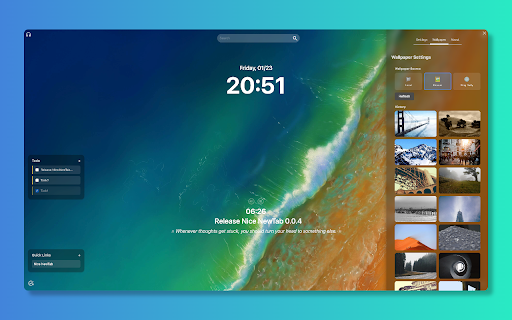

Quickly searching bookmarks and web pages, setting today's goals, starting the tomato clock and focusing on the workbench. ✨ New Features 📊 Pomodoro Statistics & History Tracking • Real-time statistics of completed Pomodoros and focused minutes • View recent activity history to track daily progress • Support for resetting statistics and exporting history • Visual display of your focus achievements 🎵 White Noise for Focus • Multiple white noise types: Rain, Ocean Waves, Forest... • Precise volume control to create the perfect focus environment • One-click on/off without interrupting your Pomodoro timer • Help you quickly enter the flow state ⏰ Time & Date Format Customization • Switch between 12-hour and 24-hour time formats • Choose from 6 date format options (Auto, Short, MM/DD, DD/MM, YYYY/MM/DD, Long) • Toggle seconds display • Toggle weekday display • Show timezone information (PST, CST, etc.) 🍅 Pomodoro enhanced • Pause/Resume function: You can pause and resume the Pomodoro in progress • Break Time Management: • Support short rest (default 5 minutes) • Supports long rests (default 15 minutes) • You can skip the break and start a new Pomodoro directly • Focus Mode Optimization: Improved the state management of the focus mask to ensure correct display when the Pomodoro is running Appearance Customization • Text color customization for the main page • Search box styling: background color, opacity, border radius • "Reset Appearance" button to restore default settings Wallpaper Enhancements • Multiple wallpaper sources: Local, Picsum random, Bing daily • Download current wallpaper • Online wallpaper history for quick switching Productivity Tools • Quick Links panel for frequently visited sites • Todo List with priority support • Today's Goal display on main page • Custom quotes/motivational messages 🔧 Fixes • Fixed missing i18n translations • Synced settings between panel and options page 0.0.3 Released. 1. Fixed the problem of Tomato clock stopping failure 2. Fixed the problem of setting failure 3. Add search engine selection settings, add clock and search box display switch settings 4. Add multiple search engines and AI quick links 0.0.2 Released. 1. added a new custom wallpaper option, users can replace their own wallpaper 2. Added several search options, and will continue to add AI functions. 3. Optimize the UI of Tomato Clock's reminder mask pop-up box. 4. New plug-in settings interface 5. Update the icon of About page 6. Fix a number of display exceptions 🎉🎉🎉 First Release. 1. Quick Search Quickly search your bookmarks and web pages. 2. Today's Goal Set daily goals to improve efficiency. 3. Pomodoro Clock Use pomodoro technique to improve concentration and efficiency. 4. Focus Workbench Provide a focused work environment, allowing you to focus on tasks.

NaiveTab - Visual Keyboard New Tab
Visual keyboard for bookmarks & browser commands — one-press access. Drag & drop layout, full customization, focus mode, and cloud… Visual keyboard for bookmarks & browser commands — one-press access. Drag & drop layout, full customization, focus mode, and cloud sync. ⌨️ Visual Keyboard — Your Productivity Accelerator Say goodbye to layers of clicks — manage your browser with a familiar keyboard layout. 📂 Bookmark Keyboard Display bookmarks on your new tab in a real keyboard layout. ✓ Customizable key mappings ✓ Customizable keyboard layout ✓ Customizable themes ✓ Quick access to your favorite sites from the new tab ⚡ Command Keyboard Execute browser commands on any page via modifier key combos (e.g. Ctrl+Shift + key). ✓ Customizable command bindings ✓ Customizable modifier combos ✓ Domain black/whitelists ✓ Tab management / page actions / scroll control — no mouse needed ⏰ Time & Date 🕐 Clock Digital, analog, flip, and neon styles 📅 Date Customizable format and style 🗓️ Perpetual Calendar Lunar calendar, holidays 🛠️ Productivity Tools 🔍 Search Bar Customizable search engine for quick queries 📁 Folder Bookmarks Grid view for bookmark folders 📝 Memo Notes and to-do lists 📊 Year Progress Percentage + dot grid visualization 🌤️ Weather Temperature, wind, humidity, daily indices, alerts 📰 News Multi-platform trending aggregation 🖱️ Free Drag & Drop — Place widgets anywhere, fits all resolutions 🎨 Full Customization — Font, color, background, border, shadow, all adjustable 🖼️ Dynamic Wallpapers — Bing Photo of the Day + local images 🌗 Auto Dark Mode — Follows system appearance 🎯 Focus Mode — Right-click toggle, show only what you need ☁️ Cross-device Sync — Sync via browser, local backup support 🌐 Multilingual — Simplified Chinese + English 📖 Open Source — Source code open for contributions ━━━━━━━━━━━━━━━━━━━━━━━━━━━━━━━━━━━━━ Made with ❤️ by GXFG | License: GPL-3.0 ━━━━━━━━━━━━━━━━━━━━━━━━━━━━━━━━━━━━━

FlowTab
A beautiful, elegant, and minimalist new tab for your browser. 👋 Thanks for checking out FlowTab! Experience elegance and minimalism like never before in a clean new tab for your browser. Keep a modern look without sacrificing your productivity, and customize to make FlowTab just the way you like it. ✅ Features include: - Custom quick links - Custom wallpaper from URL - Dark, light, and custom theme - Selection of 5 search engines - 12 and 24 hour time format Check out our GitHub (https://github.com/flowshade/flowtab) to post issues and see what we used to make this project.

Initium New Tab
A new tab page that comes with a variety of productivity enhancing tools. Included features: - Top visited sites - Notepad - Sticky notes - RSS feed reader - Clock - Current and weekly weather - Calendar with Google calendar integration - Tasks - Timer - Stopwatch - Pomodoro timer - Countdown timer - Random daily background - Ability to set your own background from URL or device

OmniTab New Tab
Free to define your new tab,add website icons,HD wallpapers,quick access to bookmarks,todo list,weather and history OmniTab is a new tab page beyond infinite possibilities, which can be customized with a high degree of freedom. OmniTab strives to create excellent interaction and a perfect UI interface, which not only provides rich functions, but also is easy to use, and can be customized with a high degree of freedom, allowing you to say goodbye to dull and uninteresting native tab pages and enjoy the personalization that OmniTab brings to you. OmniTab will redefine your new tab. With OmniTab, you get the following features: Highly Liberalized Edit 40+ setting options are provided, the layout can be freely customized, and your new tab page is up to you. Easily Manage Frequently Used Websites Integrate thousands of commonly used websites, add them with one click, and manage them in batches. HD & Exquisite Wallpaper Change at Will Built-in massive HD wallpapers, you can also upload your favorite wallpapers to make your new tab page pleasing to the eye. Super Navigation Your can add most frequently used websites to the quick navigation at the bottom, one-click quick access to improve efficiency. Featured Group You can add different groups according to your habits, and you can place website shortcut icons under each group to improve work efficiency. Search Engine Customization It integrates multiple mainstream search engines, such as google, Baidu, bing, yandex, etc., which can be switched and used arbitrarily according to your own needs, and it can be intelligently associated with search. Cloud Data Backup Sign up for an OmniTab account with an email address, enjoy cloud backup and multi-terminal synchronization, and ensure that data will never be lost.
