
ibnghddpkdpbgcfcaajdhpnkfgbdadpp
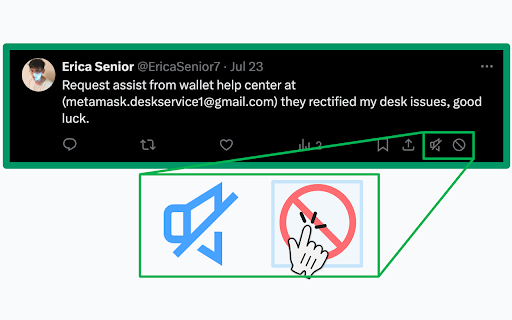

Adds muting, blocking and reporting buttons to tweets, linkedin posts and bluesky posts depending on the platform possibilities. Easily clean up your timelines with mute/block/not interested buttons on Twitter, BlueSky and Linkedin. A mute, a block and a "report as spam" button on every tweet on twitter and x.com. An unfollow(this does not remove the connection) and not interested button on every post on Linkedin.

One Click X (Twitter) Block
Easily block users with one click to restore a healthy social media. There is a new block button directly beneath the user avatar in the timeline. Be careful to not block the wrong person. You can alternatively enable confirmation before blocking in the settings (New entry in regular X/Twitter settings at the bottom). The behavior of the block button is the same as doing it manually, just that the extension navigates and clicks the menu for you. Features: - Enable confirmation dialogue before blocking a person - Change block button colors to your likings

1-click blocker for Twitter
Block users on Twitter in one click instead of 3. Block from any page where users are listed (/retweets, /followers, etc)! This extension modifies Twitter by adding a block button to each Tweet. The block button that is added enables a user to block the owner of the Tweet in one click instead of the usual 3 clicks (1. open tweet menu, 2. click block user, 3. confirm block). You can now block users from ANYWHERE! There's now a block button on the list of users on the Followers and Reposts pages. This is a universal 1-click solution to your Twitter blocking problems. You can also mute instead of block, and when you've got a whole list to get through you don't have to sit there clicking one by one. The To Block queue lets you paste handles, drop in a CSV or JSON file, save batches as staged queues, merge them together, and let the extension work through the list automatically. It opens each profile in the background and blocks or mutes them one at a time, and it won't touch accounts you've already blocked or muted. There's a full control center for all of this. Your blocked and muted users are tracked per @handle (auto-detected when you visit Twitter), with searchable lists of everyone you've acted on through the extension. Statistics show your total blocks and mutes, plus a history of queue runs (when they started, when they finished, and how many succeeded). Additional features: • Block or mute: Choose between blocking or muting as your default one-click action • Flexible button placement: Select exactly where the button appears (Timeline, Followers, Following, Search, Communities, Engagements, Replies, Trending, Notifications, Hashtags, Profiles, Explore) • Settings shortcut on Twitter: Optionally show a small icon on Twitter pages that opens the control center • To Block queue: Paste handles, import CSV/JSON, stage and merge queues, and auto-process the list in the background • Blocked & muted ledgers: Searchable lists of accounts you've blocked or muted through the extension • Backup & restore: Export your blocked/muted users and settings to a file • Selective import: Choose what to import (blocks, mutes, or settings) • Data management: Clear specific data (blocks, mutes, or settings) while keeping the rest • Statistics: Track your total blocks and mutes, plus queue run history • Timestamped backups: Each export includes the date and what data was exported

Likers Blocker
Block likers, retweeters, list members and Twitter ads. Block likers ------------------ * Once you click on a tweet, there is a link which indicates how many people liked this tweet. * Click on that link to get the list of all likers * Then click on the new button on the top which says "Block all". * After collecting the likers confirm that you want them blocked * The accounts will be added to a queue and the extension will slowly block all of them in the background while your browser is open. * You can watch the progress in the extension. * ✔ DONE. All the collected likers of the tweet are blocked. 😇 * Click on the details of a list * Click on "members" * Then proceed with the third point above ("Block All").

Blue Blocker
Just install and say goodbye to all the paid blue checkmarks! By default, Blue Blocker does not block users you follow or follow you who have purchased Twitter Blue. You can change this and other settings from the extension context menu found by clicking the extension icon in your browser's toolbar. Features: - Internal queue allows users to be blocked in the background without hitting twitter's API limits - Avoid blocking celebs and influencers who were given Twitter Blue against their will - Block anyone that promotes a tweet and supports this nightmare platform - Change the speed users are blocked to avoid API limits - Sync between tabs means that you can have dozens of tabs open without needing to worry - Simple settings menu, skip blocking people you follow or even affiliates - Feel bad about blocking? You can mute instead! - Optional messages tell you who you've blocked and even allow you to unblock them- and flag them to not be blocked again - Supports every major location tweets show up - Search Results - Tweet replies and threads - For You and your home timeline - User Pages - Optionally also block users with NFT avatars
