
ibjobjabeijpoblglpdokljkhcbaeocb
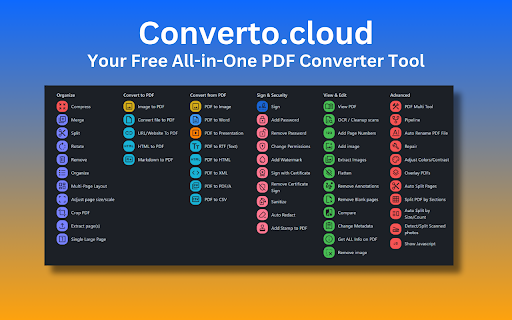


Your Free All-in-One PDF Converter Tool Converto: Your Free All-in-One PDF & File Converter for Chrome Stop juggling multiple tools! Converto is your one-stop shop for all your PDF and file conversion needs. **Completely free to use**, our Chrome extension offers a massive toolbox to transform your files with ease. Here's what you get: ✅Effortless File Management: * View, annotate, and add text or images directly within PDFs. (View PDF) * Merge, rotate, rearrange, and remove pages with ease. (PDF Multi Tool) * Organize documents by removing or rearranging pages in any order. (Organize) * Extract all images from a PDF and save them as a zip file. (Extract Images) ✅Seamless Conversion Options: * Convert nearly any file (DOCX, PNG, XLS, PPT, TXT, etc.) to PDF. (Convert file to PDF) * Transform images (PNG, JPEG, GIF) into PDFs. (Image to PDF) * Create PDFs from websites and URLs. (URL/Website To PDF) * Convert HTML, Markdown, and even scanned photos into PDFs. (HTML to PDF, Markdown to PDF, Detect/Split Scanned photos) ✅Advanced PDF Editing: * Compress PDFs to reduce their file size. (Compress) * Change or remove metadata associated with your PDF. (Change Metadata) * Add or remove page numbers throughout your document. (Add Page Numbers) * Adjust the contrast, saturation, and brightness of your PDF. (Adjust Colors/Contrast) * Crop PDFs to reduce size while maintaining text clarity. (Crop PDF) * Split PDFs into multiple documents or by sections. (Split, Split PDF by Sections) * Repair corrupt or broken PDFs. (Repair) * Remove unwanted pages, blank pages, and annotations. (Remove, Remove Blank pages, Remove Annotations) * Add custom watermarks and text/image stamps for branding. (Add Watermark, Add Stamp to PDF) ✅Enhanced Security Features: * Encrypt your PDF documents with a password. (Add Password) * Remove password protection when needed. (Remove Password) * Sign PDFs with your signature, text, or image. (Sign) * Change document permissions and add redactions (blackouts) for sensitive information. (Change Permissions, Auto Redact) ✅Advanced Functionality: * Create a single large page by merging all PDF pages. (Single Large Page) * Automatically rename PDF files based on detected headers. (Auto Rename PDF File) * Automatically split scanned PDFs using QR codes. (Auto Split Pages) * Analyze and view any Javascript embedded within a PDF. (Show Javascript) * Compare two PDFs and see the differences side-by-side. (Compare) * Extract specific pages from a PDF document. (Extract page(s)) * Overlay multiple PDFs on top of each other. (Overlay PDFs) * Convert PDFs to various formats like Word, Presentations, Text (RTF), HTML, XML, and CSV. (PDF to Word, PDF to Presentation, PDF to RTF (Text), PDF to HTML, PDF to XML, PDF to CSV) * Clean up scanned documents by detecting and re-adding text as searchable content. (OCR / Cleanup scans) * Gain detailed information about your PDF, including metadata and structure. (Get ALL Info on PDF) * Sanitize PDFs by removing scripts and unwanted elements. (Sanitize) * (For advanced users) Run multiple actions on PDFs by defining pipeline scripts. (Pipeline) No hidden fees, no limitations. Just powerful conversion features at your fingertips. Install Converto today!

iLovePDF 2 - Chrome Extension
iLovePDF2 is the only 100% free PDF toolkit to Edit, Merge, Split, Compress, and Convert your files. iLovePDF2 Chrome extension offers a fortunate "Open With" button for any PDF document you encounter browsing Chrome. This feature lets you open PDF files directly in the I Love PDF 2ool, enabling you to perform various actions such as PDF conversion, compression, merging, splitting, or converting it into any desired file format for free. ✓ Compress PDF: Reduce PDF file sizes to desired quality and size. ✓ Merge PDF: Combine multiple scanned PDFs into one or insert images in PDF. ✓ Split PDF: Extract all pages as individual files or a range of PDF pages into multiple high-quality PDFs. ✓ PDF Converter: Convert various document formats to or from PDF, including Word, Excel, PNG, PSD, and more. ✓ Screenshots: Capture and save screenshots of the active tab for further processing and sharing. ✓ OCR Scanner: Convert scanned PDF documents into text-selectable PDF files. ✓ HTML to PDF: Capture webpages as PDFs for offline reading. ✓ Rotate PDF: Adjust and reposition specific pages within your PDF. ✓ Add Page Numbers: Customize PDFs with page numbers, choosing position, typography, and size. ✓ PDF Editor: Modify text, insert images, shapes, annotations, and more directly within your PDFs. ✓ Share PDF: Connect to Google Drive and Dropbox for easy access, selection, and sharing of PDFs from the Cloud. Experience the convenience of the I Love PDF 2 Chrome extension today and easily streamline your PDF tasks. Say goodbye to the complexities of PDF handling and hello to efficient, professional results. Your PDFs will thank you! Explore the I Love PDF 2 Chrome extension today. Say goodbye to PDF complexities and welcome professional-grade efficiency. Your PDF tasks have become significantly more straightforward, accurate, and free of charge.

Free PDF Editor & Reader — Compress, Merge, Convert PDFs · PDFly
PDFly extension gives you everything you need to work with PDF files — right inside Google Chrome and easy-to-use. • PDF reader with smooth scrolling and zoom controls • Handle large PDF files with optimized rendering • Navigate via Thumbnails, Bookmarks, or Headlines • Annotate PDF - add comments, highlights, text, and free hand drawings • View PDF comments, reply and add new comments • Fill PDF forms with automatic form detection • PDF to Word (DOCX) converter including OCR • Word to PDF - create PDF from Word documents instantly • PDF to JPG and JPG to PDF conversion • PDF to PNG and PNG to PDF transformation • PDF to Excel for data extraction and editing • Batch mode to convert multiple files at once • Merge PDF files - combine multiple PDFs into one document • Split PDF - separate large PDFs into smaller files • Extract PDF pages - save specific pages as new documents • Rotate PDF pages and delete unwanted pages • Reorder PDF pages with drag-and-drop simplicity • Delete PDF pages - delete any PDF page from your PDF document • Reduce file size while keeping quality • See preview which files require optimization • Choose from two advanced compression levels • Option to preserve Metadata, Bookmarks, Annotations and advanced PDF compatibility • Batch mode to compress multiple files at once • Password protect PDF files with encryption • Custom allow printing, text copying, form filling even for password-protected PDF • Unlock PDF - remove password protection from secured files • Secure PDF sharing with built-in protection • 256-bit encryption as standard • Batch mode to password-protect multiple files at once • Translate PDF - translate entire documents to 50+ languages with auto-detection of document language • Copy the translated output • Translations are processed securely using cloud connectivity • Summarize PDF - get instant AI summaries of long documents • Choose summary length, focus of summary (general, technical points, key points) and output langauge • Summaries are processed securely using cloud connectivity PDF editor, PDF reader, PDF converter in one app Replace multiple PDF tools with this single solution Compatible with Adobe PDF standards and all PDF formats Handle large PDF files with optimized rendering Batch process multiple PDF documents simultaneously Modern, intuitive interface designed for Windows Free: Unlimited free PDF reader and all basic PDF editing tools Pro: Advanced options, batch mode, no ads, AI tools (summaries, translate, OCR), unlimited files

Converteasly: Free Online PDF, Image, Office, and File Converter Tools
Ultimate file conversion tool for your browser! Convert files into desire format. Fast, easy, and secure. Converteasly provides free tools that solve all your file-related problems! 🚀 Whether it’s converting images to PDFs, PDFs to images, text to PDFs, merging PDFs, splitting PDFs, protecting PDFs, PDF to Excel, merging DOCX, image tools, Tools for developer and much more — we’ve got you covered! 🔧 Our tools help users convert their files into the desired format with lightning-fast processing 🚀 thanks to our high-performance computing power. Files are uploaded and converted in seconds ⏱! For your peace of mind, both processed and unprocessed files are automatically deleted after 30 minutes. And the best part? Converteasly is 100% free to use — no pesky registration required! 🙌 --- 📲 QR Code Download Feature on Converteasly We’re thrilled to introduce an innovative and seamless way to download your converted or processed files using a QR code! 🎉 This feature provides a fast, secure, and convenient method to download files directly to your mobile devices or any device with a QR code scanner. 📥📱 --- 🌟 Key Benefits of QR Code Download Feature 🌟 - Convenience: Quickly download files without having to type long URLs or use complicated interfaces. QR codes make it super easy to access your files! 🔑✨ - Cross-Device Compatibility: Whether you’re on a smartphone, tablet, or computer, QR codes work on all devices. Just scan and download your files, no matter where you are! 🌍📱💻 - No Need for Email or Manual Links: Say goodbye to emails and long URLs. QR codes provide a direct and error-free method for accessing your file. 🚫📧 - Secure and Unique Access: Each QR code is unique to the file, ensuring that the download link is always correct. Extra security to keep your files safe! 🔒🔑 - Easy Sharing: Share the QR code with friends, colleagues, or clients so they can download the file easily. No need to send attachments or worry about broken links. 📤🤝 --- The QR Code Download feature is a game-changer for Converteasly! ⚡ It makes downloading files faster, secure, and user-friendly, whether you're using a desktop, mobile device, or sharing files with others. Say goodbye to the old download process and embrace the future! 🌟 --- 🛠️ Key Features of Converteasly 🛠️ 1. PDF to Image Converter: Convert PDFs into high-quality image formats (JPEG, PNG, GIF, etc.) with ease. Perfect for sharing or embedding in presentations! 📄➡️📸 2. Image to PDF Converter: Turn images (JPEG, PNG, BMP, etc.) into PDFs with just a few clicks. Merge multiple images into a single PDF for better document management. 🖼️➡️📑 3. Document to PDF Converter: Transform popular documents (DOCX, DOC, PPT, XLS, etc.) into high-quality PDFs. Ensure your formatting is preserved across all devices. 📝➡️📄 4. Image Resize: Resize images to your preferred dimensions. Ideal for website thumbnails, printing, and more! 🖼️✂️ 5. Image Compressor: Compress images without losing quality. Perfect for reducing file size for faster loading times and easier sharing. ⚡🖼️ 6. Format Conversion Tools: Convert between various image formats (JPEG, PNG, GIF, TIFF, etc.) while maintaining transparency, resolution, and color accuracy. 🔄🖼️ 7. Batch Processing: Convert, resize, or process multiple files at once, saving your time and effort. 🕒🔄 8. User-Friendly Interface: Our simple and intuitive interface makes file conversion a breeze. No technical skills required! 🎨👨💻 9. Privacy and Security: Your privacy is our priority. All files are securely processed, and your documents remain confidential. 🔐🛡️ 10. Cross-Platform Compatibility: Access Converteasly on any device with an internet connection. Works seamlessly across desktops, laptops, tablets, and smartphones. 🌐📱💻 11. No Installation Required: No need to download or install any software! Converteasly is entirely web-based, saving your storage space and ensuring you always have the latest updates. 🚫💻 --- At Converteasly, we are committed to simplifying your file conversion tasks, making it easier than ever to switch between formats, optimize file sizes, and enhance your digital workflow. Whether you're a student, a professional, or a casual user, our website provides the tools you need to handle various file formats effortlessly and efficiently. 🎓💼👨💻 Supported Tools :) Unescape JSON, Escape JSON, Image Background Remover, Compress pdf, JSON Comparator, JSON Viewer/Editor, Strings/Texts/Words Comparator, Images To Pdf, Pdf To Images, Pdf To Text, Text To Pdf, Pdf To Docx, Merge Pdfs, Unlock Pdf, Protect Pdf, Pdf Page Deleter, Split Pdf, Jpg/Jpeg To Png, Png To Jpg/Jpeg, Compress Image Size, Resize Image, Rotate Image, Base64 Text Encoder, Base64 Text Decoder, WebP To Jpg/Png, Merge Docx, Docx To Pdf, Docx To Epub, Rich Text Format To Epub, Rich Text Format To Pdf, Excel To Pdf, PPT to Pdf, ODF Formula to Pdf, Jpg/Png to WebP, create digital signature, online white board and Many More!! Start converting and optimizing your files today with Converteasly! 💥

PDF Viewer Pro - View, Edit, Fill, Convert, Sign, and More
PDF Viewer Pro: Your all-in-one PDF solution. View, edit, fill, comment, and sign PDFs seamlessly in your browser. PDF Viewer Pro is an advanced and user-friendly browser extension that allows you to view and edit PDF files directly within your browser, all for free. As a leading solution in PDF reading, PDF Viewer Pro integrates seamlessly with Google Chrome, offering an exceptional PDF viewing experience and enhanced productivity. - **Comprehensive PDF Application:** PDF Viewer Pro is a fully functional PDF web application designed for your busy lifestyle. It provides a complete suite of tools accessible from any device, making it ideal for on-the-go use. - **Conversion Capabilities:** - Convert PDFs to and from Word, Excel, PowerPoint, JPG, JPEG, PNG, and HTML. - Convert images (JPG, JPEG, PNG) to PDF and vice versa. - **PDF Management:** - Merge, Split, and Extract PDF Pages - Edit, Rotate, and Delete PDF Pages - Compress PDF Files - Sign and Send PDFs for Signature - Protect and Unlock PDF Documents 1. Install the PDF Acrobat extension for Chrome. 2. Pin the extension for easy access. 3. Open any PDF file directly in your browser. 4. Choose from the available PDF Acrobat tools to edit or convert your PDF. - **Productivity Boost:** Enhance your workflow with features such as PDF compression, merging, splitting, and more. - Supports Microsoft Office formats including Word, Excel, and PowerPoint. - Provides integration with Adobe Acrobat for additional PDF editing and conversion tools. Experience a better PDF interaction by adding PDF Viewer Pro to your Chrome browser. Enjoy tools for editing, converting, compressing, merging, and managing PDFs all from one place. We hope PDF Viewer Pro enhances your PDF handling experience. We welcome your feedback and suggestions for further improvements.
