
ibjfdphgkhclhnbihmldcphgelpeaibk
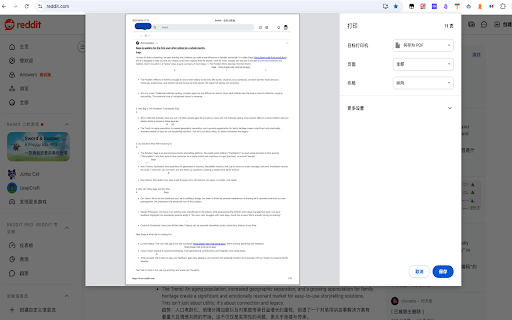
Export web pages to A4 PDF. Batch export by URL patterns. Screenshot mode (WYSIWYG) or print mode (searchable text). ### HTML to PDF Converter - 专业的网页转 PDF 工具 **一键转换,原样保留** HTML to PDF Converter 是一款轻量级的浏览器扩展,帮助您快速将任何网页转换为 PDF 文件,完整保留原始样式、超链接和背景图片。 --- ### ✨ 核心功能 **🎨 完整样式保留** - 100% 还原网页原始样式 - 保留字体、颜色、布局 - 支持复杂 CSS 样式 **🔗 超链接可点击** - PDF 中的链接依然可以点击 - 保持网页交互性 - 方便后续查阅 **🖼️ 背景图片支持** - 可选择性包含背景图 - 保留完整视觉效果 - 适合保存精美页面 **⚡ 快速转换** - 一键即可完成 - 无需上传数据 - 本地处理,保护隐私 **🔒 隐私安全** - 所有处理在本地完成 - 不收集任何用户数据 - 不上传网页内容 - 开源代码,可审计 --- ### 🎯 使用场景 ✅ **保存文章和博客** - 离线阅读,长期存档 ✅ **保存发票和收据** - 电子凭证,方便管理 ✅ **保存技术文档** - 离线查阅,提高效率 ✅ **保存网页快照** - 记录网页某时刻的状态 ✅ **分享网页内容** - PDF 格式更通用 --- ### 📖 使用方法 1. **打开任意网页** 2. **点击扩展图标** (工具栏中的蓝红图标) 3. **配置选项**(可选) - ☑ 保留超链接 - ☑ 保留完整样式 - ☑ 包含背景图片 4. **点击"生成 PDF"** 5. **在打印对话框中选择"另存为 PDF"** 6. **保存到本地** 就是这么简单! --- ### 🔧 技术优势 **零依赖设计** - 纯 JavaScript 实现 - 不依赖任何第三方库 - 体积小,加载快 **浏览器原生 API** - 使用 Chrome 原生打印引擎 - 兼容性好,稳定可靠 - 样式还原度接近 100% **Manifest V3** - 采用最新扩展标准 - 更安全,更高效 - 长期支持保证 --- ### ❓ 常见问题 **Q: 需要注册账号吗?** A: 不需要。完全免费,无需注册。 **Q: 会上传我的数据吗?** A: 绝对不会。所有处理都在您的浏览器本地完成。 **Q: 支持哪些网站?** A: 支持几乎所有网站,包括动态网页。 **Q: PDF 中的链接可以点击吗?** A: 可以!只要勾选"保留超链接"选项。 **Q: 为什么需要手动保存 PDF?** A: 这是 Chrome 安全限制。使用原生打印功能是最稳定的方案。 --- ### 🆚 与其他工具对比 | 功能 | HTML to PDF | 其他工具 | |------|-------------|----------| | 样式还原 | ✅ 100% | ⚠️ 部分支持 | | 保留链接 | ✅ 完整 | ❌ 不支持 | | 隐私保护 | ✅ 本地处理 | ❌ 需上传 | | 使用成本 | ✅ 完全免费 | ⚠️ 需付费 | | 速度 | ✅ 秒级转换 | ⚠️ 较慢 | --- ### 📊 适用用户 - 📚 **学生** - 保存学习资料 - 💼 **职场人士** - 保存工作文档 - 🔬 **研究人员** - 归档参考资料 - 📝 **作家** - 收集灵感素材 - 🎨 **设计师** - 保存设计参考 --- ### 🚀 未来规划 - [ ] 批量转换多个标签页 - [ ] 自定义页面尺寸(A4, Letter 等) - [ ] 快捷键支持 - [ ] 转换历史记录 - [ ] 云端同步(可选) --- ### 💬 反馈与支持 遇到问题或有建议?欢迎联系我们: - **GitHub**: [项目地址] - **邮箱**: support@example.com - **评分**: 如果觉得好用,请给我们 5 星好评 ⭐ --- ### 📜 开源信息 本扩展完全开源,代码托管在 GitHub: - 许可证:MIT License - 欢迎贡献代码 - 欢迎提交 Issue --- ### 🏷️ 关键词 网页转PDF, HTML转PDF, 网页保存, PDF转换器, 网页快照, 离线保存, 文档转换, Chrome扩展, 浏览器插件 --- **立即安装,开始高效保存网页内容!**

Web2PDF - HTML to PDF Converter
Download web pages as PDF, DOC or TXT. Maintains layout, images and links. Free web content converter for Chrome. Transform any webpage into multiple formats instantly! Our powerful Chrome extension lets you save web content exactly as you need it. Key Features Multiple Export Formats PDF: Save webpages with perfect layout preservation Word (DOC/DOCX): Convert pages to editable documents Text (TXT): Extract clean, formatted text content Images (PNG/JPEG): Capture full webpage screenshots Convert between DOC and TXT formats Save documents in multiple image formats Maintain original webpage formatting and structure Preserve images, tables, and text layout Save online articles for offline reading Convert web content to editable documents Archive important webpages Create backups of online information Share web content in preferred formats Extract text from webpages Capture full webpage screenshots Works with all websites Preserves original formatting Maintains image quality Keeps hyperlinks active in PDFs Supports batch processing Local file processing for privacy Perfect For Don't let important web content disappear - save it in your preferred format with Web2PDF! Our extension handles all your webpage conversion needs with just a few clicks. Try it now and join thousands of users who trust Web2PDF for their web content conversion needs! 🎯 Conclusion Web2PDF - HTML to PDF Converter is your complete solution for saving web content in various formats. With its powerful features, user-friendly interface, and commitment to privacy, it's the perfect tool for anyone needing to save and access web content offline. Download now and join thousands of satisfied users who trust Web2PDF for their web content conversion needs!

Save Website as PDF
Easily save website as PDF. Convert pages to PDF. Get clean, readable, and editable documents — link-friendly and ready to print. With this Chrome extension you can convert any web page into a clean, high-quality document in seconds. Whether you want to download, edit, print, or archive web content, this tool makes it effortless. No more messy layouts or ads. Just the essential content you need in a structured format. 🔍 Top Benefits: ➤ Convert pages to PDF instantly with just a few clicks ➤ Automatically remove ads, pop-ups, and menus ➤ Preserve original layout and clickable links so your document looks exactly like the original ➤ Edit with ease – add notes, highlight, or remove text as needed ➤ Works offline once saved, so you can work on your document, share it easily, or print it anytime ➤ 100% secure – conversion happens on your device, ensuring privacy when you convert pages to pdf 💰 Free & Pro Plans Enjoy the extension for free with generous limits. 🔹 Free: up to 10 PDFs per month Upgrade anytime for unlimited access: 🔹 Pro Monthly — $4/month 🔹 Pro Lifetime — $24 (one-time payment) No account required. Cancel anytime. 🔥 Key Features: ✅ Simplicity – Just two clicks to save website as pdf chrome ✅ High-quality output – Perfect for print or archiving ✅ Privacy – No data sent to external servers ✅ Compatibility – Works seamlessly in Chrome ✅ Preserves links and images – Keep the original structure 💡 How to Save Website Page as PDF? 1️⃣ Install the extension from Chrome Web Store 2️⃣ Open the web page you want to save 3️⃣ Click the extension icon 4️⃣ Choose whether to convert the full page or article only for a clean, clutter-free document 5️⃣ Edit your document – add notes, highlight text, or remove unnecessary elements 6️⃣ Download website as PDF instantly 7️⃣ Share or print to pdf for easy access ❓ Why Save Website Page? 🔺 Works offline once saved. You can work, share or print your document 🔺 Archive important articles and research by using this tool 🔺 Easy sharing with colleagues or friends 🔺 Structured format for printing 🔺 No risk of losing content when links expire because you’ve already saved a website page as a pdf 🧑🎓 Who Benefits from This Tool? 🔹 Students who need to save website as pdf Chrome for research and assignments 🔹 Researchers looking to convert webpage to pdf for projects and citations 🔹 Professionals who want to save reports and documentation 🔹 Travelers who need to use documents for offline reading 🔹 Freelancers and creatives preserving content for inspiration and future work 🔹 Businesses archiving compliance documents 🧐 Frequently Asked Questions: ❓ How to save a webpage as a pdf? 💡 Open the page, click the extension icon, choose full page or article view, and save website as pdf instantly ❓ Will the document look like the original page? 💡 Yes! All formatting, images, and links are preserved ❓ Can I remove unwanted content? 💡 Absolutely. Ads, menus and other useless content are removed automatically or manually ❓ Can I edit my document? 💡 Yes! Highlight text, add notes, and remove any unwanted elements with ease ❓ Is my data secure? 💡 100%. Conversion happens locally on your device, so your files always stay private ❓ Does it keep links active? 💡 Yes! All hyperlinks remain clickable ❓ Does it work in Chrome? 💡 Yes, this is a Chrome-exclusive extension for maximum compatibility 📄 Additional Benefits ➤ No extra software required – works directly in Chrome ➤ Smartly identifies main content for clean conversion ➤ Accurate formatting for any content type ➤ Automatically name files based on page title ➤ Automatically adjust layout for perfect printing Add Convenience to Your Workflow! Stop bookmarking links that might disappear. With Save Website as PDF, you can keep essential information at hand. Perfect for work, study, or personal use. No more worrying about broken links or missing articles—your content stays safe. ✅ Install Save Website as PDF today and discover the easiest way to save your documents with Chrome!

PageSaver - Webpage to PDF or Image
Webpage to image and PDF with full page support and reader mode. Transform how you capture, save, and process web content with PageSaver - your all-in-one browser productivity tool. PageSaver is the ultimate browser extension for capturing, converting, and managing web content. Whether you need to save an entire webpage as PDF, capture full-page screenshots including content beyond the viewport, or leverage AI-powered features for summarization and translation, PageSaver has you covered. PERFECT FOR: * Saving webpage(including long webpage) as PDF or Image • Saving long ChatGPT conversations and thread discussions • Creating clean, readable PDFs from cluttered web articles • Archiving important web content for offline access • Converting web pages to multiple formats for documentation • Extracting text from images with OCR technology • Quick webpage summaries using AI 📸 ADVANCED SCREENSHOT & CAPTURE • Full Page Screenshot - Capture entire webpages, including content outside the viewport • Long Page Support - Perfect for capturing infinite scroll pages, ChatGPT conversations, and lengthy discussions • Multiple Export Formats - Save as PNG, JPG, GIF, or ICO • Custom Resize - Adjust image dimensions during conversion 📄 SAVE WEBPAGE AS PDF • One-Click PDF Export - Convert any webpage to PDF instantly • Reader Mode PDF - Generate clean, distraction-free PDFs from webpage with enhanced readability • Dual Generation Modes - Choose between client-side or server-side PDF generation • HTML to PDF Converter - Transform web content into professional documents 📝 MARKDOWN EXPORT • Save as Markdown - Convert webpages to Markdown format for easy editing • Preserve Structure - Maintain heading hierarchy and formatting • Developer-Friendly - Perfect for documentation and note-taking 🤖 AI-POWERED FEATURES • AI Summary - Get instant webpage summaries using Chrome's built-in AI • Quick Page Insights - Understand long articles at a glance • Smart Text Extraction (OCR) - Extract text from images with AI support • Built-in Translation - Translate web content instantly with Chrome AI models 🔖 SAVE FOR LATER • Bookmark & Archive - Save webpages for later retrieval • Offline Access - Download saved pages as PDF anytime • Content Library - Build your personal web content collection FOR RESEARCHERS & STUDENTS • Save research articles as clean PDFs • Archive academic resources for offline study • Convert web content to Markdown for notes • Summarize lengthy papers quickly FOR PROFESSIONALS • Capture complete client conversations (Slack, email threads, chat logs) • Create PDF reports from web dashboards • Archive important documentation • Translate foreign language content FOR CONTENT CREATORS • Save inspiration and reference materials • Capture social media threads and discussions • Convert web tutorials to offline formats • Extract text from design mockups FOR EVERYONE • Screenshot full webpages without scrolling • Save recipes, articles, and guides as PDFs • Keep important information accessible offline • Summarize long articles before reading ✓ All-in-One Solution - Multiple tools in one extension ✓ Privacy-Focused - Process content locally (client-side option available) ✓ AI-Enhanced - Leverage cutting-edge Chrome AI capabilities ✓ Fast & Efficient - Capture and convert in seconds ✓ User-Friendly - Intuitive interface, no technical knowledge required ✓ Actively Maintained - Regular updates and improvements ✓ Free to Use - Powerful features at no cost WHAT YOU CAN DO WITH PAGESAVER: ✓ Save webpage as PDF ✓ Save webpage as image (PNG, JPG, GIF, ICO) ✓ Save webpage as Markdown ✓ Convert HTML to PDF ✓ Convert HTML to Image ✓ Full page screenshot capture ✓ Screenshot entire webpage (including scrollable content) ✓ Capture long ChatGPT conversations ✓ Generate reader mode PDFs ✓ AI-powered webpage summary ✓ Text translation with AI ✓ OCR - Extract text from images ✓ Image format conversion with resize ✓ Save for later reading ✓ Offline webpage archive Install PageSaver now and revolutionize how you capture, save, and manage web content. Whether you're a student, professional, researcher, or casual user, PageSaver provides the tools you need to work more efficiently online. Download PageSaver and never lose important web content again! Questions? Suggestions? We'd love to hear from you! Your feedback helps us improve PageSaver for everyone.

Convert webpage to PDF
Let Convert webpage to PDF simplify your workflow! Our tool converts webpages, saves them as PDFs, and keeps their original look. This simple yet powerful extension is perfect for users who need a reliable tool to convert webpage to pdf in Chrome. Key features 1️⃣ One-click: Simply click to turn webpage into PDF. We make the process fast and efficient. 2️⃣ Retain original layout: Your files will maintain the original look of the page, preserving text, images, and layout. 3️⃣ Save webpage as PDF Chrome: This tool offers high-quality conversion for users who need to convert internet pages. 4️⃣ Whole page screenshots: Need to screenshot entire webpage? Now you don’t have to Google how to save a webpage as a pdf anymore! How to convert webpage to PDF online Follow these simple steps: 1. Install convert webpage to pdf extension. 2. Open the website you wish to save a page from. 3. Click Convert – your file will be ready in seconds. You can also learn more in our FAQ section. Why use this webpage to pdf converter? - Quick access: Get file versions of articles, research, or turn any internet page to PDF in just a click. - Works within Chrome: No need to download side applications to learn how to save web page in PDF format, now you do not have to leave your browser just like with other extensions like GoFullPage. - Optimized for efficiency: Unlike other tools, this extension is integrated with Chrome, offering you an easy way to save chrome webpages. Online & offline saving options: Use it to convert webpage to PDF online or save as a file to your computer for later use. - Easy toolbar access: Transform links to directly from your Chrome toolbar for quick access. - We respect your privacy: Our tool does not gather your data, store your files, nor track the websites you visit. - Organize and archive: Use the Convert webpage to PDF to export any internet page into file, and seamlessly integrate them into your personal knowledge base. Who can benefit? ✔️ Researchers: Get your records of webpages easily. ✔️ Students: Capture and convert academic works to PDFs. ✔️ Professionals: Archive documents without the hassle. ✔️ Freelancers: Save internet page as PDF to keep projects. ✔️ Everyone: For anyone who has to quickly save a webpage! FAQs ❓ How do I install? To install our app, go to the Chrome Web Store and select Add to Chrome. It will be added to your browser, and you can start using it. ❓ How to convert a webpage to PDF in chrome format using your extension? To convert a webpage to a PDF, click our extension icon and your file will be generated in seconds. ❓ How to save internet page as pdf? Our extension provides a smooth way. You can save any internet page as PDF by following the simple steps. ❓ Can I use this extension to save entire webpages? Absolutely! Our Convert webpage to PDF tool became an excellent solution for saving internet pages. ❓ If I encounter a problem while using convert webpage to pdf, is there a customer support available? Feel free to contact us directly via email or leave a ticket in the Chrome Web Store. We’ll be glad to help! ❓ I have some ideas and feedback for chrome screenshot. Can I share them with the developers? Our team is always open to hearing from our users. Don't hesitate to send in your proposals, ideas, or reviews. We value what you have to say. Advanced features ➤ Screenshot entire webpage: Use full-page capture button to save a webpage as PDF. ➤ Format & quality options: Adjust the quality and format to meet your needs. ➤ Easy access from toolbar: Directly and anytime you need it. How to use our extension? 1. Install our extension. 2. Visit any webpage which you want to transform. 3. Click on our icon – your webpage will be saved instantly. 4. Continue converting webpages on-the-go – your work won't be interrupted! 5. Leave us a review if you want to change or add something! Additional benefits ⚡ No software needed: This converter works directly in Chrome. ⚡ Reliable formatting: Whether you’re converting a blog post or a detailed research, the extension ensures accurate styling. ⚡ Perfect for whole page screenshots: If you’re tired of piecing together screenshots, this extension can save the entire page as a PDF with one click. ⚡Save to your device or cloud: You can save it directly to your device or then upload it to your Cloud. Convert webpage to PDF is the ultimate Chrome extension to start downloading, archiving and sharing PDFs instantly! Happy downloading, archiving and sharing documents instantly!
